Work Center: Excluding Certain Constituents

Is there any way to EXCLUDE certain constituents (by Constituent Code or some other criteria) in the Work Center overview page?

Our fundraiser portfolios include normal constituents to be tracked, but also some “special” constituents who are treated differently and whose numbers shouldn't be counted toward a fundraiser's overall metrics.

Is there a way to EXCLUDE those “special” constituents in the Actions, Gifts and other tiles/dashboard in the Work Center via some flag or ? (I know I can add criteria once I click through to the details of Actions or Gifts, but it'd be nice to not have the numbers for these constituents show up in the Work Center overview)


Comments

  • Karen Diener
    Karen Diener Community All-Star
    Tenth Anniversary Kudos 5 First Reply Name Dropper

    @Frank Yoshida welcome to the Blackbaud Community!

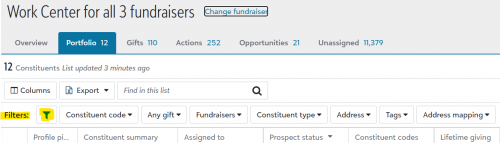
    One option is to click on the Portfolio tab and then apply the appropriate filter:

    1eb42850a346b49f7281e7eafa87266b-huge-im

    A couple of things to note:

    • I do not recall if this will be a sticky setting or not, so you may need to re-filter on occasion.
    • The filter you need may or may not be available as an option. You mentioned Constituent Code, which is available, but there not many filtering options available.

    I suspect others may have additional ideas.

  • Aldera Chisholm
    Aldera Chisholm Community All-Star
    Sixth Anniversary Kudos 5 Raiser's Edge NXT Fall 2025 Product Update Briefing Badge First Reply

    I would add to consider adding a different Fundraiser Type for these “special” constituents, that is an easy field to filter on, and it helps make it obvious why someone is included or excluded. Note: the Work Centre reports don't have filters, but when you click on them, you go to the Portfolio page, which does. If the reports are key for you, you could build dashboard replicating those reports, using filters.

  • Delphine Rocher-Lewis
    Delphine Rocher-Lewis Community All-Star
    Second Anniversary Kudos 2 First Reply Name Dropper

    @Frank Yoshida
    Could be a good addition to the Idea Bank!

  • Dan Snyder
    Dan Snyder Community All-Star
    Tenth Anniversary Kudos 5 Raiser's Edge NXT Fall 2025 Product Update Briefing Badge First Reply

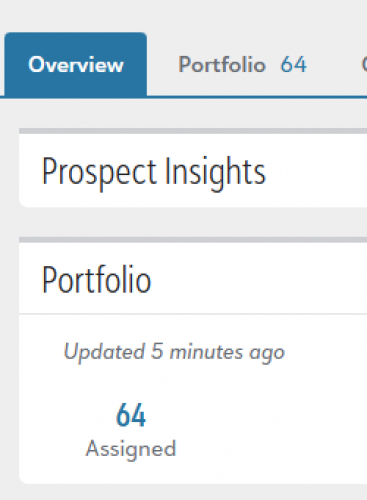
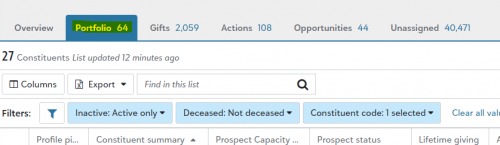
    @Karen Diener If you click on the “tab” for portfolio (picture at bottom), the settings for your list will stick, but if you click on the number in the work center (first picture), your settings will not stick. Strange, but there is a way.

    Also, the number listed on the “tab” will always remain the same as the work center tile.

    f82fee022335331c8860427f6b87f6e2-huge-im
    Work Center Tile
    547b42553e78efbd116b64c5052c2876-huge-im
    Clicking on portfolio “tab” keeps filters