Custom Dashboard - Help





Hi I am trying to replace an old crystal report. Seems like dashboard is the way to go. My fundraising team is requesting that on the dashboard it show a list of all the donors/gifts as one of the tiles. The closest i have found is “pledges by constituent”, but some of the gifts do not have pledges. How do i get a wholistic list?
Comments
-
@Emily Bastow
if you simply want to see a list of gift, then just use gift list.what exactly are you trying to see that gift list can't give you?
1 -
@Alex Wong I am wanting to also see % to goal for a campaign
0 -
@Emily Bastow
then this will depends on how you have information recorded. where is the goal info recorded? (i.e. Campaign Goal?) how do you corrently do record gift against the goaldepending on if your data is recorded in a way that aligns with how Blackbaud think you should record, you may be able to use some of the default functionalities in RE NXT.
However, if you need something truly custom, then Power BI, Power Automate, SKY Add-in will be your best bet. There are some getting started guides for this on developer.blackbaud.com to do this on your own, and User Group that will help guide you along.
0 -
@Alex Wong I am wanting to also see % to goal for a campaign
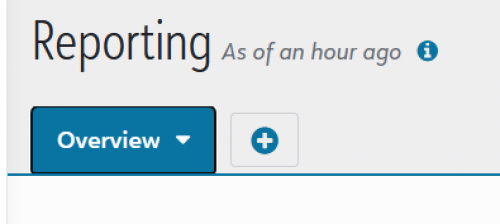
If you add the goal field to the Campaign record, this is easily reported using the Fundraising Dashboards under Analysis. MANY organizations I work with are unaware of this, because when they navigate to that page, you often only see the Overview tab. But if you click on it, there are quite a few more reporting possibilities:
If you select Campaigns from the drop-down, you can easily access a “Progress to Goals” dashboard for any Campaigns you select in the filters at the top of that page. Note that these are all from a sample database.
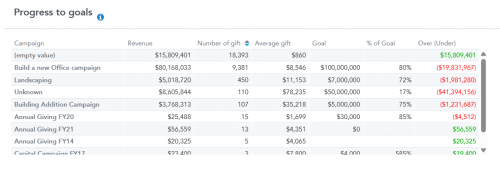
If you click on the “Number of gifts” in each row, you will see a flyout on the right that lists the gifts. It does require that you have a different Campaign set up for each year, but it gets you the high level detail. To see donor and gift information, in a more complete way, you could experiment with the Dashboard Builder, which is NOT an extra expense. Once you create a dashboard, you can add it as a view on the Fundraising Dashboards on the Analysis page.
Hope that gets you started in the right direction!3 -
@Karen Diener thank you for pointing me in that direction. I did find a way to do it thru dashboard builder, using some of the different tiles.
1








Categories
- All Categories
- New K-12 Community Home (TEST)
- New Higher Education Home Page (Test)
- New Impact Edge Community TEST
- New YourCause Community TEST
- New SKY Community TEST
- New Grantmaking TEST Community
- New Altru Test Community
- New bbcon Community - TEST
- 12 Blackbaud Agents for Good™
- New Raiser's Edge NXT Community
- 8 Blackbaud Community Help
- 222 bbcon®
- 1.4K Blackbaud Altru®
- 410 Blackbaud Award Management™ and Blackbaud Stewardship Management™
- 1.2K Blackbaud CRM™ and Blackbaud Internet Solutions™
- 16 donorCentrics®
- 361 Blackbaud eTapestry®
- 2.7K Blackbaud Financial Edge NXT®
- 687 Blackbaud Grantmaking™
- 603 Blackbaud Education Management Solutions for Higher Education
- 3.3K Blackbaud Education Management Solutions for K-12 Schools
- 954 Blackbaud Luminate Online® and Blackbaud TeamRaiser®
- 85 JustGiving® from Blackbaud®
- 7K Blackbaud Raiser's Edge NXT®
- 4K SKY Developer
- 258 ResearchPoint™
- 123 Blackbaud Tuition Management™
- 165 Organizational Best Practices
- 248 Member Lounge (Just for Fun)
- 40 Blackbaud Community Challenges
- 37 PowerUp Challenges
- 3 (Closed) PowerUp Challenge: Grid View Batch
- 3 (Closed) PowerUp Challenge: Chat for Blackbaud AI
- 3 (Closed) PowerUp Challenge: Data Health
- 3 (Closed) Raiser's Edge NXT PowerUp Challenge: Product Update Briefing
- 3 (Closed) Raiser's Edge NXT PowerUp Challenge: Standard Reports+
- 3 (Closed) Raiser's Edge NXT PowerUp Challenge: Email Marketing
- 3 (Closed) Raiser's Edge NXT PowerUp Challenge: Gift Management
- 4 (Closed) Raiser's Edge NXT PowerUp Challenge: Event Management
- 3 (Closed) Raiser's Edge NXT PowerUp Challenge: Home Page
- 4 (Closed) Raiser's Edge NXT PowerUp Challenge: Standard Reports
- 4 (Closed) Raiser's Edge NXT PowerUp Challenge: Query
- 829 Community News
- 3.1K Jobs Board
- 57 Blackbaud SKY® Reporting Announcements
- 47 Blackbaud CRM Higher Ed Product Advisory Group (HE PAG)
- 19 Blackbaud CRM Product Advisory Group (BBCRM PAG)