Is there any way to add profile photos on constituents with an import for hundreds of records?
Or is this merely done one-at-a-time?
@Chris Zello I haven't done that in probably 18 months now since I switched organizations but previously I had to upload them one at a time. I at least had a constituent list I worked from and all the photos to use for profile pictures in one folder so I could just go down the list and update them.
@Chris ZelloThere is a API endpoint for thishttps://developer.sky.blackbaud.com/api#api=56b76470069a0509c8f1c5b3&operation=PatchConstituentProfilePicture
so you can use power automate to make it happen faster
@Alex WongHi Alex,Does Blackbaud has any action to convert the image into Base64? for instance my image is in this link https://ibb.co/PsPZw9s6 How to convert this image into Blackbaud supported UUID? How to get the Thumbnail ID?Thank you!
@Venky ImmadisettyBlackbaud does not have function for image convert to base64 as this is not specific to Blackbaud API. Any coding platform: Power Automate, PHP, Java, C#, etc has the functionality to convert an image to base64 string.
However, your understanding of this is incorrect.
The docuemnt_id and thumbnail_id request body to update a constituent profile picture is not sending the image as base64 string, it is the document location id for the image and thumbnail.
This is similar to uploading a “physical” attachment to constituent or gift record, you have to follow a few steps process first to get the “docuemt location” created in Blackbaud environment, then upload the image using HTTP PUT method onto this document location (identified by “UUID”, which is a 36 characters ID as highlighted above). Then use the PATCH API to update constituent profile picture by pointing the profile picture document_id to the document location UUID.
@Venky Immadisetty @Chris Zello I found this old post I replied to with details on how to do constituent attachment, it has many of the information you will need to update profile photo and the steps needed.
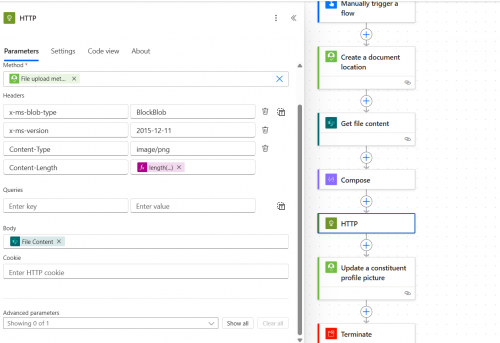
@Alex WongThank you for your reference post; I used it as a guide. I am passing the HTTP headers as shown below.
I got the following errorAction 'HTTP' failed: The response to partial content upload request is not valid. The status code returned in the subsequent partial content response is 'Created'. Expected status code is 'OK'.When Trouble shooting I understand that the Content Length of Create a document location action is 927
and the SharePoint image Content-Length is 4916
is this because of the content length? or something else? what should I have to do in order to resolve this errorThank you!
@Venky ImmadisettyDon't specify Content Length header
Your HTTP action doesn't show the URI paramter, show that to make sure it is the File upload URL dynamic content from the create doc location action.
@Alex WongActual I am Passing the URI in the flow but its not in the screenshot. I ran the flow by removing the content length and again the same errorThe response to partial content upload request is not valid. The status code returned in the subsequent partial content response is 'Created'. Expected status code is 'OK'.
Thanks!
@Venky ImmadisettyThe only thing I can think of is also remove the Content-Type and if you still receive an error, check with your IT department to see if HTTP action is “blocked” or not, I know some IT department block this action.
Thanks @Alex WongI turned off Allow Chunking under setting in HTTP Action and the flow successfully updated the profile picture.
Article Referred:
Thanks to Austin. She suggested to look up the error in the Microsoft power platform community. Thank you!
@Venky ImmadisettyThis is another instance of Old Designer better than New Designer.
Old Designer HTTP action by default have “Allow Chunking” Off
New Designer HTTP action by default have “Allow Chunking” On?