Why are Actions Closed in RE not showing Closed in RE NXT?

Why are Actions that I Closed in Raiser's Edge still showing as Past Due in Raiser's Edge NXT? I go back into database view and pull up the constituent record to verify I closed the Action literally years ago, then have to go back into NXT and Mark complete status (actually just marking it Closed again,) just so it drops from my flagged list for Past Due Actions!


Comments

  • JoAnn Strommen
    JoAnn Strommen Community All-Star
    Tenth Anniversary Kudos 5 Raiser's Edge NXT Fall 2025 Product Update Briefing Badge First Reply

    @Heather Pauli yes a thought - I know another staff member told me once something about needing to have the action completed on date box checked and a date entered. Could that be it?

  • @JoAnn Strommen I don't think so, the actions were Closed and had a completed date with corresponding box checked on at least two records that I've verified so far.

  • JoAnn Strommen
    JoAnn Strommen Community All-Star
    Tenth Anniversary Kudos 5 Raiser's Edge NXT Fall 2025 Product Update Briefing Badge First Reply

    @Heather Pauli You won't probably like this answer. :) I asked KB your question as I'm sure it will be something we encounter as well.

    The ‘generate answer’ reads:

    Actions added in RE NXT webview will sync to the Constituent record in the database view. However, if actions are closed in the database view, they may not appear as closed in RE NXT due to the way actions are managed between the two systems. If actions are not showing as closed in RE NXT, it may be necessary to check the synchronization status or edit the action in the database view to ensure it reflects correctly in RE NXT.

  • @JoAnn Strommen I thought it might be something like that, but thought I would put it out to the Community to see if I was missing anything; I will have to see if someone around here knows how to check the synchronization status in our system. I find it strange that Raiser's Edge has a Closed status for Actions, and RE NXT has a Closed dropdown option as an Actions status, but the two systems can't recognize the exact same word Closed in communicating with each other for the exact same Action--it doesn't give me a lot of hope that other crucial information isn't being lost in translation if the systems can't even understand each other when no translation is needed.

  • Marie Stark
    Marie Stark Community All-Star
    Tenth Anniversary Kudos 5 December 2025 Monthly Challenge PowerUp Challenge #3 Gift Management

    @Heather Pauli I think it has to do with this setting:

    Action Statuses

    Action statuses track the progress of a task or interaction and whether it's complete. To track the state of actions, your organization may use either the default completion status or custom status codes.

    Default completion status

    If you use the default completion status, you choose when an action is finished to track whether it's Open, Past due, or Completed. This option is ideal if your organization wants a straightforward, no-fuss way to track action statuses.

    Note: Actions are Open until they're marked as Complete or their due date passes and they become Past due. To change the status of a Past due action, change its due date.

  • Karen Diener
    Karen Diener Community All-Star
    Tenth Anniversary Kudos 5 First Reply Name Dropper

    @Heather Pauli:

    Why are Actions that I Closed in Raiser's Edge still showing as Past Due in Raiser's Edge NXT? I go back into database view and pull up the constituent record to verify I closed the Action literally years ago, then have to go back into NXT and Mark complete status (actually just marking it Closed again,) just so it drops from my flagged list for Past Due Actions!

    In webview, customers select what means “completed” for actions. On an action tile, click the gear icon in the upper right corner. Then indicate what RENXT should use to indicate completion - either specific statuses OR the presence of the “is complete” checkbox. This setting applies to all users of the database.

    47e7593f0ed3b235154598bdf6baa32e-huge-im

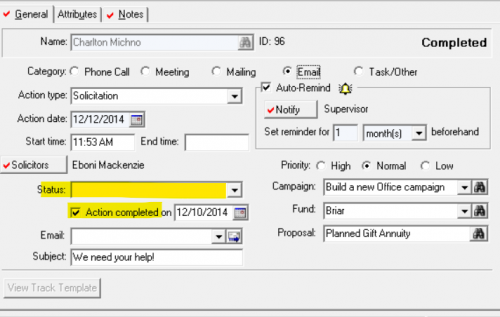
    For reference, these are the two action fields (from a sample database) that are relevant:

    3c027f9799a467b949efa6493903e7ff-huge-im

    My guess is that you will need to do some cleanup - in database view - of your actions regardless of which option you select in webview.