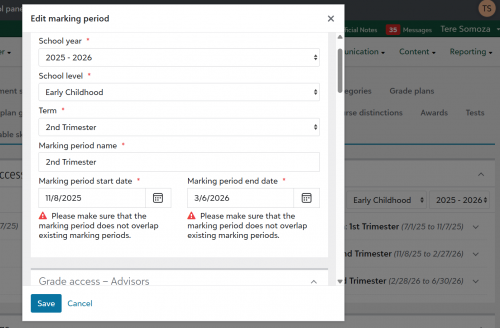
"Make sure Marking periods do not overlap" error message when they are not

eaecc5f8a50cba6ad2b012a0e815f480-huge-im

Wondering if anyone is having this same issue. Trying to set up marking periods on my 25-26 Gradebook and the system does not allow me to save these dates, even though they are not overlapping. Reached out to Blackbaud support but they could not replicate it. Any insight would be greatly appreciated.

Comments

  • @Tere Somoza - looking at the screenshot - change the dates on 3rd trimester first (this is where the date is overlapping) then go back and do 2nd trimester

  • @Kathy Hannon hi, I guess I am not seeing where they are overlapping. I just went and changed the 3rd Trimester to be 2/28/2026 to 6/30/2026 and still got the error.

  • @Tere Somoza What is the date/language setting on your browser? For me, sometimes a windows update will change the keyboard layout to have the date be in the Day/Month/Year format instead of Month/Day/Year Format. For me in Chrome, going to settings then languages, my settings are sometimes changed to English instead of just English (United States).

  • @Tere Somoza- might it be your school terms set up - in Core? You are trying to set up grade book within the dates to the term set up

  • @Tere Somoza Kathy is right, those dates are definitely overlapping in the screenshot. The “end date” of your 2nd trimester is 3/6 and the “start date” (from what we can see) of your 3rd trimester is 2/28. So between 2/28 and 3/6 it's both the 2nd and 3rd trimesters. You will need to move your 3rd trimester start date later before you can save the 2nd trimester end date.