Sneak Peek of Upcoming BBCRM 4.0 New Feature: Edit Pledge Installments

Matt Lacy
Blackbaud Employee




Do you have donors with complicated pledges who split their pledge across multiple installments and have each payment applied to the installments differently?
If you answered yes, then the new Edit installment wizard introduced in BBCRM version 4.0 will help simplify this process.
Instead of going to multiple locations in the program to edit installment information, you can now save time by doing so from one location. You can change the schedule and installment amounts for each designation within this new window.
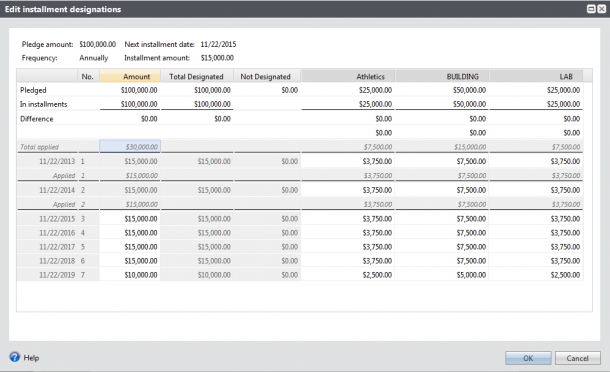
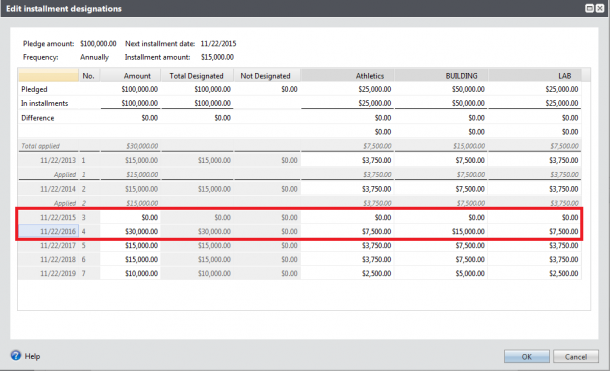
Within the Edit installment wizard, the grid displays the designations for the commitment and the total amount applied to each designation. Any amount displayed in red or in parentheses indicates imbalances in the grid installment totals, helping you know action needs to be taken before the installments are saved. The summary section at the top of the screen shows the amount and frequency of the pledge, in addition to the date and amount of the next installment.
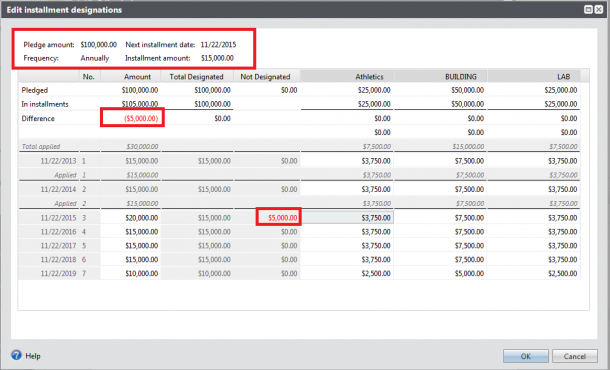
At the top of the grid, the Pledged row shows the total pledge amount, as well as the amount designated and not designated. It also shows the amount for each designation. The installments and differences rows highlight if there are differences between the amount pledged and the amount designated.
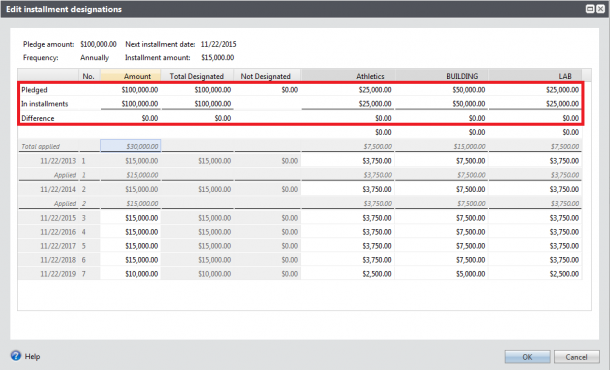
Below that, the installment schedule is listed with amount and designation information. You cannot change the number of installments or the installment dates, but you can change the amounts for each designation. This is helpful when you want to pay off the balance of one designation first (i.e. pay off the Building designation before the other two designations).
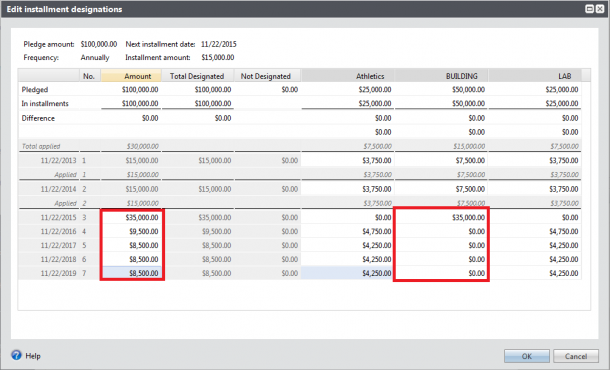
It is also helpful if a constituent needs to skip an installment but will make up the difference with the next installment payment. In this scenario, you can change the installment amount to zero and then add the amount to the next installment.
We hope these changes make it easier for you and your users to complete complicated pledge tasks, allowing you more time to focus on your mission.
If you answered yes, then the new Edit installment wizard introduced in BBCRM version 4.0 will help simplify this process.
Instead of going to multiple locations in the program to edit installment information, you can now save time by doing so from one location. You can change the schedule and installment amounts for each designation within this new window.

Within the Edit installment wizard, the grid displays the designations for the commitment and the total amount applied to each designation. Any amount displayed in red or in parentheses indicates imbalances in the grid installment totals, helping you know action needs to be taken before the installments are saved. The summary section at the top of the screen shows the amount and frequency of the pledge, in addition to the date and amount of the next installment.

At the top of the grid, the Pledged row shows the total pledge amount, as well as the amount designated and not designated. It also shows the amount for each designation. The installments and differences rows highlight if there are differences between the amount pledged and the amount designated.

Below that, the installment schedule is listed with amount and designation information. You cannot change the number of installments or the installment dates, but you can change the amounts for each designation. This is helpful when you want to pay off the balance of one designation first (i.e. pay off the Building designation before the other two designations).

It is also helpful if a constituent needs to skip an installment but will make up the difference with the next installment payment. In this scenario, you can change the installment amount to zero and then add the amount to the next installment.

We hope these changes make it easier for you and your users to complete complicated pledge tasks, allowing you more time to focus on your mission.
0
Categories
- All Categories
- New K-12 Community Home (TEST)
- New Higher Education Home Page (Test)
- New Impact Edge Community TEST
- New YourCause Community TEST
- New SKY Community TEST
- New Grantmaking TEST Community
- New Altru Test Community
- New bbcon Community - TEST
- 12 Blackbaud Agents for Good™
- New Raiser's Edge NXT Community
- 8 Blackbaud Community Help
- 222 bbcon®
- 1.4K Blackbaud Altru®
- 411 Blackbaud Award Management™ and Blackbaud Stewardship Management™
- 1.2K Blackbaud CRM™ and Blackbaud Internet Solutions™
- 16 donorCentrics®
- 361 Blackbaud eTapestry®
- 2.7K Blackbaud Financial Edge NXT®
- 688 Blackbaud Grantmaking™
- 604 Blackbaud Education Management Solutions for Higher Education
- 3.3K Blackbaud Education Management Solutions for K-12 Schools
- 954 Blackbaud Luminate Online® and Blackbaud TeamRaiser®
- 85 JustGiving® from Blackbaud®
- 7.1K Blackbaud Raiser's Edge NXT®
- 4K SKY Developer
- 258 ResearchPoint™
- 123 Blackbaud Tuition Management™
- 165 Organizational Best Practices
- 249 Member Lounge (Just for Fun)
- 40 Blackbaud Community Challenges
- 37 PowerUp Challenges
- 3 (Closed) PowerUp Challenge: Grid View Batch
- 3 (Closed) PowerUp Challenge: Chat for Blackbaud AI
- 3 (Closed) PowerUp Challenge: Data Health
- 3 (Closed) Raiser's Edge NXT PowerUp Challenge: Product Update Briefing
- 3 (Closed) Raiser's Edge NXT PowerUp Challenge: Standard Reports+
- 3 (Closed) Raiser's Edge NXT PowerUp Challenge: Email Marketing
- 3 (Closed) Raiser's Edge NXT PowerUp Challenge: Gift Management
- 4 (Closed) Raiser's Edge NXT PowerUp Challenge: Event Management
- 3 (Closed) Raiser's Edge NXT PowerUp Challenge: Home Page
- 4 (Closed) Raiser's Edge NXT PowerUp Challenge: Standard Reports
- 4 (Closed) Raiser's Edge NXT PowerUp Challenge: Query
- 829 Community News
- 3.1K Jobs Board
- 57 Blackbaud SKY® Reporting Announcements
- 47 Blackbaud CRM Higher Ed Product Advisory Group (HE PAG)
- 19 Blackbaud CRM Product Advisory Group (BBCRM PAG)