Sneak Peek of Upcoming BBCRM 4.0 New Features!



CRM 4.0 introduces the Information Library as THE place to manage, well, information. This ListBuilder-driven area replaces what would normally be seen when adding an ad-hoc query but a closer look reveals it’s more than just a replacement.
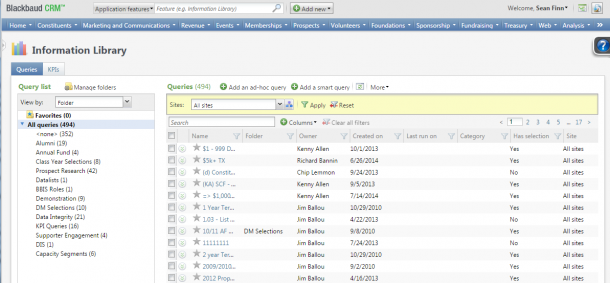
There are options to search/filter/sort this list down to the column level as well as a few extra columns that surface statistics covering when the query was last run and how many results the run contained. The Information Library and the approach it takes with displaying queries and KPIs is welcomed as you’re now able to easily mark favorite queries you use often. Additionally, with the ability to multi-select the items in the list, you’re now able to easily group and move them into folders to help with organization.
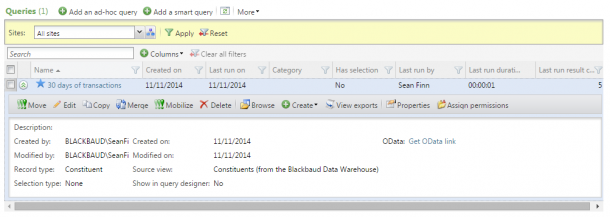
Here, I’ve created and marked a query favorite. Expanding the entry gives me some additional information as well as new options to View exports that have used this query. We’ve also added in an OData link for all queries which can be used to consume them with 3rd party products like Tableau or Excel. A more detailed view of the OData feature can be found here.
Also, with CRM 4.0, we’ve added ability to query Constituent information directly from the Blackbaud Data Warehouse. The largest benefit of using the Data Warehouse is in the speed of the results. You get answers in seconds versus minutes or more, making it a powerful option for data lists, selections, or reports.
Let’s edit this query and explore some more:
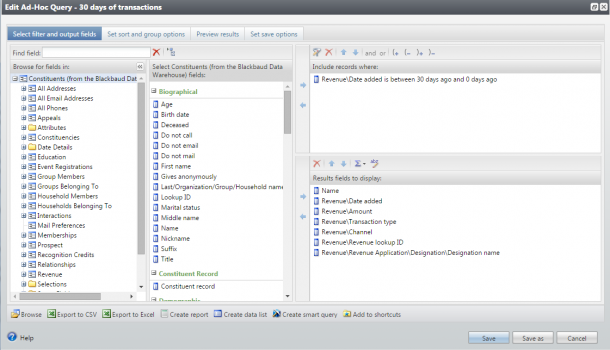
Hard to tell in a blog post, but editing any query will now expand the editor fully in the browser window. No more expanding manually just to be able to view filters. We’ve also added a “Save as” button as an option for all queries. Very handy if you’ve ever been caught editing an existing query versus starting from a copy of one.
Aside from speed, the query node structure was simplified for this Constituents (from the Blackbaud Data Warehouse) source query view. Also, queries created from the Blackbaud Data Warehouse that use date filters are now able to specify Rolling date ranges:
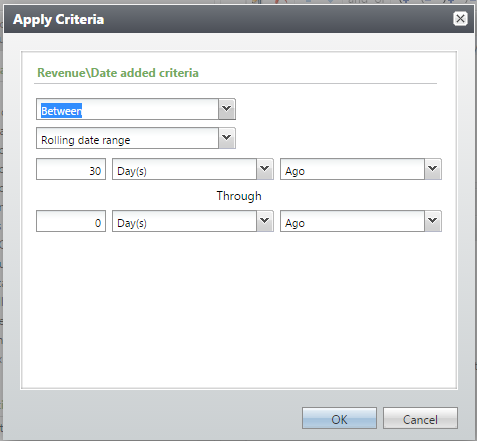
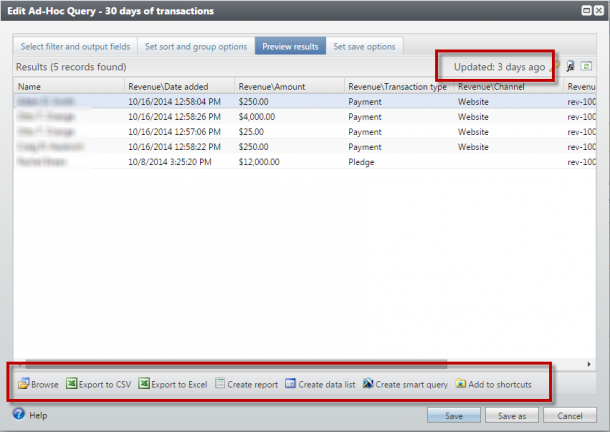
The Rolling date ranges are dependent on the Data Warehouse and are not available in any other source query views. Likewise, queries created with this source query view or any against the Data Warehouse will be current as of the last ETL or refresh of the warehouse. However, we do display how “stale” the data is on the results tab of the query as well as retain export, report, data list, and smart query creation options at the bottom:
Finally, while viewing query results in the application will still limit results to 500 records, that limit was removed when choosing to “Export to Excel” from the Ad-hoc query window. Clicking “Export to Excel” above functions the same as it has in previous versions but the limit of records that would be returned has been removed. This is invaluable when you have a lot of results but don’t want to create an export process to get them into a CSV or Excel file.

There are options to search/filter/sort this list down to the column level as well as a few extra columns that surface statistics covering when the query was last run and how many results the run contained. The Information Library and the approach it takes with displaying queries and KPIs is welcomed as you’re now able to easily mark favorite queries you use often. Additionally, with the ability to multi-select the items in the list, you’re now able to easily group and move them into folders to help with organization.

Here, I’ve created and marked a query favorite. Expanding the entry gives me some additional information as well as new options to View exports that have used this query. We’ve also added in an OData link for all queries which can be used to consume them with 3rd party products like Tableau or Excel. A more detailed view of the OData feature can be found here.
Also, with CRM 4.0, we’ve added ability to query Constituent information directly from the Blackbaud Data Warehouse. The largest benefit of using the Data Warehouse is in the speed of the results. You get answers in seconds versus minutes or more, making it a powerful option for data lists, selections, or reports.
Let’s edit this query and explore some more:

Hard to tell in a blog post, but editing any query will now expand the editor fully in the browser window. No more expanding manually just to be able to view filters. We’ve also added a “Save as” button as an option for all queries. Very handy if you’ve ever been caught editing an existing query versus starting from a copy of one.
Aside from speed, the query node structure was simplified for this Constituents (from the Blackbaud Data Warehouse) source query view. Also, queries created from the Blackbaud Data Warehouse that use date filters are now able to specify Rolling date ranges:

The Rolling date ranges are dependent on the Data Warehouse and are not available in any other source query views. Likewise, queries created with this source query view or any against the Data Warehouse will be current as of the last ETL or refresh of the warehouse. However, we do display how “stale” the data is on the results tab of the query as well as retain export, report, data list, and smart query creation options at the bottom:

Finally, while viewing query results in the application will still limit results to 500 records, that limit was removed when choosing to “Export to Excel” from the Ad-hoc query window. Clicking “Export to Excel” above functions the same as it has in previous versions but the limit of records that would be returned has been removed. This is invaluable when you have a lot of results but don’t want to create an export process to get them into a CSV or Excel file.
0
Categories
- All Categories
- New YourCause Community TEST
- New SKY Community TEST
- New Grantmaking TEST Community
- New Altru Test Community
- New bbcon Community - TEST
- 12 Blackbaud Agents for Good™
- New Raiser's Edge NXT Community
- 7 Blackbaud Community Help
- 218 bbcon®
- 1.4K Blackbaud Altru®
- 409 Blackbaud Award Management™ and Blackbaud Stewardship Management™
- 1.2K Blackbaud CRM™ and Blackbaud Internet Solutions™
- 16 donorCentrics®
- 361 Blackbaud eTapestry®
- 2.7K Blackbaud Financial Edge NXT®
- 680 Blackbaud Grantmaking™
- 598 Blackbaud Education Management Solutions for Higher Education
- 3.3K Blackbaud Education Management Solutions for K-12 Schools
- 952 Blackbaud Luminate Online® and Blackbaud TeamRaiser®
- 85 JustGiving® from Blackbaud®
- 7K Blackbaud Raiser's Edge NXT®
- 3.9K SKY Developer
- 257 ResearchPoint™
- 123 Blackbaud Tuition Management™
- 165 Organizational Best Practices
- 247 Member Lounge (Just for Fun)
- 40 Blackbaud Community Challenges
- 37 PowerUp Challenges
- 3 (Closed) PowerUp Challenge: Grid View Batch
- 3 (Closed) PowerUp Challenge: Chat for Blackbaud AI
- 3 (Closed) PowerUp Challenge: Data Health
- 3 (Closed) Raiser's Edge NXT PowerUp Challenge: Product Update Briefing
- 3 (Closed) Raiser's Edge NXT PowerUp Challenge: Standard Reports+
- 3 (Closed) Raiser's Edge NXT PowerUp Challenge: Email Marketing
- 3 (Closed) Raiser's Edge NXT PowerUp Challenge: Gift Management
- 4 (Closed) Raiser's Edge NXT PowerUp Challenge: Event Management
- 3 (Closed) Raiser's Edge NXT PowerUp Challenge: Home Page
- 4 (Closed) Raiser's Edge NXT PowerUp Challenge: Standard Reports
- 4 (Closed) Raiser's Edge NXT PowerUp Challenge: Query
- 822 Community News
- 3.1K Jobs Board
- 57 Blackbaud SKY® Reporting Announcements
- 47 Blackbaud CRM Higher Ed Product Advisory Group (HE PAG)
- 19 Blackbaud CRM Product Advisory Group (BBCRM PAG)