Creating Report Subscriptions: Delivering reports directly to user's inboxes
Hi Folks!
My name is Joseph and I’ve been on the CRM team here at Blackbaud for 2 years now. I’d like to share a feature of CRM that I’ve helped a handful of customers setup in the past. We receive this question from time to time so would like to share this tip with all of you.
Using Microsoft’s SQL Reporting Server, we can deliver CRM reports directly to user’s inboxes on a set schedule. I find this feature incredibly useful as a user can have a report available to them at their fingertips instead of having to login and run it through CRM. Ready to see how it works? Let’s dive in!
First, you’ll need to obtain the url for your SQL reporting server. If you’re a hosted customer, Blackbaud support can provide this for you and set you up with access. If you’re not hosted with us, your IT team will be able to provide the url for you.
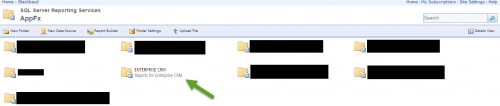
Once you’re logged in, you’ll select the database you want to run the report from. For example, select the Blackbaud folder> AppFx Folder> Database Name>System Reports


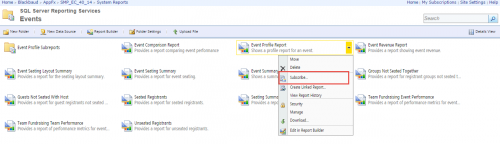
Next, find the report you would like to subscribe a user to and right-click or click the arrow next to the report. Click Subscribe.

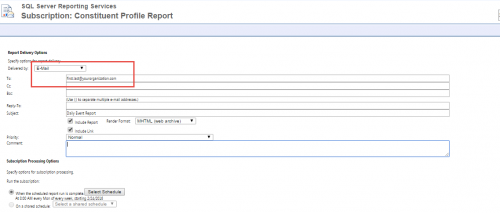
In the “To:” field, enter the email addresses of the users that need to receive the report.

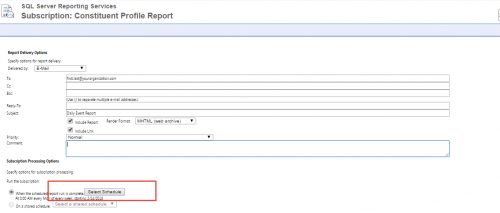
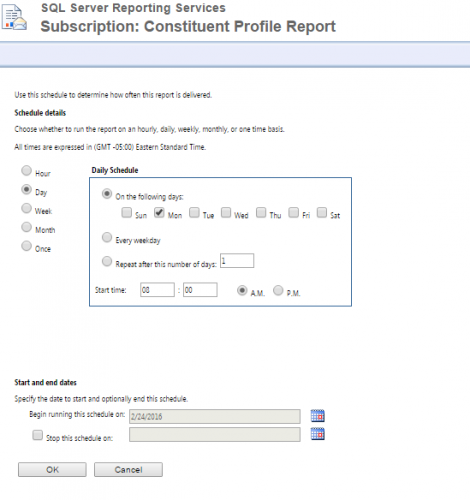
Click on Select Schedule to set up a schedule for when the report should be sent.

On the following screen, create the schedule for the day(s) and time(s) the report should be delivered via email.

Select Ok and then Ok to create the subscription. In addition to standard CRM reports, this will also work with ad-hoc query reports.
My name is Joseph and I’ve been on the CRM team here at Blackbaud for 2 years now. I’d like to share a feature of CRM that I’ve helped a handful of customers setup in the past. We receive this question from time to time so would like to share this tip with all of you.
Using Microsoft’s SQL Reporting Server, we can deliver CRM reports directly to user’s inboxes on a set schedule. I find this feature incredibly useful as a user can have a report available to them at their fingertips instead of having to login and run it through CRM. Ready to see how it works? Let’s dive in!
First, you’ll need to obtain the url for your SQL reporting server. If you’re a hosted customer, Blackbaud support can provide this for you and set you up with access. If you’re not hosted with us, your IT team will be able to provide the url for you.
Once you’re logged in, you’ll select the database you want to run the report from. For example, select the Blackbaud folder> AppFx Folder> Database Name>System Reports


Next, find the report you would like to subscribe a user to and right-click or click the arrow next to the report. Click Subscribe.

In the “To:” field, enter the email addresses of the users that need to receive the report.

Click on Select Schedule to set up a schedule for when the report should be sent.

On the following screen, create the schedule for the day(s) and time(s) the report should be delivered via email.

Select Ok and then Ok to create the subscription. In addition to standard CRM reports, this will also work with ad-hoc query reports.
0
Comments
-
Would love to do this for some of my users!0
Categories
- All Categories
- 6 Blackbaud Community Help
- 213 bbcon®
- 1.4K Blackbaud Altru®
- 401 Blackbaud Award Management™ and Blackbaud Stewardship Management™
- 1.1K Blackbaud CRM™ and Blackbaud Internet Solutions™
- 15 donorCentrics®
- 360 Blackbaud eTapestry®
- 2.6K Blackbaud Financial Edge NXT®
- 655 Blackbaud Grantmaking™
- 576 Blackbaud Education Management Solutions for Higher Education
- 3.2K Blackbaud Education Management Solutions for K-12 Schools
- 939 Blackbaud Luminate Online® and Blackbaud TeamRaiser®
- 84 JustGiving® from Blackbaud®
- 6.6K Blackbaud Raiser's Edge NXT®
- 3.7K SKY Developer
- 248 ResearchPoint™
- 119 Blackbaud Tuition Management™
- 165 Organizational Best Practices
- 241 Member Lounge (Just for Fun)
- 34 Blackbaud Community Challenges
- 34 PowerUp Challenges
- 3 (Open) PowerUp Challenge: Chat for Blackbaud AI
- 3 (Closed) PowerUp Challenge: Data Health
- 3 (Closed) Raiser's Edge NXT PowerUp Challenge: Product Update Briefing
- 3 (Closed) Raiser's Edge NXT PowerUp Challenge: Standard Reports+
- 3 (Closed) Raiser's Edge NXT PowerUp Challenge: Email Marketing
- 3 (Closed) Raiser's Edge NXT PowerUp Challenge: Gift Management
- 4 (Closed) Raiser's Edge NXT PowerUp Challenge: Event Management
- 3 (Closed) Raiser's Edge NXT PowerUp Challenge: Home Page
- 4 (Closed) Raiser's Edge NXT PowerUp Challenge: Standard Reports
- 4 (Closed) Raiser's Edge NXT PowerUp Challenge: Query
- 791 Community News
- 2.9K Jobs Board
- 53 Blackbaud SKY® Reporting Announcements
- 47 Blackbaud CRM Higher Ed Product Advisory Group (HE PAG)
- 19 Blackbaud CRM Product Advisory Group (BBCRM PAG)