It's Election Day in America, where voters take to the polls and make selections to meet their diverse needs and help set the direction of the country. In a — very loose! — analogy, your organization can similarly make selections within
Raiser's Edge NXT and customize several features to meet your needs and help set the direction of your data!
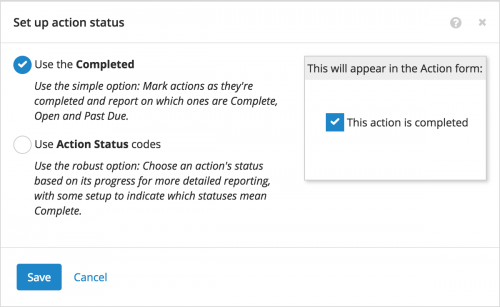 Action statuses.
To track the progress of tasks and interactions, your organization can choose whether to use default completion statuses or custom status codes.
- With the default completion statuses, you choose when an action is finished to track whether it's Open, Past due, or Completed.
- With custom status codes, you choose an action's status as if progresses through your workflow. For example, in addition to completion statuses, you may have a status of Assigned when an action's created for a fundraiser, and In progress for when work begins.
To elect to use the default statuses or custom status codes, admins can select
Settings (the cog) under
Notes and actions on any constituent record or
Actions on any opportunity record. For more information, see the
Action Statuses Help.
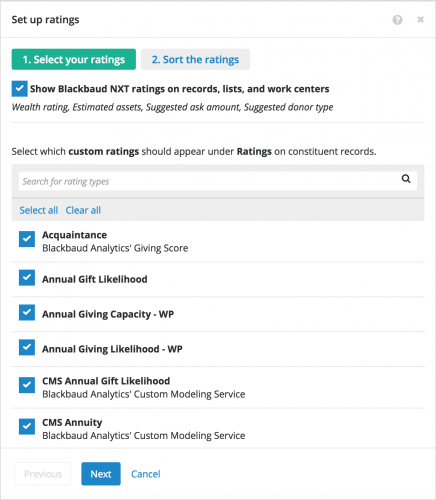 Ratings.
Ratings indicate your constituents' estimated wealth and capacity to give, based on information from your organization's prospect research or sources like
ResearchPoint or
Target Analytics, a division of Blackbaud Inc. To help prioritize the ratings that appear throughout
Raiser's Edge NXT, admins can choose which custom ratings appear under
Ratings on constituent records and whether to use the Blackbaud NXT ratings provided by
Target Analytics. To set up ratings for your organization, select
Settings (the cog) under
Ratings on any constituent's record. For more information, see the
Ratings Help.
Opportunity and prospect statuses. With
Prospect Research Management, your organization can use statuses to track your opportunities and prospects.
- To help detail efforts to secure major gifts, you can use statuses — such as Initial contact, Pending, and Accepted — to track where opportunities are in your solicitation process. To alert fundraisers when an opportunity has a status for too long, admins can set how long each status should last and whether a status means 'Closed'. To set up these statuses for your organization, select Settings (yep, the cog) under Opportunities on any constituent's record. When an opportunity has a status for too long, an alert appears at the top of its record. For details, see the Opportunity Statuses Help.
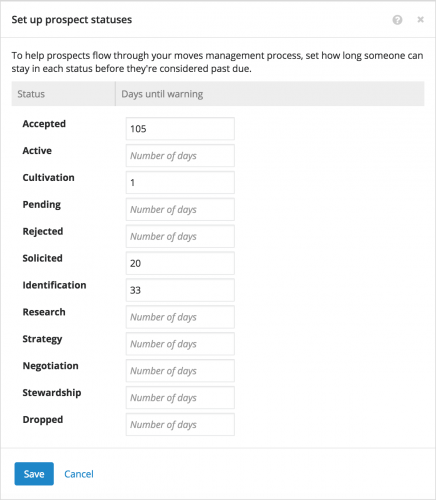 With moves management, your organization develops donors' interest in your mission through a standard process to identify and acquire prospects, cultivate relationships, and generate major gift opportunties. As you determine this process, you can track its milestones as prospect statuses. To alert fundraisers when a prospect has a status for too long, admins can set how long someone should be in each stage of your moves management process. To set up these statuses for your organization, select Settings (say it with me: the cog) under Prospect management on any constituent's record. When a prospect has a status for too long, an alert appears at the top of their constituent record. For details, check out the Prospect Status Help.
Communication preferences. Communication preferences are your constituents' rules of contact, such as to not call after a certain hour or on weekends. To give a reminder or special instructions about priority preferences, admins can choose which should appear as alerts on constituent records. To make these elections, select
Settings (that cog again) under
Communication preferences on any constituent's record. For more information, see the
Communication Preferences Help.
Revenue types. As recently discussed, you can use a
Revenue type filter to choose whether to analyze giving as revenue
received through cash-in-hand gifts or
committed to fundraising efforts including pledges and matching gifts. To best meet the needs of your organization, admins can select
Control Panel,
Settings and choose which gift types to count when calculating received or committed revenue, such as gifts-in-kind for Received revenue or recurring gift payments for Committed revenue. For more information, see the
Revenue Types Help.
With these elections, your organization can customize
Raiser's Edge NXT to support your business processes and get the most of its features. (Now if only the democratic process was so easy!)
