Raiser's Edge NXT Customized For You: Personalizing The Constituent Record


We've been talking about constituents a lot lately. How you can search for them, how you can customize the constituent record for you, but today let's talk about how you can customize the record for your constituent. Have you ever had to wait at a coffee shop for a constituent and ask every guy that came in if they were Tom? While that may be a bit of an exaggeration, I hope I am not alone in having a blind donor date and wishing I had access to more about them right before my meeting.
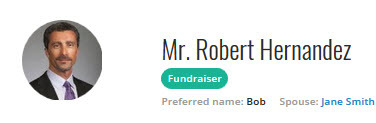
Did you know that those colored circles with initials in them can be replaced with a picture? On the constituent record, just click on the
circle (to add or updated the picture) and it will open up your files for you to select the picture. Now you at least have some idea of whom you are looking for at that next blind meeting!
You may say, well, that is just great, but I don't have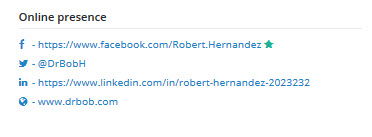 a picture of Tom on my computer. I get it, I don't pictures of any of my clients on my computer either. However, another feature with RE NXT is to have Online Presence links. You can link out to LinkedIn, Facebook, Twitter, and blogs. While you are linking out to those sites, go ahead and download a picture from one of the accounts and you can add it in.
You now have a picture of Tom, have reviewed his online presence, and have your meeting. Well, you probably learned a few things during your meeting. There are a few different areas to do this. First, if you learned something about how he wants to be communicated with, update his Communication Preferences. You can also add a note at the very top of his constituent record right by his picture with general information about him. If there is something that should pop up each time someone goes to Tom's record, you can add an Alert.
Now each time you have to meet with Tom, Dick, or Harry, you will know which one is which!

Did you know that those colored circles with initials in them can be replaced with a picture? On the constituent record, just click on the
circle (to add or updated the picture) and it will open up your files for you to select the picture. Now you at least have some idea of whom you are looking for at that next blind meeting!
You may say, well, that is just great, but I don't have
 a picture of Tom on my computer. I get it, I don't pictures of any of my clients on my computer either. However, another feature with RE NXT is to have Online Presence links. You can link out to LinkedIn, Facebook, Twitter, and blogs. While you are linking out to those sites, go ahead and download a picture from one of the accounts and you can add it in.
 You now have a picture of Tom, have reviewed his online presence, and have your meeting. Well, you probably learned a few things during your meeting. There are a few different areas to do this. First, if you learned something about how he wants to be communicated with, update his Communication Preferences. You can also add a note at the very top of his constituent record right by his picture with general information about him. If there is something that should pop up each time someone goes to Tom's record, you can add an Alert.
Now each time you have to meet with Tom, Dick, or Harry, you will know which one is which!
0
Categories
- All Categories
- New K-12 Community Home (TEST)
- New Higher Education Home Page (Test)
- New Impact Edge Community TEST
- New YourCause Community TEST
- New SKY Community TEST
- New Grantmaking TEST Community
- New Altru Test Community
- New bbcon Community - TEST
- 12 Blackbaud Agents for Good™
- New Raiser's Edge NXT Community
- 8 Blackbaud Community Help
- 222 bbcon®
- 1.4K Blackbaud Altru®
- 410 Blackbaud Award Management™ and Blackbaud Stewardship Management™
- 1.2K Blackbaud CRM™ and Blackbaud Internet Solutions™
- 16 donorCentrics®
- 361 Blackbaud eTapestry®
- 2.7K Blackbaud Financial Edge NXT®
- 687 Blackbaud Grantmaking™
- 603 Blackbaud Education Management Solutions for Higher Education
- 3.3K Blackbaud Education Management Solutions for K-12 Schools
- 954 Blackbaud Luminate Online® and Blackbaud TeamRaiser®
- 85 JustGiving® from Blackbaud®
- 7K Blackbaud Raiser's Edge NXT®
- 4K SKY Developer
- 258 ResearchPoint™
- 123 Blackbaud Tuition Management™
- 165 Organizational Best Practices
- 248 Member Lounge (Just for Fun)
- 40 Blackbaud Community Challenges
- 37 PowerUp Challenges
- 3 (Closed) PowerUp Challenge: Grid View Batch
- 3 (Closed) PowerUp Challenge: Chat for Blackbaud AI
- 3 (Closed) PowerUp Challenge: Data Health
- 3 (Closed) Raiser's Edge NXT PowerUp Challenge: Product Update Briefing
- 3 (Closed) Raiser's Edge NXT PowerUp Challenge: Standard Reports+
- 3 (Closed) Raiser's Edge NXT PowerUp Challenge: Email Marketing
- 3 (Closed) Raiser's Edge NXT PowerUp Challenge: Gift Management
- 4 (Closed) Raiser's Edge NXT PowerUp Challenge: Event Management
- 3 (Closed) Raiser's Edge NXT PowerUp Challenge: Home Page
- 4 (Closed) Raiser's Edge NXT PowerUp Challenge: Standard Reports
- 4 (Closed) Raiser's Edge NXT PowerUp Challenge: Query
- 829 Community News
- 3.1K Jobs Board
- 57 Blackbaud SKY® Reporting Announcements
- 47 Blackbaud CRM Higher Ed Product Advisory Group (HE PAG)
- 19 Blackbaud CRM Product Advisory Group (BBCRM PAG)