What's New In Raiser's Edge NXT The Week Of January 31
This week, Raiser's Edge NXT updates with several new features and enhancements to ease analyzing your top fundraising efforts, filtering constituents by their academic history, and interacting with constituents through all channels — including in person!
Locate constituents on a map (some of you!). To locate nearby donors or help plan a trip, you can now select Map in Lists to pinpoint constituents. (If you can't yet map constituents, don't worry! This feature will release in waves, so expect it in a future update if you don't see it today.)
Powered by Microsoft Bing, the map displays the locations of constituents — as pins — based on their primary addresses. To identify the constituent at a location, select its pin to view details such as their name and address. For more details, you can select the constituent's name to view their record. (When you add or edit a constituent's primary address, it may take up to 24 hours for their new pin to appear on the map.)
You can search the map for a specific constituent or location. To include only constituents with a specific area, you can also select Select map filter and draw a box around where to pinpoint. To view a list of those constituents, select List to apply the map filter. For more information, check out the Consituent Map Help.
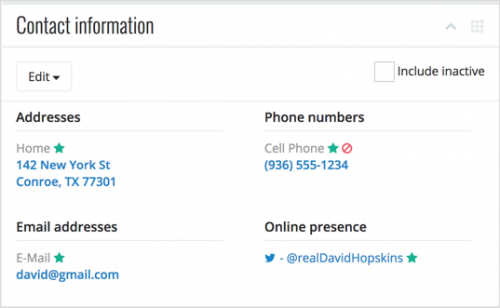
Increase focus on contact information. To ease communication with constituents, their mailing addresses, email addresses, phone numbers, and online presence now appear under Contact information on their records. Previously, these details appeared under Constituent summary. For more information, see the Contact Information Help. (In a future update, you'll be able to manage address information from here as well!)
Filter constituents by education information. In a list of constituents, you can now include only those with specific academic history, such where they attended, when they graduated, and their fields of study. With Alumni Tracking, you can also choose whether to include only information about schools marked as the constituent's primary education. To filter constituents based on these details, select Filters and choose the criteria to include under Education. For more information, see the Constituent List Filters Help.
Analyze your top ten campaigns, funds, or appeals. To help focus on your most effective fundraising efforts, the Top campaigns, Top funds, and Top appeals metrics in Analyze now include only the ten top-grossing efforts, based on your selected filters. Previously, these metrics included all efforts that met the filter criteria. For more information, see the Top Campaigns Analysis Help, Top Funds Analysis Help, and Top Appeals Analysis Help.
For more information about these features, or to catch up on previous releases, check out the What's New Help and What's Recent Help. Enjoy!

Locate constituents on a map (some of you!). To locate nearby donors or help plan a trip, you can now select Map in Lists to pinpoint constituents. (If you can't yet map constituents, don't worry! This feature will release in waves, so expect it in a future update if you don't see it today.)Powered by Microsoft Bing, the map displays the locations of constituents — as pins — based on their primary addresses. To identify the constituent at a location, select its pin to view details such as their name and address. For more details, you can select the constituent's name to view their record. (When you add or edit a constituent's primary address, it may take up to 24 hours for their new pin to appear on the map.)
You can search the map for a specific constituent or location. To include only constituents with a specific area, you can also select Select map filter and draw a box around where to pinpoint. To view a list of those constituents, select List to apply the map filter. For more information, check out the Consituent Map Help.
Increase focus on contact information. To ease communication with constituents, their mailing addresses, email addresses, phone numbers, and online presence now appear under Contact information on their records. Previously, these details appeared under Constituent summary. For more information, see the Contact Information Help. (In a future update, you'll be able to manage address information from here as well!)Filter constituents by education information. In a list of constituents, you can now include only those with specific academic history, such where they attended, when they graduated, and their fields of study. With Alumni Tracking, you can also choose whether to include only information about schools marked as the constituent's primary education. To filter constituents based on these details, select Filters and choose the criteria to include under Education. For more information, see the Constituent List Filters Help.
Analyze your top ten campaigns, funds, or appeals. To help focus on your most effective fundraising efforts, the Top campaigns, Top funds, and Top appeals metrics in Analyze now include only the ten top-grossing efforts, based on your selected filters. Previously, these metrics included all efforts that met the filter criteria. For more information, see the Top Campaigns Analysis Help, Top Funds Analysis Help, and Top Appeals Analysis Help.
For more information about these features, or to catch up on previous releases, check out the What's New Help and What's Recent Help. Enjoy!

0
Comments
-
"If you can't yet map constituents, don't worry! This feature will release in waves, so expect it in a future update if you don't see it today."
What is the general timeline for this feature? I've been importing to Google Maps for a similar feature.0 -
Hey Kevin! Glad to hear you're looking forward to the new Map feature. It will release to everyone over the next couple of weeks, so I recommend you keep checking your constituent lists in Lists for it during that time. Thanks!0
Categories
- All Categories
- 6 Blackbaud Community Help
- 209 bbcon®
- 1.4K Blackbaud Altru®
- 395 Blackbaud Award Management™ and Blackbaud Stewardship Management™
- 1.1K Blackbaud CRM™ and Blackbaud Internet Solutions™
- 15 donorCentrics®
- 359 Blackbaud eTapestry®
- 2.5K Blackbaud Financial Edge NXT®
- 646 Blackbaud Grantmaking™
- 564 Blackbaud Education Management Solutions for Higher Education
- 3.2K Blackbaud Education Management Solutions for K-12 Schools
- 934 Blackbaud Luminate Online® and Blackbaud TeamRaiser®
- 84 JustGiving® from Blackbaud®
- 6.4K Blackbaud Raiser's Edge NXT®
- 3.7K SKY Developer
- 243 ResearchPoint™
- 118 Blackbaud Tuition Management™
- 165 Organizational Best Practices
- 238 The Tap (Just for Fun)
- 33 Blackbaud Community Challenges
- 28 PowerUp Challenges
- 3 (Open) Raiser's Edge NXT PowerUp Challenge: Product Update Briefing
- 3 (Closed) Raiser's Edge NXT PowerUp Challenge: Standard Reports+
- 3 (Closed) Raiser's Edge NXT PowerUp Challenge: Email Marketing
- 3 (Closed) Raiser's Edge NXT PowerUp Challenge: Gift Management
- 4 (Closed) Raiser's Edge NXT PowerUp Challenge: Event Management
- 3 (Closed) Raiser's Edge NXT PowerUp Challenge: Home Page
- 4 (Closed) Raiser's Edge NXT PowerUp Challenge: Standard Reports
- 4 (Closed) Raiser's Edge NXT PowerUp Challenge: Query
- 779 Community News
- 2.9K Jobs Board
- 53 Blackbaud SKY® Reporting Announcements
- 47 Blackbaud CRM Higher Ed Product Advisory Group (HE PAG)
- 19 Blackbaud CRM Product Advisory Group (BBCRM PAG)

