What's New In Raiser's Edge NXT The Week Of September 5





This week, Raiser's Edge NXT recently updated with nifty enhancements to Lists and your Blackbaud ID!
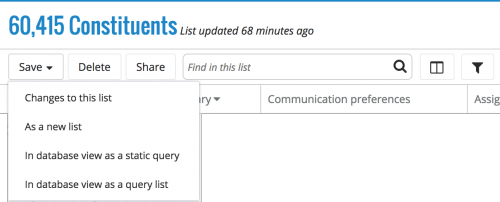 Create a list based on another list. As previously discussed, to ease list creation, you can now base a new list on an existing list and tweak its filters and columns as necessary. To create a copy of an open list to start a new one, select Save, As a new list. (To instead save your edits to the open list, select Save, Changes to this list.) For more information, see the Lists Help.
Use two-step authentication with your Blackbaud ID and Google. If you sign in to Raiser's Edge NXT through Google authentication,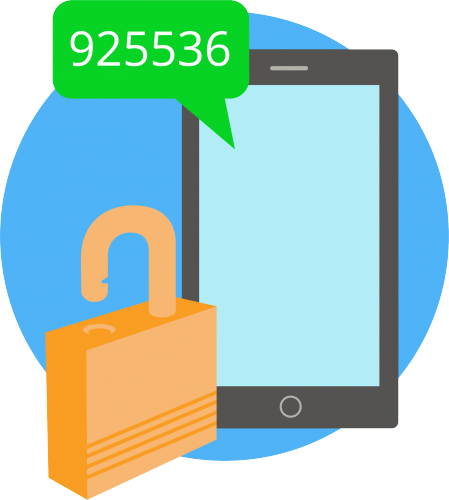 you can now use two-step authentication with your Blackbaud ID for an extra layer of security. Two-step authentication enables your Blackbaud ID to require a unique verification code — received on your personal device — in addition to your email address and password. To use two-step authentication, visit your Blackbaud ID profile and select Turn on under Two-step authentication. (Previously, you could use two-step authentication only if you signed in through Blackbaud's secure service.)
For more information about these features, or to catch up on previous updates, check out the What's New Help and What's Recent Help. Enjoy!
 Create a list based on another list. As previously discussed, to ease list creation, you can now base a new list on an existing list and tweak its filters and columns as necessary. To create a copy of an open list to start a new one, select Save, As a new list. (To instead save your edits to the open list, select Save, Changes to this list.) For more information, see the Lists Help.
Use two-step authentication with your Blackbaud ID and Google. If you sign in to Raiser's Edge NXT through Google authentication,
 you can now use two-step authentication with your Blackbaud ID for an extra layer of security. Two-step authentication enables your Blackbaud ID to require a unique verification code — received on your personal device — in addition to your email address and password. To use two-step authentication, visit your Blackbaud ID profile and select Turn on under Two-step authentication. (Previously, you could use two-step authentication only if you signed in through Blackbaud's secure service.)
For more information about these features, or to catch up on previous updates, check out the What's New Help and What's Recent Help. Enjoy!
0
Categories
- All Categories
- New K-12 Community Home (TEST)
- New Higher Education Home Page (Test)
- New Impact Edge Community TEST
- New YourCause Community TEST
- New SKY Community TEST
- New Grantmaking TEST Community
- New Altru Test Community
- New bbcon Community - TEST
- 12 Blackbaud Agents for Good™
- New Raiser's Edge NXT Community
- 8 Blackbaud Community Help
- 222 bbcon®
- 1.4K Blackbaud Altru®
- 411 Blackbaud Award Management™ and Blackbaud Stewardship Management™
- 1.2K Blackbaud CRM™ and Blackbaud Internet Solutions™
- 16 donorCentrics®
- 361 Blackbaud eTapestry®
- 2.7K Blackbaud Financial Edge NXT®
- 687 Blackbaud Grantmaking™
- 604 Blackbaud Education Management Solutions for Higher Education
- 3.3K Blackbaud Education Management Solutions for K-12 Schools
- 954 Blackbaud Luminate Online® and Blackbaud TeamRaiser®
- 85 JustGiving® from Blackbaud®
- 7K Blackbaud Raiser's Edge NXT®
- 4K SKY Developer
- 258 ResearchPoint™
- 123 Blackbaud Tuition Management™
- 165 Organizational Best Practices
- 248 Member Lounge (Just for Fun)
- 40 Blackbaud Community Challenges
- 37 PowerUp Challenges
- 3 (Closed) PowerUp Challenge: Grid View Batch
- 3 (Closed) PowerUp Challenge: Chat for Blackbaud AI
- 3 (Closed) PowerUp Challenge: Data Health
- 3 (Closed) Raiser's Edge NXT PowerUp Challenge: Product Update Briefing
- 3 (Closed) Raiser's Edge NXT PowerUp Challenge: Standard Reports+
- 3 (Closed) Raiser's Edge NXT PowerUp Challenge: Email Marketing
- 3 (Closed) Raiser's Edge NXT PowerUp Challenge: Gift Management
- 4 (Closed) Raiser's Edge NXT PowerUp Challenge: Event Management
- 3 (Closed) Raiser's Edge NXT PowerUp Challenge: Home Page
- 4 (Closed) Raiser's Edge NXT PowerUp Challenge: Standard Reports
- 4 (Closed) Raiser's Edge NXT PowerUp Challenge: Query
- 829 Community News
- 3.1K Jobs Board
- 57 Blackbaud SKY® Reporting Announcements
- 47 Blackbaud CRM Higher Ed Product Advisory Group (HE PAG)
- 19 Blackbaud CRM Product Advisory Group (BBCRM PAG)