This week,
Raiser's Edge NXT introduces a handful of enhancements, including a name change for donations, an extended inactivity timeout, and updates to the Microsoft
Outlook add-in.
Donations are now "one-time gifts". To help clarify the difference between individual charitable gifts from sustained giving such as recurring gifts, donations now appear as one-time gifts in the web view. (In the database view, they still appear as
Cash gifts.) For more information, see the
Gift Types Help.
Automatically sign out when inactive for 90 minutes. As previously discussed, to help protect sensitive data but still enable you to multitask or take time for deliberate decisions as you work in
Raiser's Edge NXT, your Blackbaud ID now automatically signs out of the web view after 90 minutes of inactivity, instead of the previous 15 minutes.
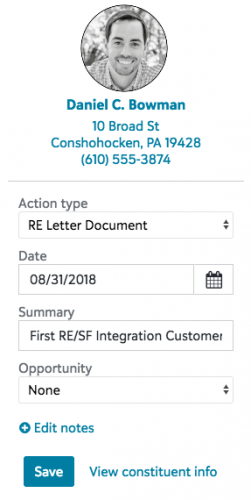 Save a summary, opportunity, and fundraiser to actions with Raiser's Edge NXT for Outlook.
 With the
Raiser's Edge NXT for Outlook add-in, you can view constituent details about email senders and recipients and create actions from their messages in your Microsoft
Outlook inbox. To help save time, you can now add an action as soon as you select
Raiser's Edge NXT - Blackbaud from your inbox. When you create an action from the add-in:
- It now automatically offers the type of the last action save, to further help save time. You can choose another action type if necessary.
- It now includes the email's subject line as a summary on the action. You can edit the action's summary as necessary.
- If you're a fundraiser, it automatically assigns you the action.
- With Prospect Research Management, you can now choose which of the constituent's opportunities the action supports.
In addition, you can use multiple databases with the add-in. To choose which database to connect to, you now select
Settings,
Select database. From
Settings, you can now also sign out of the add-in or access
its Help content.
Admins! To enable others at your organization to install the add-in, from
Control Panel,
Applications, browse to
Raiser's Edge NXT for Outlook under
Available apps, and select
Connect. Once enabled, users at your organization can then install the application through the
Microsoft Office Store.
Manage database view activity from the web view (with Blackbaud SKY, powered by Microsoft Azure). With
Blackbaud SKY, powered by Microsoft
Azure, admins can now monitor and manage activity in the database view from the web view. To manage your database view sessions, select
Database,
Database options.
- Under Sessions, you can view your current Citrix sessions with the database view. For each session, you can view its Citrix details, which desktop you used, its state, and when it started.
- For security, Blackbaud automatically backs up data from your database view on a nightly basis. With Bulk Data Delivery, you can manage these backups under Backups. (Note that these backups don't include data that appears only in the web view, such as attachments.)
- For ease of access, Blackbaud provides a secure file transfer protocol (SFTP) location, where you can store files for use in your database. Under FTP access, you can view the details required to access these files through an FTP client like FileZilla, such as to share with a third-party vendor through an automated process.
(Don't have
Blackbaud SKY, powered by
Azure? No need to worry. If all goes well based on feedback and usage, expect its wider release in a future update.)
For more information, see the
Database View Options Help.
For more information about these features, or to catch up on previous releases, check out the
What's New Help and
What's Recent Help.
Enjoy!