If you couldn’t tell, we love our community here in
Blackbaud K-12. Places like the
Idea forum in
Blackbaud Community are rife with wonderful ideas that help us further expand and evolve the K-12 products. One feature we’ve been hearing a lot of from the community is in regards to files and working with them on
Candidate Profiles.
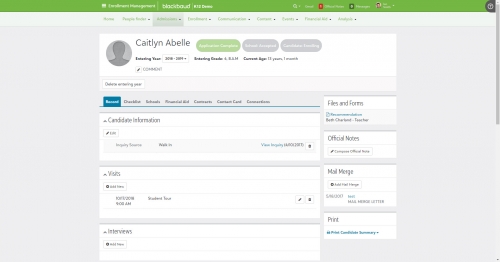
Following the October release, we’ve created the
Files and Forms title on
Student and
Candidate profiles. This feature gathers all attachments and forms currently on the profile and allows admissions managers to view and download them. The files are ordered alphabetically by the File type, with the name of the file displayed underneath. Select the file type from this tile to open the file or report in a new screen.
You may notice that the “Forms” part of
Files and Forms isn’t represented here. As you’ll see in a couple weeks for the November release, we’re not done innovating in this space as well. We’re doing similar things with other forms as well, so stay tuned.
This functionality also directly ties into our upcoming
Committee Review feature, which we’ll be unveiling as an EAP later in November. More on that in a later blog.
That’s going to do it for now! Make sure to subscribe to the K-12 Community to stay up to date on all of the latest content including the previously mentioned Committee Review blog. Thanks for reading everyone and we’ll see you right back here next week!