Report Card and Transcript Builder Works Harder For You

Derek Nichols
Blackbaud Employee




We’re constantly evolving the Report Card and Transcript Builder process for you and this past release on May 1 wasn’t an exception to this fact. We added a few subtle features that if you blink, you may just miss entirely.
So, in case you missed it, here are some of the smart changes made to both the Report Card and Transcript builder processes under Academics.
Improved Dragging and Dropping! This is one area of the update that is easily overlooked, especially when viewed alongside the more obvious changes that we’ll discuss in a minute. When dragging and dropping new items on a Report Card or Transcript, the response time has been improved. Following the May 1 update, schools should be seeing a big difference when adding new sections to templates and moving them around.
Readability Enhanced! Another subtle change, but one that I feel is a big quality of life improvement for this feature. After opening a report card or transcript template, the left navigation is now expanded by default. This makes it easier for users to see which header each section lives under and eliminates the expand collapse guessing game that can happen until you find what you need. Typically, it’s in the last place that you look, right?
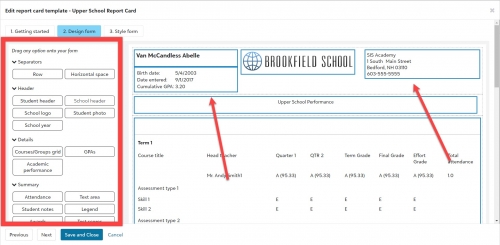
New Headers and Fields! Arguably the most obvious change, the May 1 release saw numerous fields added to the Student Header. The Student header now displays the student’s name, preferred address, their birth date, enroll date and graduation date. We also created a brand new section called School header. Similar to the Student header, this new section is all about the school. It displays the school’s name, main address, and phone number. Of course, users can edit these sections to add or remove fields as needed.
Naturally, we’re going to continue to make this feature even better as 2019 continues, but we do hope that these newly added updates make the process even better.
Let us know what you like best in this Report Card and Transcript Builder update by leaving us a like or comment below. Thanks for reading and stay tuned for an all new K-12 Blog next week! See you then!
So, in case you missed it, here are some of the smart changes made to both the Report Card and Transcript builder processes under Academics.
Improved Dragging and Dropping! This is one area of the update that is easily overlooked, especially when viewed alongside the more obvious changes that we’ll discuss in a minute. When dragging and dropping new items on a Report Card or Transcript, the response time has been improved. Following the May 1 update, schools should be seeing a big difference when adding new sections to templates and moving them around.
Readability Enhanced! Another subtle change, but one that I feel is a big quality of life improvement for this feature. After opening a report card or transcript template, the left navigation is now expanded by default. This makes it easier for users to see which header each section lives under and eliminates the expand collapse guessing game that can happen until you find what you need. Typically, it’s in the last place that you look, right?

New Headers and Fields! Arguably the most obvious change, the May 1 release saw numerous fields added to the Student Header. The Student header now displays the student’s name, preferred address, their birth date, enroll date and graduation date. We also created a brand new section called School header. Similar to the Student header, this new section is all about the school. It displays the school’s name, main address, and phone number. Of course, users can edit these sections to add or remove fields as needed.
Naturally, we’re going to continue to make this feature even better as 2019 continues, but we do hope that these newly added updates make the process even better.
Let us know what you like best in this Report Card and Transcript Builder update by leaving us a like or comment below. Thanks for reading and stay tuned for an all new K-12 Blog next week! See you then!
1
Categories
- All Categories
- New K-12 Community Home (TEST)
- New Higher Education Home Page (Test)
- New Impact Edge Community TEST
- New YourCause Community TEST
- New SKY Community TEST
- New Grantmaking TEST Community
- New Altru Test Community
- New bbcon Community - TEST
- 12 Blackbaud Agents for Good™
- New Raiser's Edge NXT Community
- 8 Blackbaud Community Help
- 222 bbcon®
- 1.4K Blackbaud Altru®
- 410 Blackbaud Award Management™ and Blackbaud Stewardship Management™
- 1.2K Blackbaud CRM™ and Blackbaud Internet Solutions™
- 16 donorCentrics®
- 361 Blackbaud eTapestry®
- 2.7K Blackbaud Financial Edge NXT®
- 687 Blackbaud Grantmaking™
- 603 Blackbaud Education Management Solutions for Higher Education
- 3.3K Blackbaud Education Management Solutions for K-12 Schools
- 954 Blackbaud Luminate Online® and Blackbaud TeamRaiser®
- 85 JustGiving® from Blackbaud®
- 7K Blackbaud Raiser's Edge NXT®
- 4K SKY Developer
- 258 ResearchPoint™
- 123 Blackbaud Tuition Management™
- 165 Organizational Best Practices
- 248 Member Lounge (Just for Fun)
- 40 Blackbaud Community Challenges
- 37 PowerUp Challenges
- 3 (Closed) PowerUp Challenge: Grid View Batch
- 3 (Closed) PowerUp Challenge: Chat for Blackbaud AI
- 3 (Closed) PowerUp Challenge: Data Health
- 3 (Closed) Raiser's Edge NXT PowerUp Challenge: Product Update Briefing
- 3 (Closed) Raiser's Edge NXT PowerUp Challenge: Standard Reports+
- 3 (Closed) Raiser's Edge NXT PowerUp Challenge: Email Marketing
- 3 (Closed) Raiser's Edge NXT PowerUp Challenge: Gift Management
- 4 (Closed) Raiser's Edge NXT PowerUp Challenge: Event Management
- 3 (Closed) Raiser's Edge NXT PowerUp Challenge: Home Page
- 4 (Closed) Raiser's Edge NXT PowerUp Challenge: Standard Reports
- 4 (Closed) Raiser's Edge NXT PowerUp Challenge: Query
- 829 Community News
- 3.1K Jobs Board
- 57 Blackbaud SKY® Reporting Announcements
- 47 Blackbaud CRM Higher Ed Product Advisory Group (HE PAG)
- 19 Blackbaud CRM Product Advisory Group (BBCRM PAG)