Welcome to our second week of Summer blog recaps, where we’re providing a deep dive on all of the additions, updates, and changes you may have missed over the summer months of June, July, and August.
So far, this annual blog series has already taken a look at
Enrollment management as well as
the APIs. This week, we’re looking at School website which introduced a bunch of quality of life updates. Enjoy!
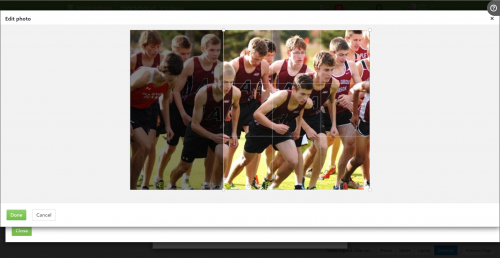
Photo managementThe team kicked the summer off with a bunch of quality of life improvements to the photo management side of
School website. In June, we added even more editing options to help you personalize your photos. New options include:
- Resize – while in edit photo mode, a horizontal bar can be dragged to dynamically alter the default size of the image.
- Crop – by default, a grid is placed over the entire full size of the image, letting the user drag the crop marks at each corner to resize the photo.
- Rotate – Shifts the image 90 degrees clockwise.
- Edit inside preview – While previewing the image, users can now choose to edit the image from there, rather than having to first back out and then edit.
Website AccessibilityOur focus in July was centered on website accessibility, introducing additional quality of life changes and WCAG compliance. Here are a few more details as to what was updated as part of this campaign.
Heading TagsWe now have WCAG compliant head tags, which means they’re not only in the correct order, none of them are skipped. These changes impacted
Templates and
Classes,
Custom CSS, and all
Content Types.
In addition, any templates that contained empty heading tags such as ones in the
New Archive list, have been removed.
ALT AttributeWCAG requires that all image elements have an
Alt attribute caption to describe the picture. We’ve updated
Link,
Media, and
Content for Affinity/Athletics team coaches to fill in text for
Alt tags that are empty.
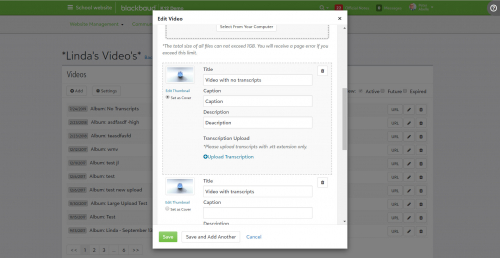
TranscriptsWe were excited to add the option for users to upload their own transcript text for video or audio content. When editing an audio or video file from
Media whether in
Core or
School website, transcript text can either be entered manually or by dragging/browsing to a created
.vtt file. One caveat is that the file can’t be bigger than 1GB.
Everything ElseOn a minor, yet still important note, we added a submit button for ease of use with the
New Archive Date picker.
And that’s going to do it for School website for this week. If you have any
School website related questions or comments, feel free to post them below. What was your favorite addition over the summer? Make sure to hit the like button below to let us know!
We’re sticking with our double upload schedule for this week, so make sure to come back on Thursday to see which of the remaining products will be pushed into the spotlight. Thanks for reading and I’ll see you back here later this week!