The Spooktacular New Candidate List Flyout

Derek Nichols
Blackbaud Employee




The final week of October is here and while that typically means an increase in both tricks and treats, I promise that today’s post is nothing but a treat, especially for admissions managers.
In case you missed it from our hefty October update, the Enrollment management team created a new flyout panel in conjunction with the Candidate List. Hopefully this will make your life much easier when working through this list. Let’s examine.
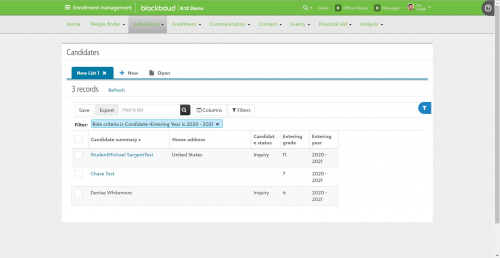
Before the October 2019 update, admissions managers would select a candidate from the list and be taken to their contact card. Unfortunately, this means that they’d then need to go back through multiple screens on their browser or navigate back to the Candidate List once they were done. As you can see, that’s a lot of added clicks.
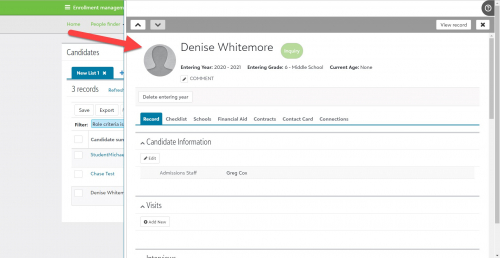
So we wanted to streamline this process a bit and make it less click heavy than it was previously. Now, when you select a candidate name from the list, the panel flies out from the right side of the screen containing the entire candidate record, details, and anything previously added. Better yet, this isn’t a read only file as you can edit any part of the record right from the panel.
But that’s not all! This panel also has arrows that allow admissions managers to move up and down the Candidate list without having to change screens or close the panel completely. If need be, select View Record to go right to the candidate record directly.
Ultimately, the goal with this feature was to reduce the number of clicks that had to be made as well as prevent admissions managers from having to navigate through a number of screens in order to work with candidate information.
For those of you that this directly affects, I hope it makes your work day just a little bit brighter. We’ll be back next week to showcase even more new content for Blackbaud’s Education Management Solution as we quickly head towards our November 2019 release.
And hey, for those of you heading out for some actual treats later this week, have fun and be safe! You know what? In the spirit of the season, let me know your favorite candy or Halloween treat below in the comments. At the very least, you’re probably going to make me hungry.
See you next week!
In case you missed it from our hefty October update, the Enrollment management team created a new flyout panel in conjunction with the Candidate List. Hopefully this will make your life much easier when working through this list. Let’s examine.
Before the October 2019 update, admissions managers would select a candidate from the list and be taken to their contact card. Unfortunately, this means that they’d then need to go back through multiple screens on their browser or navigate back to the Candidate List once they were done. As you can see, that’s a lot of added clicks.

So we wanted to streamline this process a bit and make it less click heavy than it was previously. Now, when you select a candidate name from the list, the panel flies out from the right side of the screen containing the entire candidate record, details, and anything previously added. Better yet, this isn’t a read only file as you can edit any part of the record right from the panel.
But that’s not all! This panel also has arrows that allow admissions managers to move up and down the Candidate list without having to change screens or close the panel completely. If need be, select View Record to go right to the candidate record directly.

Ultimately, the goal with this feature was to reduce the number of clicks that had to be made as well as prevent admissions managers from having to navigate through a number of screens in order to work with candidate information.
For those of you that this directly affects, I hope it makes your work day just a little bit brighter. We’ll be back next week to showcase even more new content for Blackbaud’s Education Management Solution as we quickly head towards our November 2019 release.
And hey, for those of you heading out for some actual treats later this week, have fun and be safe! You know what? In the spirit of the season, let me know your favorite candy or Halloween treat below in the comments. At the very least, you’re probably going to make me hungry.
See you next week!
4
Comments
-
We are experiencing issues with the flyout panel. It doesn't work as it should. Wondering if anyone else is experiencing the following issue:
When you open a candidate list and the click the first name in the list, the flyout panel pops open
Then when you use the up or down arrows in the top left corner of the panel, the student name and the top part of the information changes, but the rest of the information in the RECORD tab does not update and when you print the candidate summary it prints the summary of the first boy, not the boy you've progressed to.
Is this the way it is supposed to behave?
LMK if you are seeing these issues too 0
0 -
Reese's all the way!0
-
We love the idea of the flyout panel as it does make for a whole lot fewer clicks but unfortunately, as you scroll from one record to the next the Candidate information doesn't update.0
-
Kathy Steinman That's definitely unfortunate. Using the arrow icons isn't updating the records? Sounds like something fishy is going on. If you haven't already, I'd recommend getting in touch with support to have them investigate.0
-
It's been reported to support. They're working on it.0








Categories
- All Categories
- New K-12 Community Home (TEST)
- New Higher Education Home Page (Test)
- New Impact Edge Community TEST
- New YourCause Community TEST
- New SKY Community TEST
- New Grantmaking TEST Community
- New Altru Test Community
- New bbcon Community - TEST
- 12 Blackbaud Agents for Good™
- New Raiser's Edge NXT Community
- 8 Blackbaud Community Help
- 222 bbcon®
- 1.4K Blackbaud Altru®
- 410 Blackbaud Award Management™ and Blackbaud Stewardship Management™
- 1.2K Blackbaud CRM™ and Blackbaud Internet Solutions™
- 16 donorCentrics®
- 361 Blackbaud eTapestry®
- 2.7K Blackbaud Financial Edge NXT®
- 687 Blackbaud Grantmaking™
- 604 Blackbaud Education Management Solutions for Higher Education
- 3.3K Blackbaud Education Management Solutions for K-12 Schools
- 954 Blackbaud Luminate Online® and Blackbaud TeamRaiser®
- 85 JustGiving® from Blackbaud®
- 7K Blackbaud Raiser's Edge NXT®
- 4K SKY Developer
- 258 ResearchPoint™
- 123 Blackbaud Tuition Management™
- 165 Organizational Best Practices
- 248 Member Lounge (Just for Fun)
- 40 Blackbaud Community Challenges
- 37 PowerUp Challenges
- 3 (Closed) PowerUp Challenge: Grid View Batch
- 3 (Closed) PowerUp Challenge: Chat for Blackbaud AI
- 3 (Closed) PowerUp Challenge: Data Health
- 3 (Closed) Raiser's Edge NXT PowerUp Challenge: Product Update Briefing
- 3 (Closed) Raiser's Edge NXT PowerUp Challenge: Standard Reports+
- 3 (Closed) Raiser's Edge NXT PowerUp Challenge: Email Marketing
- 3 (Closed) Raiser's Edge NXT PowerUp Challenge: Gift Management
- 4 (Closed) Raiser's Edge NXT PowerUp Challenge: Event Management
- 3 (Closed) Raiser's Edge NXT PowerUp Challenge: Home Page
- 4 (Closed) Raiser's Edge NXT PowerUp Challenge: Standard Reports
- 4 (Closed) Raiser's Edge NXT PowerUp Challenge: Query
- 829 Community News
- 3.1K Jobs Board
- 57 Blackbaud SKY® Reporting Announcements
- 47 Blackbaud CRM Higher Ed Product Advisory Group (HE PAG)
- 19 Blackbaud CRM Product Advisory Group (BBCRM PAG)