Telesales in fundraising




Hi everyone, has been a LONG time since I posted here. We're about to transition from RE7 (self hosted) to NXT, so I'm still in the text environment getting my head around it all. What I want to know is how do you manage "fundraising leads" within NXT? How do you download leads due for a call, and how do you best manage them/push them out to fundraisers in NXT? Or do you use a separate plug-in?
We download leads monthly based on their last pledge or payment, I allocate them in a spreadsheet, then reupload the assigned info into the Appeals tab. Fundraisers get their leads by a spreadsheet and work directly in RE7 with pledges, notes, actions etc. While we still have our lead download criteria to adhere to, what is the best way to manage them in NXT? And what can NXT tell me about the fundraisers calls/pledges made etc? Is there a management report?
Thanks in advance!!
Michelle.
Answers
-
Hi @Michelle Geange - I am checking with my team to see what resources we have available to help! Also tagging in some All-Stars @Austen Brown @Carlene Johnson @Dan Snyder to see if they can offer any insight.
1 -
Wonderful, thank you! Any help/guidance would be amazing. Am trying to get my head around how best to do them once we cross over :) Leads are issued randomly each month, so they may not get the same lead back the following year.
0 -
To be clear, by moving from self-hosted to NXT you do not need to change anything. Your processes should still work the same as you will have access to both database view (RE7) and webview (RENXT).
That being said, one option would be to assign each lead to a specific fundraiser. That way the fundraiser can take advantage of their Work Center. While the main portfolio tile only shows prospects newly assigned in the last seven days, at the start of each month they could identify those fairly easily. This would be instead of using the appeals tab.
In terms of the reporting piece, you could use the Work Center to see per individual fundraiser the gifts they have brought in as well as action activity ( a caveat with actions here, you would likely want to click on the actions area within the red box below and set your filters to a different date range than the default 7 days in the action tile).
However, if you are looking for a management type report that looks at the work of all fundraisers together, you would likely be best served with the Dashboard Builder where you can use some of the pre-built visuals to build a report that has all of the information in one location.
As you move over and get comfortable, you could also look into automation with Power Automate, however, I do not think that is necessary to successfully accomplish what you are looking to do.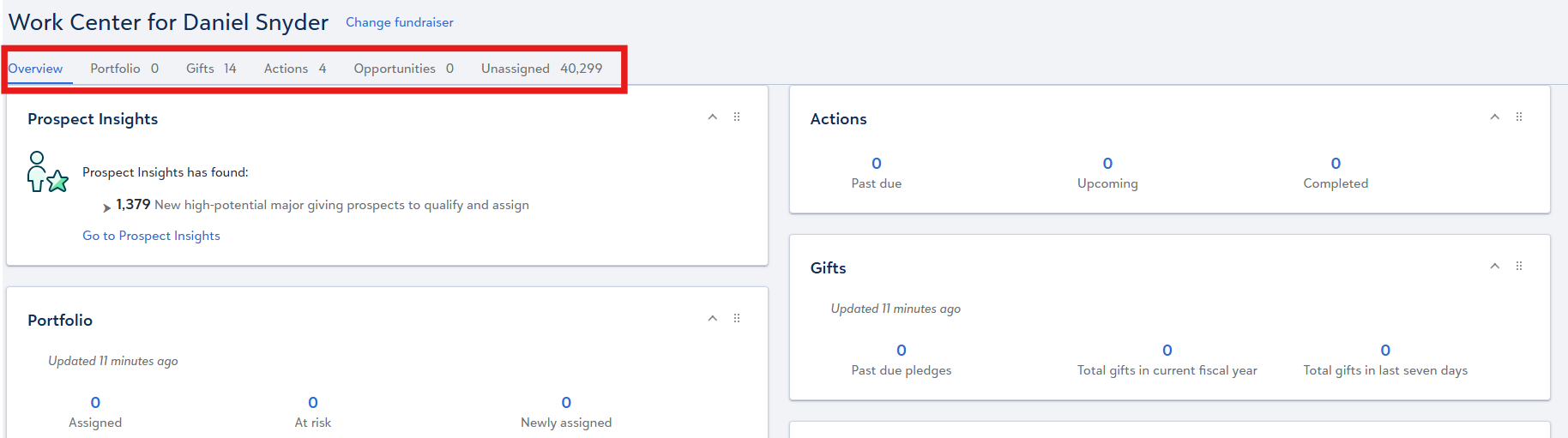 0
0 -
Thanks Dan. I'll have a look in the test environment and play a bit more :) Appreciate your feedback. M.
0








Categories
- All Categories
- New YourCause Community TEST
- New SKY Community TEST
- New Grantmaking TEST Community
- New Altru Test Community
- New bbcon Community - TEST
- 12 Blackbaud Agents for Good™
- New Raiser's Edge NXT Community
- 7 Blackbaud Community Help
- 218 bbcon®
- 1.4K Blackbaud Altru®
- 409 Blackbaud Award Management™ and Blackbaud Stewardship Management™
- 1.2K Blackbaud CRM™ and Blackbaud Internet Solutions™
- 16 donorCentrics®
- 361 Blackbaud eTapestry®
- 2.7K Blackbaud Financial Edge NXT®
- 681 Blackbaud Grantmaking™
- 599 Blackbaud Education Management Solutions for Higher Education
- 3.3K Blackbaud Education Management Solutions for K-12 Schools
- 952 Blackbaud Luminate Online® and Blackbaud TeamRaiser®
- 85 JustGiving® from Blackbaud®
- 7K Blackbaud Raiser's Edge NXT®
- 3.9K SKY Developer
- 257 ResearchPoint™
- 123 Blackbaud Tuition Management™
- 165 Organizational Best Practices
- 247 Member Lounge (Just for Fun)
- 40 Blackbaud Community Challenges
- 37 PowerUp Challenges
- 3 (Closed) PowerUp Challenge: Grid View Batch
- 3 (Closed) PowerUp Challenge: Chat for Blackbaud AI
- 3 (Closed) PowerUp Challenge: Data Health
- 3 (Closed) Raiser's Edge NXT PowerUp Challenge: Product Update Briefing
- 3 (Closed) Raiser's Edge NXT PowerUp Challenge: Standard Reports+
- 3 (Closed) Raiser's Edge NXT PowerUp Challenge: Email Marketing
- 3 (Closed) Raiser's Edge NXT PowerUp Challenge: Gift Management
- 4 (Closed) Raiser's Edge NXT PowerUp Challenge: Event Management
- 3 (Closed) Raiser's Edge NXT PowerUp Challenge: Home Page
- 4 (Closed) Raiser's Edge NXT PowerUp Challenge: Standard Reports
- 4 (Closed) Raiser's Edge NXT PowerUp Challenge: Query
- 822 Community News
- 3.1K Jobs Board
- 57 Blackbaud SKY® Reporting Announcements
- 47 Blackbaud CRM Higher Ed Product Advisory Group (HE PAG)
- 19 Blackbaud CRM Product Advisory Group (BBCRM PAG)