If anyone is newly experiencing their favicons not showing up in browser tabs on their LO pages, this may be the reason — and a solution.
Your favicons are probably not showing up any more because the code in the "Meta Tags" field of your PageWrapper are being placed in the <body> of the html doc instead of the <head>.
I'm not sure if this started happening because of a change in the way LO treats the Meta Tags field in the PageWrapper, or if it's always done this and Google just started treating <body>-placed meta tags differently than it had before.
Anyway — a fix (until, maybe, BB changes where the code is rendered) is the following.
In your PageWrapper's Meta Tags area,
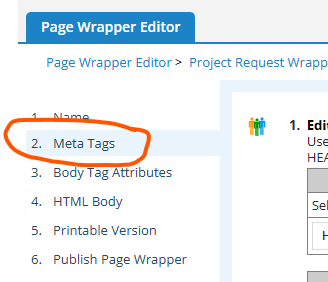
wrap the code with a tag (I'm using a <section> tag with an id you can reference in javascript later (I'm using "lo-metatags-section").
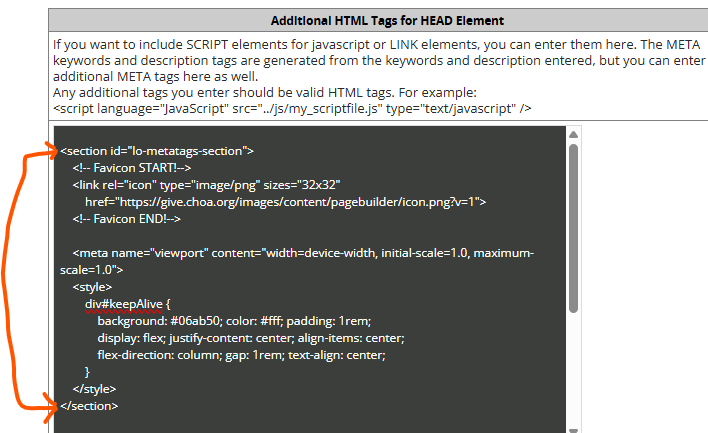
Then, somewhere — probably at the bottom of the "HTML Body" field of your PageWrapper, put some code like this to move the Meta Tags scripts from the <body> of your doc to the <head>, where it should be:
<script>  // MOVE CODE IN META TAGS SECTION OF PAGEWRAPPER TO DOC HEAD

  document.addEventListener('DOMContentLoaded', function () {

    var faviconCode = document.getElementById('lo-metatags-section');

    if (!faviconCode) return;

    // move faviconCode children into <head>, then remove the wrapper

    while (faviconCode.firstChild) {

      document.head.appendChild(faviconCode.firstChild);

    }

    faviconCode.remove();

  });

</script>