Giving Pyramid in Dashboard Builder





Has anyone figured out how to build a donor giving pyramid in Dashboard Builder with the current limited attribute filters and fields that are available in Insight Builder?
We currently export a standard report for our executive team which breaks down the number of constituents with annual giving at specific levels. The table features rows of stepped committed giving levels (eg $5k - $9,999 or $10k - $24,999) with 2 columns that (1) calculate the number of donors who have given that much this year and (2) that group of donor's combined giving for the year. But leadership would like to be able to view that report in real time without waiting on our team to pull it.
I've exhausted all my "workaround" ideas so I'm wondering if anyone has had success building a dashboard with metrics like I've described above. Is there a way to do this without Insight Designer adding metrics and filters like "Gift Amount" or "Total Giving" ?
Answers
-
Database has the report you are looking for in Demographic and Statistical Reports/Statistical Reports, but right now that report is not available in RE NXT where you could schedule it. But you seem to already know this.
1 -
This type of thing is why we dropped Insight Builder from our subscription. It didn't allow us the flexibility that it was billed to provide. I don't think there is a suitable workaround for an easy to access table like the dashboard. You could use Power BI or Tableau exporting data out or using the API, but even that is on a delay and may be cost/time prohibitive.
I really wish they built ALL the database dashboard components into NXT. 😞
6 -
Like Joe I do wish all the reports from datebase view were available in the web view and oh how I wish I could get dashboards to do all the things I would like. I have access to the donor category report under analytics in the web view. I would love a preview option but I can export to .csv. Here is a screenshot of the .csv from our recent campaign:
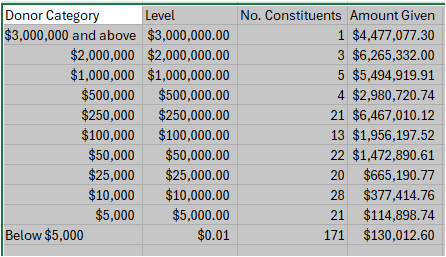
We have other categories based on giving category tables for other purposes.
Here is a link to the idea bank if you would also like to vote for a preview option.
You can schedule it to be sent to any RE user. Here are some screenshots from that process that you can find by pressing the elipses next to the report name: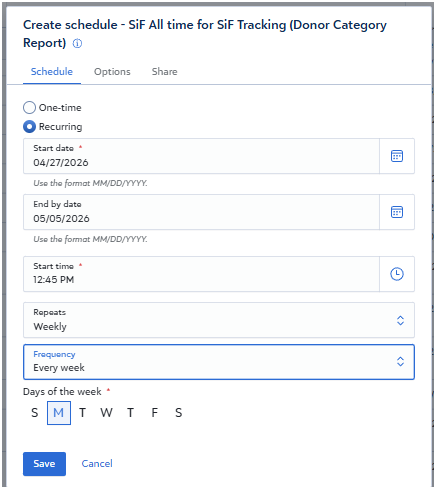
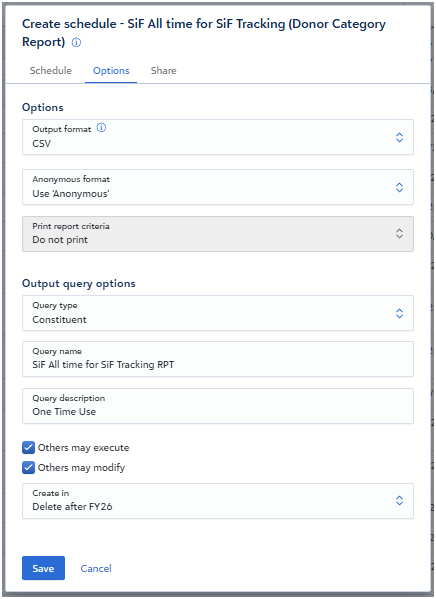
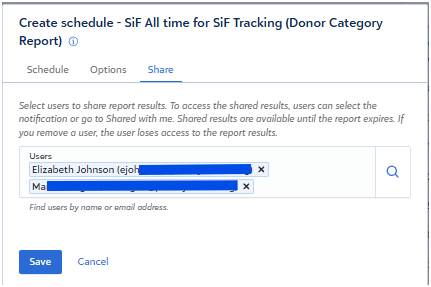
I hope this helps.
3











Categories
- All Categories
- New K-12 Community Home (TEST)
- New Higher Education Home Page (Test)
- New Impact Edge Community TEST
- New YourCause Community TEST
- New SKY Community TEST
- New Grantmaking TEST Community
- New Altru Test Community
- New bbcon Community - TEST
- 12 Blackbaud Agents for Good™
- New Raiser's Edge NXT Community
- 8 Blackbaud Community Help
- 222 bbcon®
- 1.4K Blackbaud Altru®
- 410 Blackbaud Award Management™ and Blackbaud Stewardship Management™
- 1.2K Blackbaud CRM™ and Blackbaud Internet Solutions™
- 16 donorCentrics®
- 361 Blackbaud eTapestry®
- 2.7K Blackbaud Financial Edge NXT®
- 687 Blackbaud Grantmaking™
- 604 Blackbaud Education Management Solutions for Higher Education
- 3.3K Blackbaud Education Management Solutions for K-12 Schools
- 954 Blackbaud Luminate Online® and Blackbaud TeamRaiser®
- 85 JustGiving® from Blackbaud®
- 7K Blackbaud Raiser's Edge NXT®
- 4K SKY Developer
- 258 ResearchPoint™
- 123 Blackbaud Tuition Management™
- 165 Organizational Best Practices
- 248 Member Lounge (Just for Fun)
- 40 Blackbaud Community Challenges
- 37 PowerUp Challenges
- 3 (Closed) PowerUp Challenge: Grid View Batch
- 3 (Closed) PowerUp Challenge: Chat for Blackbaud AI
- 3 (Closed) PowerUp Challenge: Data Health
- 3 (Closed) Raiser's Edge NXT PowerUp Challenge: Product Update Briefing
- 3 (Closed) Raiser's Edge NXT PowerUp Challenge: Standard Reports+
- 3 (Closed) Raiser's Edge NXT PowerUp Challenge: Email Marketing
- 3 (Closed) Raiser's Edge NXT PowerUp Challenge: Gift Management
- 4 (Closed) Raiser's Edge NXT PowerUp Challenge: Event Management
- 3 (Closed) Raiser's Edge NXT PowerUp Challenge: Home Page
- 4 (Closed) Raiser's Edge NXT PowerUp Challenge: Standard Reports
- 4 (Closed) Raiser's Edge NXT PowerUp Challenge: Query
- 829 Community News
- 3.1K Jobs Board
- 57 Blackbaud SKY® Reporting Announcements
- 47 Blackbaud CRM Higher Ed Product Advisory Group (HE PAG)
- 19 Blackbaud CRM Product Advisory Group (BBCRM PAG)