
For many organizations, Query Lists have been the place to preserve a carefully curated group of constituents—the invite list for an event, the audience for a mailing, or a roster your team depends on. We recently released a new capability that makes this function a easier to find in Raiser’s Edge NXT: Managed Lists (within Constituent Lists).
If your team previously used Query Lists, you’ll now be able to port over and manage these constituent groups with full change log capabilities using Managed Lists. This new capability brings curated, auditable constituent groups into the same Lists experience your team already uses to view, share, and act on data, while preserving the control and accountability database managers need (that was previously only found in Query Lists).
What are Managed Lists?
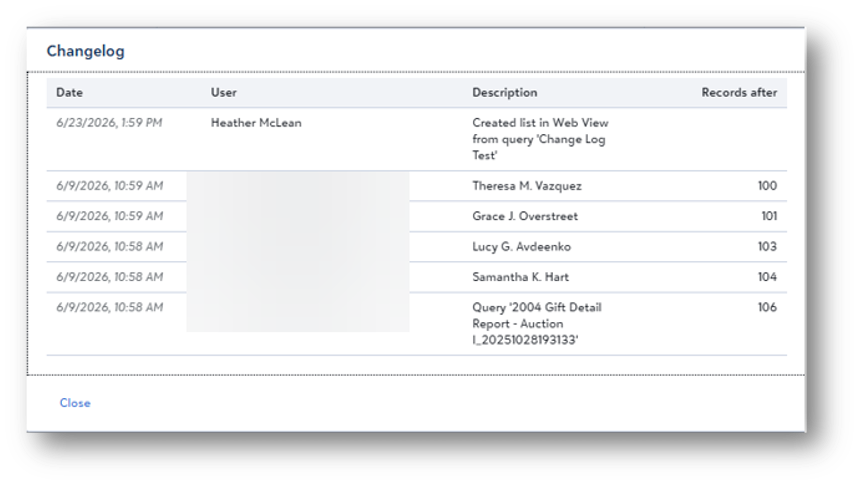
Unlike filter-based lists, a Managed List gives you direct control over exactly which constituent records are included. You explicitly add or exclude records, and each change is logged with the date, user, action, and record count.
Use a Managed List when you need to lock in a specific group—such as event invitees, email recipients, or a roster—and maintain a documented record of every change. Unlike other list types, a Managed List does not update automatically. That’s by design: you decide who belongs on the List.
How do I get started?
This is the key change to share with your team if your organization uses Query Lists in the Query tool:
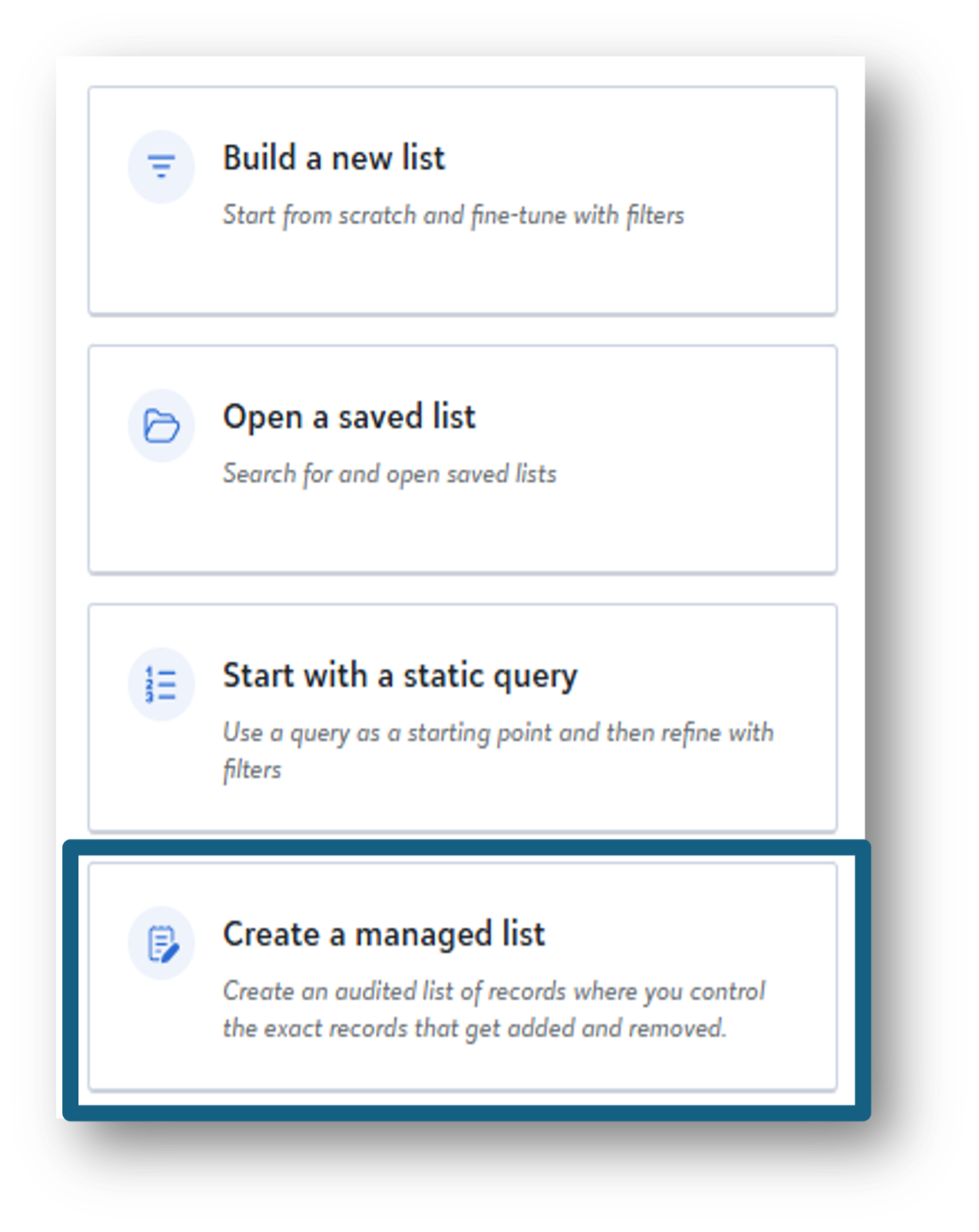
- Managed Lists is the new destination for creating and managing curated groups of constituents (that previously would have been managed within Query Lists).
- If you want to continue to use an existing Query List, along with its associated changelog, create a Managed List and “promote” that Query List so the changelog migrates.
- Going forward, after promoting your Query Lists, you should access these lists only under Constituent Lists—not in Query. And create new curated lists with Managed Lists.
However, after creation, the Managed List and the original Query List are completely disconnected—changes you make in one view do not affect the other. You can continue to use and edit both independently.
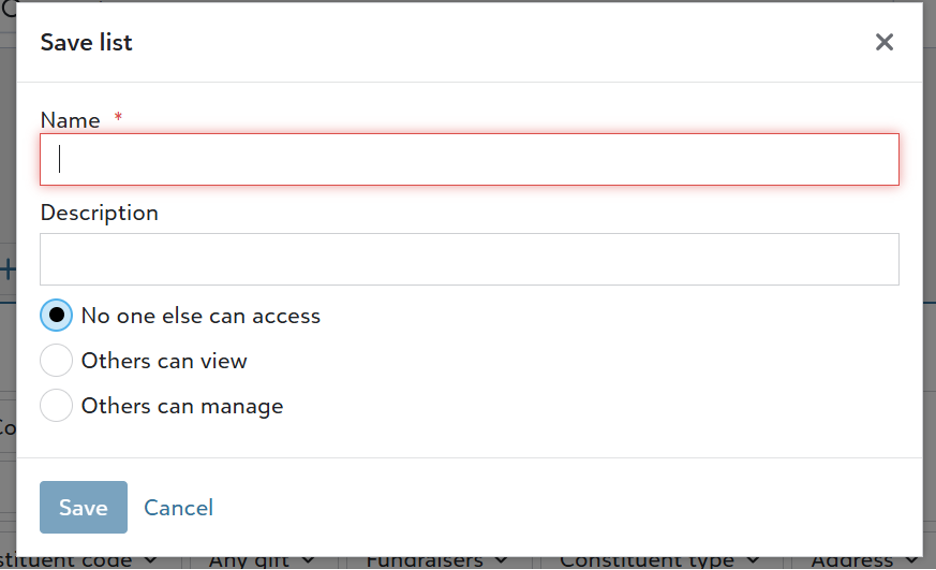
A note about access rights: As you create a new Managed List (or promote a Query List to be a Managed Lists) you can set permissions (no access, view only, manage).
Why does Raiser’s Edge NXT have both Query and Lists?
Query and Lists are built for different jobs and different users.
Query is the analytical engine for database administrators and power users. It supports complex filtering logic, multi-condition criteria, and precise segmentation across multiple instances of the same field, calculated values, and AND/OR logic.
Lists are built for people who need to act on data: fundraisers, major gift officers, event coordinators, and annual fund managers. Lists live in web view, require no database expertise, and are designed to be approachable, shareable, and fast to use.
When to use Query
Query is your go-to when you need dynamic, criteria-driven segmentation. The results update automatically as your data changes, which makes it ideal for:
- Segmentation for appeals or mailings—for example, “all LYBUNTs in the Northeast who gave between $500 and $4,999 in the last three fiscal years”
- Compliance and audit pulls—identifying records that meet or fail specific data conditions
- Complex multi-condition logic—combining AND/OR criteria across multiple fields and related records
- Analysis that should stay live—if you want results that reflect your database in real time whenever you run the query
Query is available in web view, and it supports both static and dynamic query types—giving you flexibility in how you build and use your segments. When precision matters more than simplicity, Query delivers.
One important limitation: Query results are not deduplicated by default. Today, producing a clean, deduplicated segment, for a mailing, for example, requires combining Query with Export (for now). Lists, by contrast, deduplicate by design. Every list shows one row per record, so what you see is what you get.
When to use Lists
Lists are the web view’s primary tool for surfacing data and taking action. Raiser’s Edge NXT includes four list types, each tailored to a different record type:
- Constituent Lists—dynamic, filter-driven views of your constituents. Filter by giving history, engagement, demographics, and more. Results update as your data changes.
- Opportunity Lists—dynamic, filter-driven views of your major giving or grants pipeline.
- Action Lists—dynamic, filter-driven views of touches, moves, tasks, and other donor outreach activities.
- Gift Lists—dynamic, filter-driven views of giving to campaigns, appeals, and funds.
These four List types share a common design: they’re filter-based, they update automatically as data changes, and they’re built to support a broader set of team members, including fundraisers, event staff, and advancement teams.
Lists are also the primary analysis surface in Chat for Blackbaud AI. You can locate a query by name in Chat, but Lists are where AI-powered analysis and outreach workflows are built.
Which to use when?
- Use Query when you need complex criteria.
- Use standard Lists when you need a more streamlined working view that’s live and filter-based.
- Use Managed Lists when you need a specific, auditable group that does not change unless someone updates it.
The table below summarizes the key differences between Query, standard Lists and Managed Lists.
| Query | Lists (Constituent, Opportunity, Action, Gift) | Managed Lists |
|---|
Best for | Complex, precise criteria and fully customizable output columns | Dynamic, filter-driven views for any team member | Curated groups requiring an audit trail |
Updates automatically | Yes, optionally | Yes | No—you control who’s on the list |
Changelog / audit trail | No | No | Yes |
Works with Blackbaud AI Chat | Available for retrieval by name; not the primary AI analysis surface | Yes—primary AI analysis surface | Available for retrieval by name; not the primary AI analysis surface |
Record types | Constituents, Opportunities, Actions, Gifts, Funds, Campaigns, Appeals, Events, Participants, Individuals, Organizations, Jobs, Memberships, Relationships | Constituents, Opportunities, Actions, Gifts | Constituents only |
What’s next for Query and Lists
We are working to bring more depth to the simpler Lists experience. Two upcoming capabilities, along with one Early Access enhancement, will bring the Query and List experiences closer together:
1. Dynamic query with automated refresh
Across all List types—Constituent, Opportunity, Action, and Gift—you’ll be able to start a List from a dynamic query and have it refresh automatically as your data changes. This brings Query’s live-data behavior into the Lists interface, so Lists can stay current without manual re-seeding.
2. Query criteria directly in the List interface
Instead of building criteria in Query and then switching to Lists, you’ll be able to apply Query-style criteria directly in the List interface. That means less context switching and more segmentation power where your team already works.
3. Single-row query replacing Export (currently in Early Access)
Today, producing a deduplicated segment from Query requires combining it with Export. Single-row query is currently in Early Access, with broader availability planned for a future release. When available, it will let you produce a clean, deduplicated output directly from Query in one step.
What this means for your team
Managed Lists bring the power of Query List functionality into the Lists experience in Raiser’s Edge NXT web view.
If your organization used Query Lists to preserve specific groups of constituents, you should begin to create and manage those groups from Constituent Lists—with the same intentional control and audit history your team depends on.
Your team has choice:
- Use Query when you need complex, criteria-driven segmentation.
- Use standard Lists when you need a simpler, more streamlined live, filter-based working view.
- Use Managed Lists when you need a curated group that stays exactly as defined until someone changes it.
As we increasingly enhance the capabilities of Query and Lists, teams will have more ways to build, manage, and act on constituent groups in web view—without giving up precision, transparency, or accountability.
Questions about Lists, Query, or Managed Lists in your organization’s Raiser’s Edge ENXT instance? Drop them in the comments below.