How can I import (and update) Client Details in Receivables?





We're looking for a more efficient method of entering Client details in FE NXT. Specifically we'd like to use import files to bring in new EFT Accounts and Automatic Payments:
Receivables > Clients > Details > EFT Accounts
Receivables > Clients > Details > Automatic Payments
But it would also be very helpful to be able to use import files to update the specifics under Automatic Payments:
Receivables > Clients > Details > Automatic Payments > Status
Receivables > Clients > Details > Automatic Payments > Default amount
Receivables > Clients > Details > Automatic Payments > Payment schedule > Number of payments
When I've tried to create import files for these records, I get error messages about the record already existing. Can anyone share the trick for using import files to work with this information?
Alternatively, I would settle for being able to edit these values through the SKY API, but at first glance, I don't see appropriate endpoints in the documentation.
Best Answer
-
That's where you'd open up or set up a client import parameter. But on the 1st tab, instead of marking the 1st radio button that says Import, pick the 2nd one for Update. That says the client exists already but I'm adding or changing data on it. Then you use the client import ID, or if using client ID's you can use either of those in the import file to direct the updates to the correct client.
0




Answers
-
In the import parameters, I see a myriad of sections for both EFT and Automatic payments :
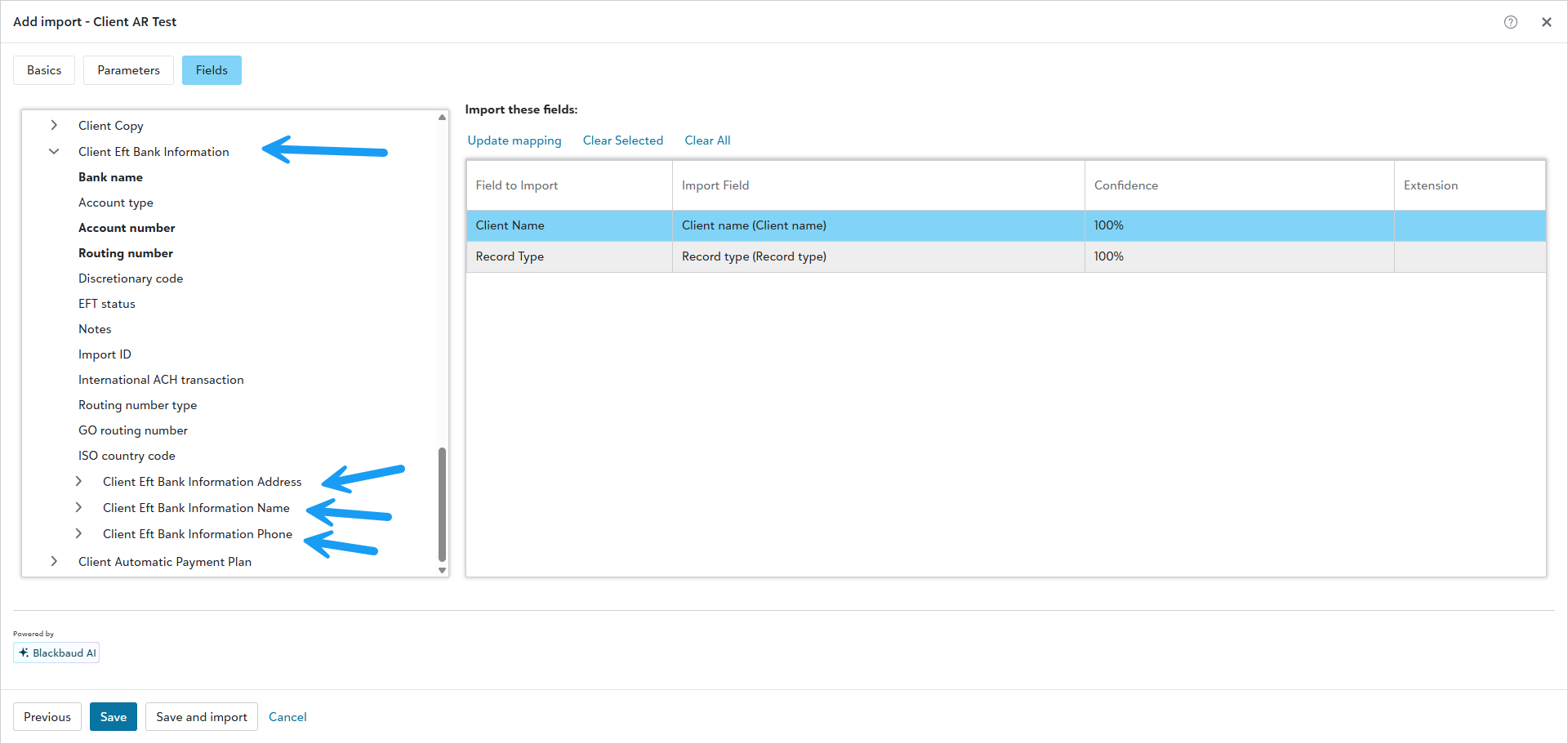
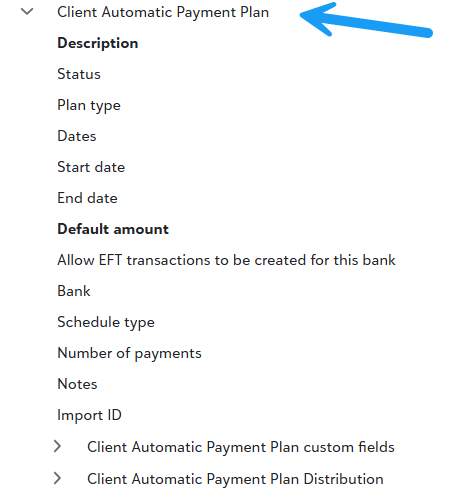
And under each are sub headings that deal with it that show other fields we should be able to Add or Update. If the client already exist, then on the import parameter, likely want to use the Update Field. The error you got, would make me think the parameter was set to Import, and that's for adding new instances of clients vs the update , which is Add this information to an existing client.0 -
Yes, those are exactly the sections I was working with. It is possible my question is more about general import howto knowledge.
If I have a Client and I would like to add a new Client EFT Bank Information Record, how would I go about that? Would I use Import or Update?
0 -
Thanks for confirming that a Client Import of type Update is the correct way to import a new EFT Bank record for a client. After a few tries, I was able to get it working. Here's what I think was required of the columns. Please correct me if I'm missing something important or including something unnecessary.
- Client Import ID
- Client Record Type
- EFT Bank Import ID (left blank to create a new record, filled in to update an existing record)
- All of the fields required to create an EFT Bank
I think I will always be importing new EFT Banks, so this is exactly what I need. In the case of Automatic Payment records, I will more frequently want to make updates to existing records. In that case, I think I will need the Automatic Payment Import ID. The problem is how to get these. From what I can see there are three ways of getting data out of FE NXT: Analysis > Query, Settings > Export, Settings > Import (with a type of Export). Of these three Analysis > Query is the only one I can get without user interaction (I'm using the Query API to pull data in the background) but it is also the only one that I can't seem to find the Automatic Payment Import ID in. Do you know if the Automatic Payment Import ID is available in Query? Or perhaps if there is an Export API that would give access to it?
1 -
Off top of my head that looks correct @Aaron Spike good job.
0 -
I spoke with a support representative this morning and confirmed that the Import IDs of related records are not available in Query. I've posted the following feature request.
0 -
Did you try using the export option in query to export the AR record IDs? I know that I can export project record IDs using a query, but have never tried to update or upload information into AR.
0 -
Client Automatic Payment Import IDs are available in the Export tool (though other fields that are available in Query and Import are missing, like number of payments). The difficulty with Export is that it is not available as an API like Query is. I would like to provide a solution for my users that has as few steps as possible. Ideally the integrations between FE NXT and our other systems would be seamless and require no user interaction. The second best case is that if I can export data from FE NXT automatically, then my users only need to import changes back in manually.
[Edit] Sorry, I may have misinterpreted your response. The mixture of ways that FE uses the words Import, Export, and Query is confusing. The Query tool doesn't work for me because the Import IDs are not available.
0 -
Depending on the query fields some are. Example client's , their import ID is an option from the query, usually it's the fields near bottom called Client Properties, or whatever the query type is. One field from there is Import ID. Now others like updating bank records etc may or may not, if there isn't a field, but Patricia has a good idea. Try exports or using the Import parameter's export option. Export an example with as many fields as possible to see if there is any other import id's for other fields.
0 -
I've tried all three options for exporting data. (Why are there this many slightly different ways to do this!?)
The Query tool is available as an API that allows processing without user interaction. But while it provides access to the Import ID for the primary record type it does not provide Import ID for the related records. For example, if I perform a Client query I can access the Client Import ID, but I cannot access the related Automatic Payment Import ID.
The Import tool's Export option provides access to the Import IDs of both the primary record type and the related records. But there doesn't appear to be any way to order the related records so that I can be sure I will receive the correct one. And it is not available as an API that allows processing without user interaction.
The Export tool provides access to the Import IDs both of the primary record type and the related records. And it allows ordering the related records. But some other fields are unavailable and it is not available as an API that would allow processing without user interaction.
Would be great to have a single full featured option.
0





Categories
- All Categories
- New K-12 Community Home (TEST)
- New Higher Education Home Page (Test)
- New Impact Edge Community TEST
- New YourCause Community TEST
- New SKY Community TEST
- New Grantmaking TEST Community
- New Altru Test Community
- New bbcon Community - TEST
- 12 Blackbaud Agents for Good™
- New Raiser's Edge NXT Community
- 8 Blackbaud Community Help
- 222 bbcon®
- 1.4K Blackbaud Altru®
- 411 Blackbaud Award Management™ and Blackbaud Stewardship Management™
- 1.2K Blackbaud CRM™ and Blackbaud Internet Solutions™
- 16 donorCentrics®
- 361 Blackbaud eTapestry®
- 2.7K Blackbaud Financial Edge NXT®
- 688 Blackbaud Grantmaking™
- 604 Blackbaud Education Management Solutions for Higher Education
- 3.3K Blackbaud Education Management Solutions for K-12 Schools
- 954 Blackbaud Luminate Online® and Blackbaud TeamRaiser®
- 85 JustGiving® from Blackbaud®
- 7.1K Blackbaud Raiser's Edge NXT®
- 4K SKY Developer
- 258 ResearchPoint™
- 123 Blackbaud Tuition Management™
- 165 Organizational Best Practices
- 249 Member Lounge (Just for Fun)
- 40 Blackbaud Community Challenges
- 37 PowerUp Challenges
- 3 (Closed) PowerUp Challenge: Grid View Batch
- 3 (Closed) PowerUp Challenge: Chat for Blackbaud AI
- 3 (Closed) PowerUp Challenge: Data Health
- 3 (Closed) Raiser's Edge NXT PowerUp Challenge: Product Update Briefing
- 3 (Closed) Raiser's Edge NXT PowerUp Challenge: Standard Reports+
- 3 (Closed) Raiser's Edge NXT PowerUp Challenge: Email Marketing
- 3 (Closed) Raiser's Edge NXT PowerUp Challenge: Gift Management
- 4 (Closed) Raiser's Edge NXT PowerUp Challenge: Event Management
- 3 (Closed) Raiser's Edge NXT PowerUp Challenge: Home Page
- 4 (Closed) Raiser's Edge NXT PowerUp Challenge: Standard Reports
- 4 (Closed) Raiser's Edge NXT PowerUp Challenge: Query
- 829 Community News
- 3.1K Jobs Board
- 57 Blackbaud SKY® Reporting Announcements
- 47 Blackbaud CRM Higher Ed Product Advisory Group (HE PAG)
- 19 Blackbaud CRM Product Advisory Group (BBCRM PAG)