My Community
YourCause®
Impact Edge™
All-Star Lounge
Member Lounge (Just for Fun)
Community News
Community Manager
Groups
Browse Products
Members
Community All-Stars
Monthly Challenges
Member Search
Jobs Board
Help
Using the Blackbaud Community
Blackbaud Support
Knowledgebase
Blackbaud University
Discussions
Categories
Groups
Home
Blackbaud Luminate Online® and Blackbaud TeamRaiser®
Blackbaud Luminate Online® & Blackbaud TeamRaiser® Discussions
Email that looks authentic
Angela Massol
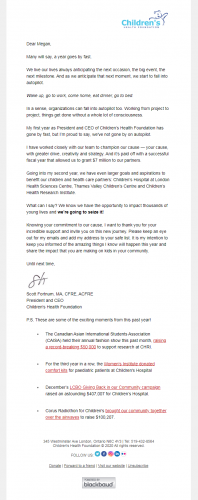
Has anyone built an email in Luminate that looks like it came directly from a person's outlook account? My boss wants to do some testing to see if we get a better response rate. Would love to see samples.
Find more posts tagged with
LuminateOnline
Comments
Megan Vandekerckhove
We have done this for the past few years now. We went from the standard enewsletter type email, to a more authentic email.
A few tips:
-Create an email alias so it looks like it's coming from a real email address, example:
JSmith@YourCharity.com
instead of
noreply@YourCharity.com
-We use subject lines that anyone would use to send a quick email to a colleague. "I thought you'd like this." "Name, here are the photos from today."
-Is your boss comfortable with getting REAL with people? These emails have to appear authentic in both tone and content.
-While we haven't created a FULL 'authentic' stationery for our emails, it's still pretty basic and is responsive to mobile.
-We took this new email as an opportunity to remove disengaged constituents (Blackbaud Knowledgebase Article #94767).
In turn, these new emails were being sent to 42% less people, but more people ended up opening it because of who it was coming from. Our average open rate went from 18% to 52%.
We also get a TON of authentic replies which is useful for engaging our community.
Quick Links
All Categories
Recent Posts
Activity
Unanswered
Groups
Help
Best Of