My Community
YourCause®
Impact Edge™
All-Star Lounge
Member Lounge (Just for Fun)
Community News
Community Manager
Groups
Browse Products
Members
Community All-Stars
Monthly Challenges
Member Search
Jobs Board
Help
Using the Blackbaud Community
Blackbaud Support
Knowledgebase
Blackbaud University
Discussions
Categories
Groups
Home
Blackbaud Raiser's Edge NXT®
Raiser's Edge NXT Discussions
Need to Mark Large Quantity of Emails as DNC
Eleonore Buet
We have always use Constant Contact, which captures our unsubscribed emails. We recently migrated to RE NXT and want to use that email tool, but first I need to mark the emails that have unsubscribed in Constant Contact. It's about 1k emails, so I need a large scale way to do it.
I can export all the emails in the DB, then through a series of Vlookups, associate the particular email with the System Record ID or the Constituent ID for each email. However, I am not sure if I can then do a Global Change using the System Record ID for the email to mark as DNC, or Constituent ID to Request no email.
Any thoughts on this?
Find more posts tagged with
RaisersEdge7 Databaseview
Comments
Aaron Rothberg
Hi Eleonore-
You'll be hard pressed to find a way to mark phones as DNC en masse. Your best options are to use Import and either mark them as Inactive or create a new Phone Type called Do Not Contact and update your emails with that Phone Type.
Eleonore Buet
Thank you!
Can you explain a little more about how I would update the emails with the Do Not Contact phone type? Are you saying I could change the Phone type on the specific email address? How would I go about that?
Alan French
If you've got ImportOmatic, you can use that to mark phones as DNC. You just need the constituent ID and the phone type (which might be a problem if your business rules permit a constituent to have more than one phone of the same type, since ImportOmatic then won't know which one to update)
Aaron Rothberg
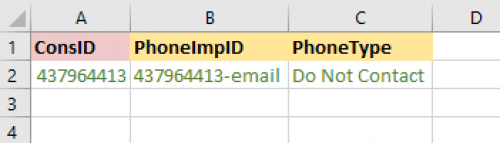
Yes, you could, as one option, change the Phone Type on the email addresses. You'll need two other pieces of data; the Constituent Id and the Phone Import Id. Export those two values for each email address you'd like to update and add a third column called PhoneType (screenshot below). Then use a Constituent Phone Update Import to update the Phone Types in Raiser's Edge.
One advantage of this method is that you can filter by PhoneType in your exports to exclude your Do Not Contact addresses.
Alan is correct. If you have ImportOmatic you can update the DNC checkbox en masse, but using Raiser's Edge Import or Global Change it's just not possible.
Eleonore Buet
Ok, thanks to both of you. We do not have Importomatic.
So just to clarify, I want the ImportID, not the System Record ID,even if the email was manually entered it will have an import ID?
Thank you again!
Aaron Rothberg
Correct. All of your phones and emails have an Import Id and it's the Constituent Id and the Phone Import Id you'll need to change the Phone Type using Raiser's Edge Import.
Rick Franklin
Any chance that Blackbaud engineers would put DNC as a field in import?
Alan French
There's been a few
requests
for this in the idea bank for some years but they haven't received that many votes, so it's probably unlikely
Quick Links
All Categories
Recent Posts
Activity
Unanswered
Groups
Help
Best Of