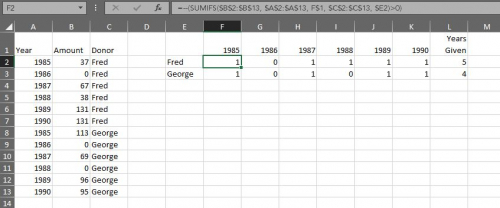
Tom Klimchak:We do things like this pretty regularly, though we often want "8 years out of 10 years" or something more than just five... Yes, you could build something in Crystal Reports, but for a (relatively) quick and dirty report we have two options:Option 1: Excel Export with ID, Name and Year1 Giving, Year2 Giving, Year3 Giving... Year10 Giving columns. At the end of those columns create one more column which uses the COUNTIF function. It looks like this: =COUNTIF(C2:K2,">0") That will simply look across and "count" any column that has any number greater than 0. Fill that formula down and you have everyone who gave x out of 10 years (or how many years you exported). You can copy or import those IDs back into RE and you have your list.Option 2: This requires a plug-in, but if you find yourself doing this sort of thing a lot it might be worth it. It's an Omatic plugin called ScoreOMatic. It allows you to build "scores" like this and drop them into Attributes. We have one set up and we just manually run it every few months. All my donor records have an Attribute called "Years Given in Last Decade" which I can query on very easily... Let me know if you need more details or want to see a sample Excel file... I can make an upload a quick example....
Thank you everyone! All of your input and guidance is so helpful!Tom Klimchak Do you create the query then use export to get the information out of Raiser's Edge? We always export directly from query. What is the best practice here?Chris Nungesser I have not used pivot tables in excel before but I am willing to try. Is there a way would suggest reducing down your output list. If I wanted to pull someone who made a gift 7 out of the last 10 years, would I just pull a list of all gifts in the last 10 years?