My Community
YourCause®
Impact Edge™
All-Star Lounge
Member Lounge (Just for Fun)
Community News
Community Manager
Groups
Browse Products
Members
Community All-Stars
Monthly Challenges
Member Search
Jobs Board
Help
Using the Blackbaud Community
Blackbaud Support
Knowledgebase
Blackbaud University
Discussions
Categories
Groups
Home
Blackbaud Education Management Solutions for K-12 Schools
Blackbaud K–12 Education Solutions™ General Discussions
Core
List/Report showing how many years a student has attended our school
Marita Gonsalves
This is our first year with Blackbaud and I'm trying to get a list of our Class of 2020 who have been with the school from 6th grade (we are a Grade 6 - 12 school). This was a breeze with the software we had previously. We have 118 seniors. The BB list I have is close to 800 rows as it is pulling every enrollment year for each student.
Any ideas/suggestions how I can get this data without having to manipulate this data in Excel to get a simple count?
Thanks,
MG
Find more posts tagged with
Comments
Candace Chesler
I built an Advanced List that displays the Enrollment Date for each student. I have a vague memory of having to enter these dates ourselves because in 2015 that was not part of the implementation process. If you have no values for Enrollment Date - you can import them in Core using a Student Import. (Hooray for Import)
My Advanced List has the following tables:
Started with UserBase - then selected User Detail, User School Defined Fields, User Role, User Register.
Under UserRegister I selected School Year and Grade Level
User Detail, User Role and School Year are all set as inner joins.
My primary filter is User Register.enrolldate is not null. I also have a filter of User Role.role any of Student - to exclude anyone who dropped.
To restrict my output to just the Class of 2020 - I added User Base.Grad Year any of 2020
With those tables and filters - I was able to get a list of just our students for the class of 2020 and their enrollment dates.
Angie Stalquist
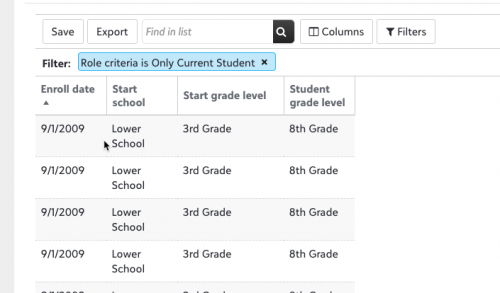
Hi! There is now a column you can add to a student list called Enroll Date. I go to Academics>Student Lists> Define my columns and filter. Let me know if you do not see it or need more details. Take care.
Janet Wittenberg
Yes,
Angie Stalquist
you are correct! You can also grab the starting school level and starting grade level when they entered
Quick Links
All Categories
Recent Posts
Activity
Unanswered
Groups
Help
Best Of