Editing or Changing Promotional Codes



We have used the same promo codes for five years for an annual event's ticket sales... Can anyone give me guidance as to how do make changes to the codes. I have found the directions in Altru... but the Promotion Code Tab is not available in location it directed me to make edits. Thanks for any help provided.
Tagged:
0
Comments
-
Hi Laura,
What we'll do is click the Discount link that you want to edit/change (from Tickets - Tickets and Merchandise Discounts) and hit 'Edit discount' on the right side toolbar under 'Tasks'. In 'Selected for Use,' you should see 'with code'. Here, you can change the Promo code to something else without having to add another Discount. Hope this helps!0 -
Thank you for this suggestion, however it did not solve my issue. Our promo codes are set "manually", when I change them to "with code" the code does not appear so it can be edited. I have been on a page in Altru that listed all the codes and you were able to edit them there and set their expiration date. I can't find it now....
Our Altru Administrator passed away recently and we are trying to find our way through Altru and we are not making much headway. Would you know how to located the section/page I am speaking of above? Any additional help would be appreciated. Thank you!0 -
Hm. If you go to Tickets tab - Tickets and Merchandise Discounts (under Discounts and promotions), all of your discounts will be listed here. If you click the link of the discount you want to edit, you should be able to add/change a promotional code.
Or, if you hit 'Edit Discount' on the left toolbar (once you're in the discount you want to change the promo code for):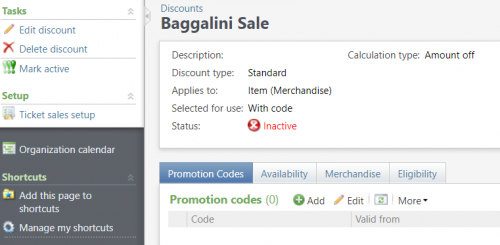
and hit Selected for Use: With Code: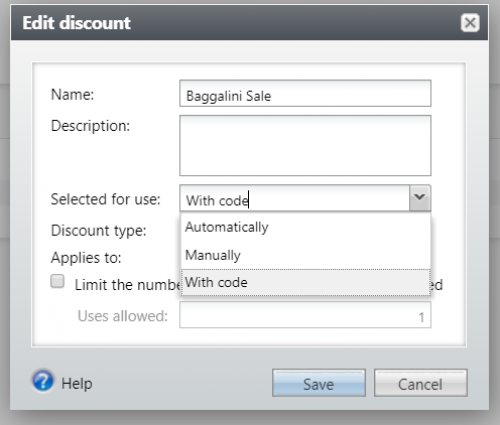
Hit 'Save.' Next, you'll see a Promotional Codes in your Discount: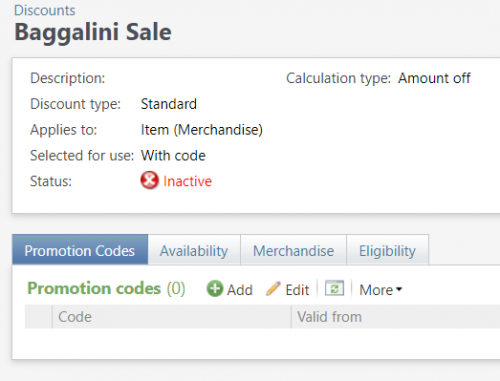
Here, you can Add or Edit your promotional codes and change your Availability to certain dates. The only difference here is your discount should have a green check mark and say 'Active' - I just used one of ours as an example.
Hope this helps!
1 -
Thank you for your suggestion. However, I have to change the "selected for use" from manually to with code, but even when I do this the current code does not show up to be edited. I have seen a list of promo codes somewhere in this system where I have edited them before and that is what I am trying to find.... with no luck. Hopefully tech support can help me. Thanks again.0
-
Laura Vaughn Sounds like you need your permissions edited. You would need one of these two permissions to edit discounts, promotions and codes if I am not mistaken:
Group Sales Coordinator
Guest Services Manager0 -
Hi Laura,
I'm so sorry for your recent loss.
I am guessing that as "with code" is different from "manually" there are no codes to edit. We don't use "manually," so I'm unsure how that switch would function in the reporting. The other option would be to deactivate the old coupons and create new ones that would allow for multiple codes or codes to be changed.
Perhaps you could create a new coupon, test, then edit to see it first on something you don't care about? If you have chat support, that could also be a great way to get a faster answer.0 -
Thank you Breanne, our admin was a wonderful man that got us out of many sticky areas when it came to Altru. We miss him very much!
Hopefully, I have figured it out... with the help of customer support. I am not completely sure it will work the way I want it to.... we will know when our tickets go on sale. If I have a problem, I may do the chat thing as you suggested.... Thanks again!0 -
You're welcome and good luck!0











Categories
- All Categories
- New YourCause Community TEST
- New SKY Community TEST
- New Grantmaking TEST Community
- New Altru Test Community
- New bbcon Community - TEST
- 12 Blackbaud Agents for Good™
- New Raiser's Edge NXT Community
- 7 Blackbaud Community Help
- 218 bbcon®
- 1.4K Blackbaud Altru®
- 409 Blackbaud Award Management™ and Blackbaud Stewardship Management™
- 1.2K Blackbaud CRM™ and Blackbaud Internet Solutions™
- 16 donorCentrics®
- 361 Blackbaud eTapestry®
- 2.7K Blackbaud Financial Edge NXT®
- 680 Blackbaud Grantmaking™
- 598 Blackbaud Education Management Solutions for Higher Education
- 3.3K Blackbaud Education Management Solutions for K-12 Schools
- 952 Blackbaud Luminate Online® and Blackbaud TeamRaiser®
- 85 JustGiving® from Blackbaud®
- 7K Blackbaud Raiser's Edge NXT®
- 3.9K SKY Developer
- 257 ResearchPoint™
- 123 Blackbaud Tuition Management™
- 165 Organizational Best Practices
- 247 Member Lounge (Just for Fun)
- 40 Blackbaud Community Challenges
- 37 PowerUp Challenges
- 3 (Closed) PowerUp Challenge: Grid View Batch
- 3 (Closed) PowerUp Challenge: Chat for Blackbaud AI
- 3 (Closed) PowerUp Challenge: Data Health
- 3 (Closed) Raiser's Edge NXT PowerUp Challenge: Product Update Briefing
- 3 (Closed) Raiser's Edge NXT PowerUp Challenge: Standard Reports+
- 3 (Closed) Raiser's Edge NXT PowerUp Challenge: Email Marketing
- 3 (Closed) Raiser's Edge NXT PowerUp Challenge: Gift Management
- 4 (Closed) Raiser's Edge NXT PowerUp Challenge: Event Management
- 3 (Closed) Raiser's Edge NXT PowerUp Challenge: Home Page
- 4 (Closed) Raiser's Edge NXT PowerUp Challenge: Standard Reports
- 4 (Closed) Raiser's Edge NXT PowerUp Challenge: Query
- 822 Community News
- 3.1K Jobs Board
- 57 Blackbaud SKY® Reporting Announcements
- 47 Blackbaud CRM Higher Ed Product Advisory Group (HE PAG)
- 19 Blackbaud CRM Product Advisory Group (BBCRM PAG)