My Community
YourCause®
Impact Edge™
All-Star Lounge
Member Lounge (Just for Fun)
Community News
Community Manager
Groups
Browse Products
Members
Community All-Stars
Monthly Challenges
Member Search
Jobs Board
Help
Using the Blackbaud Community
Blackbaud Support
Knowledgebase
Blackbaud University
Discussions
Categories
Groups
Home
Blackbaud Luminate Online® and Blackbaud TeamRaiser®
Blackbaud Luminate Online® & Blackbaud TeamRaiser® Discussions
Is there an s-tag for TeamRaiser username?
Kim Ethridge
I searched the knowledge base but didn't come up with anything. Does someone know?
Kim
Find more posts tagged with
LuminateOnline
Comments
Jon Reich
Hi, Kim. I believe you're just looking for:
[[S1:user_name]]
.
- Jon
--
Jon Reich * Partner *
Cathexis Partners
* jon@cathexispartners.com * p.605.377.8147
Kim Ethridge
Thanks, Jon. We'll try that.
-Kim
Derek Martin
If you're allowing participants to set up a different screen name, you may be looking for [[S48:fr_ID:screenname:param]]?
Kim Ethridge
Derek Martin
and
Jon Reich
- these aren't what I'm looking for. I need the name of the new teammate. Here's the spot I'm trying to fill:
[Jon Doe]
has joined your Walk the Watershed team!
-Kim
Noah Cooper
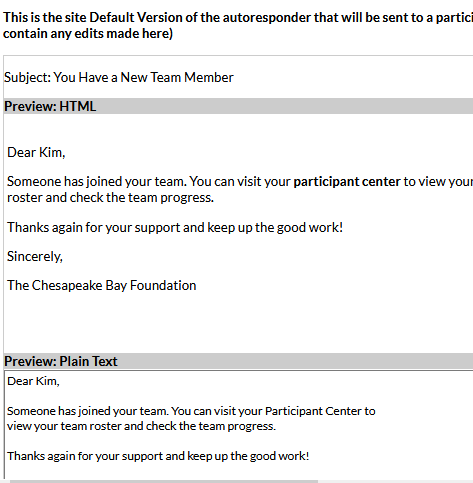
The name of the teammate is automatically included at the top of the "Someone Joined Your Team" autoresponder. If you need that name to be available within the body of the message, Blackbaud Professional Services can perform a customization to make it available, as it is not available by default.
Derek Martin
Hey Kim...I'm sorry, I'm not aware of a way to do that. My gut tells me it isn't possible.
[EDIT]
I see Noah's response which clarifies that it isn't possible outside of a template customization, but that the team member's name is included in the autoresponder by default.
Kim Ethridge
Noah Cooper
- Hmmm, we customize our auto-responders in TeamRaiser (with complete layout html) so I don't know if we're overwriting something.. I did a quick revert to default on another TeamRaiser we are just getting started on and the Preview doesn't seem to show anyplace that would appear. Was it part of a Participant Center upgrade? Is it a setting somewhere in LO Setup?
Noah Cooper
Kim Ethridge
sorry, I said it appears at the top of the autoresponder, but it's actually at the bottom. You won't see it in the preview, but below your content, the team member's name and a link to the participant center are automatically added. Rather than using preview, if you create a real team and add a team member, you should see it.
Kim Ethridge
Got it! That's nicely obvious (not!) Guess it's time to submit a suggestion
Quick Links
All Categories
Recent Posts
Activity
Unanswered
Groups
Help
Best Of