My Community
YourCause®
Impact Edge™
All-Star Lounge
Member Lounge (Just for Fun)
Community News
Community Manager
Groups
Browse Products
Members
Community All-Stars
Monthly Challenges
Member Search
Jobs Board
Help
Using the Blackbaud Community
Blackbaud Support
Knowledgebase
Blackbaud University
Discussions
Categories
Groups
Home
Blackbaud Raiser's Edge NXT®
Raiser's Edge NXT Discussions
sort portfolio by zip code
Kris Pearson
Has anyone found a way to sort a portfolio by zip code when using the work center in NXT? Seems like this would be a standard way to view someone's portfolio if they want to group their prospects geographically without using the mapping view.
Find more posts tagged with
RaisersEdge7 Databaseview
Comments
Faith Murray
I love the mapping tool - one of the best parts of NXT!
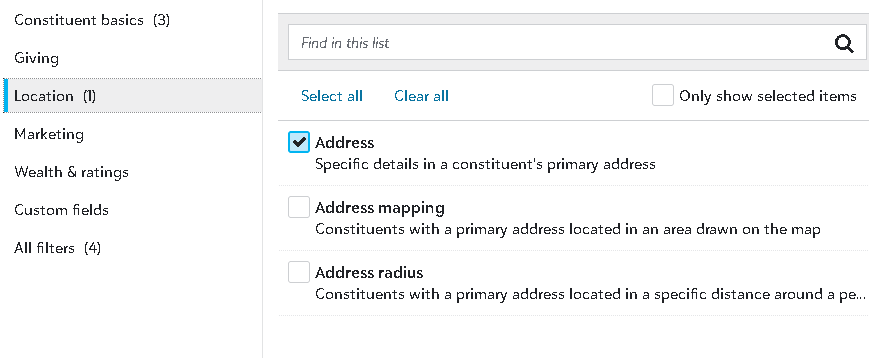
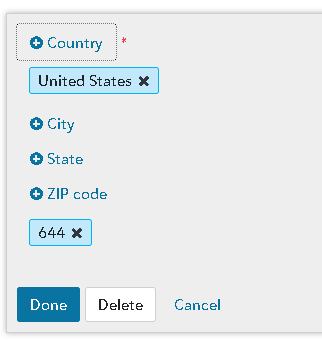
That being said, there is the zip code filter, and you can use a fuzzy filter on the zip code to broaden you region. See pics below, where I filtered by only the first 3 digits of the zip.
Another option, which also comes in handy for appeals segmenting and queries, is to do a mapping filter in NXT, save as a static query in DB view, and then "tag" individuals in Constituent code or attribute according to defined geographic regions ... although this process would need updated after each annual Addressfinder update. In our database, for example, I've tagged constituents who live within a 20-mile radius of our org ("superlocals") and those within a 50-mile radius ("midlocals") so that I can easily include this as a filter when doing mailing list pulls. So much easier and more precise to employ the mapping tool in NXT this way, than to rely on zip code lists. If you added such a tag, then that tag would become available to sort by in your NXT prospect lists without using the mapping tool every single time.
Quick Links
All Categories
Recent Posts
Activity
Unanswered
Groups
Help
Best Of