Hi, I am trying to integrate the Google SSO option in our new Blackbaud account, and because our Workspace is Education, I do not have access to set up a Google Project/API. How have you worked around this issue on your ends?
@Maggie Storm - we are using Google as the authentication provider for BB-ID accounts for students and employees. We also have a Google Drive integration for uploading files from Drive to the LMS.
If you can't access console.cloud.google.com, your Google domain admin should check the status of that service for your domain.
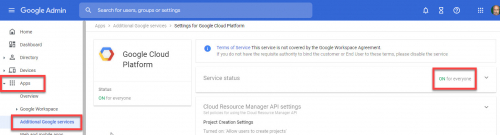
At admin.google.com, go to Apps > Additional Google Services and open Google Cloud Platform. Verify that the account you are using to to access console.cloud.google.com is in an OU for which the Cloud Platform service is active. If it's not on, you can turn it on for the all users or a specified OU.
Thank you! It was set to ON but “Project Creation Settings" were off. You saved me!
Hi Brian,
I thought that resolved it, but when I tried again I still get the attached.
@Maggie Storm - My guess is that the account you're using is in a Google OU that has been identified as having some users under 18. This Google Admin support page will help some:
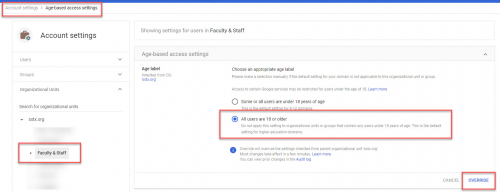
In the Google Admin Console, go to Account Settings. Near the bottom of the page, click on Age based access settings.
On that page:
Wait a few minutes, and then sign into the Google account again before attempting to create the project.