Display issues with new laptop
I've recently got a new laptop and there are a number of things in RE that are not displaying correctly - I've had a fiddle with screen resolution, font size etc. but haven't managed to fix it. Has anyone had a similar issue and has any tips for resolving it? Some of the issues I'm having are:
- Field labels don't fit the space on the constituent record
- Double-clicking on a field to add it to a query sometimes doesn't work - this seems to be when the field is near the bottom of the screen, I can usually select the same field if I scroll down the list to move it up a bit!
- Some of the buttons in Query (the And, Or and brackets) are totally missing, as is the record count at the bottom of the window
- Where a screen is split into multiple panels (e.g. the prospect tab) the items on the right hand side are being overlapped by the left hand panel. This is worse when I have the constituent record maximised, it improves slightly if the window's not taking up the whole screen (but not much!)
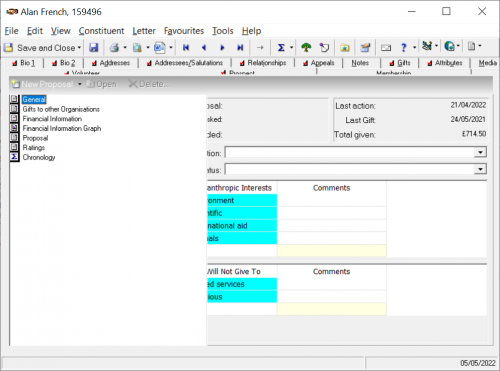
Any help gratefully received as it's driving me nuts! Haven't logged it with Blackbaud yet as it seems to be an issue with my laptop specifically, not RE in general.

Comments
-
I had a new employee start on Monday and she had the same issues. I had her call BB customer support and they helped her fix it. I am not sure what they did but it did get corrected.
4 -
Hi, @Alan French, Sounds frustrating for sure. Mac or PC? Hosted with Azure, onsite, or other? Glad to hear support was able to help @Jenny Stephens' employee which sounds promising for you.
1 -
How frustrating! I've heard of some folks having accessibility settings do something like this on their computer. I'm sorry that I don't know where to find said settings. I bet it's look-up-able, but I can't take the time at the moment.
1 -
Thanks for all your suggestions - after Jenny said it was definitely fixable I had a bit more of a detailed poke around in the settings and realised that my laptop was defaulting to scaling everything up to 150%. I've put it back down to 100% and it's working normally now
5 -
Thanks for the update - glad it worked out!
0 -
We access our on-premises version of RE 7.96 via windows remote desktop. We found that if Omatic Software IOM is installed on the remote desktop this problem arises. Omatic have a suggested fix for the problem in their knowledgebase and I find that every now and again the problem re-appears and the fix has to be re-applied.
A nuisance but at least we know how to deal with it now.
2
Categories
- All Categories
- 6 Blackbaud Community Help
- 209 bbcon®
- 1.4K Blackbaud Altru®
- 395 Blackbaud Award Management™ and Blackbaud Stewardship Management™
- 1.1K Blackbaud CRM™ and Blackbaud Internet Solutions™
- 15 donorCentrics®
- 360 Blackbaud eTapestry®
- 2.5K Blackbaud Financial Edge NXT®
- 648 Blackbaud Grantmaking™
- 566 Blackbaud Education Management Solutions for Higher Education
- 3.2K Blackbaud Education Management Solutions for K-12 Schools
- 937 Blackbaud Luminate Online® and Blackbaud TeamRaiser®
- 84 JustGiving® from Blackbaud®
- 6.5K Blackbaud Raiser's Edge NXT®
- 3.7K SKY Developer
- 247 ResearchPoint™
- 118 Blackbaud Tuition Management™
- 165 Organizational Best Practices
- 239 The Tap (Just for Fun)
- 33 Blackbaud Community Challenges
- 31 PowerUp Challenges
- 3 (Open) PowerUp Challenge: Data Health
- 3 (Closed) Raiser's Edge NXT PowerUp Challenge: Product Update Briefing
- 3 (Closed) Raiser's Edge NXT PowerUp Challenge: Standard Reports+
- 3 (Closed) Raiser's Edge NXT PowerUp Challenge: Email Marketing
- 3 (Closed) Raiser's Edge NXT PowerUp Challenge: Gift Management
- 4 (Closed) Raiser's Edge NXT PowerUp Challenge: Event Management
- 3 (Closed) Raiser's Edge NXT PowerUp Challenge: Home Page
- 4 (Closed) Raiser's Edge NXT PowerUp Challenge: Standard Reports
- 4 (Closed) Raiser's Edge NXT PowerUp Challenge: Query
- 782 Community News
- 2.9K Jobs Board
- 53 Blackbaud SKY® Reporting Announcements
- 47 Blackbaud CRM Higher Ed Product Advisory Group (HE PAG)
- 19 Blackbaud CRM Product Advisory Group (BBCRM PAG)