Identifying a test environment
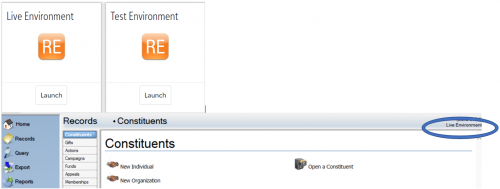
We just installed a test environment (RE and FE NXT). We noticed that when in database view there is no way to identify if you are in the production or the test environment.
Does anyone know of a method to alert users which database they are logged in to? Could be colour coded, a banner, a message box or ????
Thanks

Comments
-
@Moshe BenShach in our pre-production environment I have created a new addressee format that includes the words “PRE-PRODUCTION” in it, and then set this as the name format to display in the constituent record title bar, so when I open a record it will say “Alan French, 123456 (PRE-PRODUCTION)” at the top of the record.
It makes it a bit clearer which environment I'm in when in a constituent record, but it does have to be set up per user and also it's no use if I'm in another area of the system like Admin ?
If anyone's got any better suggestions I'd love to hear them! ?
1 -
You could add a business rule to pop up every time a record is opened, but again it doesn't help with other areas of the database and also once you've dismissed the message to get into the record, it's no longer visible.
1 -
@Moshe BenShach I've color-coded my default fields differently between test and production. For instance, my test environment has yellow shaded required fields, as opposed to the aqua in production. There's a couple of other options, but I think the color-coding is the best example.
Like @Alan French mentioned, this is a user option and has to be set for each individual user, but I would suggest it. Also, do you expect to have a lot of users with access to the test environment? If you will only have a handful of users in test, it might be better to just tell them to set up a couple of user options than to look for something more widespread.
5 -
@Dariel Dixon I really like the idea of colour-coding the required fields, I may steal that one! ?
0 -
I use the same color coding of required fields as @Dariel Dixon. I have a “Delete Me” folder for queries and exports. This folder is where users move the queries they would like to have deleted. In the test environment, this folder is labeled SANDBOX Delete Me and for production it is labeled PRODUCTION Delete Me. When the test environment is refreshed, the first thing you must do is restore the indicators that you put into place. After all, the refresh is a copy of production.
1 -
@Moshe BenShach If I'm not mistaken, you can request that blackbaud change the name to ‘test environment’
2
Categories
- All Categories
- 6 Blackbaud Community Help
- 210 bbcon®
- 1.4K Blackbaud Altru®
- 395 Blackbaud Award Management™ and Blackbaud Stewardship Management™
- 1.1K Blackbaud CRM™ and Blackbaud Internet Solutions™
- 15 donorCentrics®
- 360 Blackbaud eTapestry®
- 2.5K Blackbaud Financial Edge NXT®
- 649 Blackbaud Grantmaking™
- 567 Blackbaud Education Management Solutions for Higher Education
- 3.2K Blackbaud Education Management Solutions for K-12 Schools
- 937 Blackbaud Luminate Online® and Blackbaud TeamRaiser®
- 84 JustGiving® from Blackbaud®
- 6.5K Blackbaud Raiser's Edge NXT®
- 3.7K SKY Developer
- 247 ResearchPoint™
- 119 Blackbaud Tuition Management™
- 165 Organizational Best Practices
- 239 The Tap (Just for Fun)
- 33 Blackbaud Community Challenges
- 31 PowerUp Challenges
- 3 (Open) PowerUp Challenge: Data Health
- 3 (Closed) Raiser's Edge NXT PowerUp Challenge: Product Update Briefing
- 3 (Closed) Raiser's Edge NXT PowerUp Challenge: Standard Reports+
- 3 (Closed) Raiser's Edge NXT PowerUp Challenge: Email Marketing
- 3 (Closed) Raiser's Edge NXT PowerUp Challenge: Gift Management
- 4 (Closed) Raiser's Edge NXT PowerUp Challenge: Event Management
- 3 (Closed) Raiser's Edge NXT PowerUp Challenge: Home Page
- 4 (Closed) Raiser's Edge NXT PowerUp Challenge: Standard Reports
- 4 (Closed) Raiser's Edge NXT PowerUp Challenge: Query
- 785 Community News
- 2.9K Jobs Board
- 53 Blackbaud SKY® Reporting Announcements
- 47 Blackbaud CRM Higher Ed Product Advisory Group (HE PAG)
- 19 Blackbaud CRM Product Advisory Group (BBCRM PAG)