Need help updating website navigation using PageBuilder
Are there any free or low cost resources for working with custom coding in Luminate? I've inherited LO and can't figure out what was done with the custom coding. It's preventing me from making simple updates to our website's navigation bars. For example, I can't add a new menu item at the top of a submenu and I can't create new submenus. Any help or advice would be greatly appreciated! Thanks in advance.

Comments
-
@Lawrence Rush
A short video on Page Wrappers
Like much of LO, the many features that allow for customization and optimization make the tool powerful but complicated. There are many parts of your environment that could be affecting your ability to make the desired changes.To start with, have you looked at:
- Set up > Page Wrapper Editor –
- Customization could be entered to Additional HTML Tags for HEAD Element
- Basic layout settings will show you if the previous owner started with LO components or a blank page.
- Content > Page Builder > Create a new page
- Step 4 select if you want to use the default page wrapper. If you select to override, you can select what you want to use here.
- Step 5 on the second page has meta data that could be used to alter the displays
- You can also check your specific site settings at
- Set up > Site Options > select Content from the dropdown menu
If you do not see all the options you need to make changes, check your permissions:
- Set up > Groups > Admin group list
- Set up > Security Categories
I hope this is helpful.
2 - Set up > Page Wrapper Editor –
-
@Lawrence Rush At Blackbaud University, we have trainings on both Page Wrappers and Page Builder.
1 -
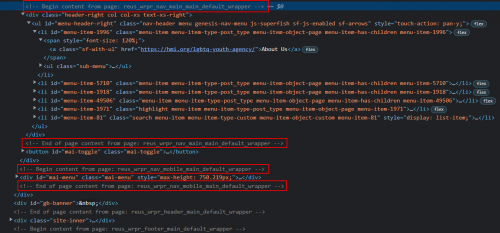
I checked out the Org's website listed on your profile and specifically the donation page. There is a trick that everyone should know, especially if you're trying to hunt down the location of something in Luminate Online. That trick is to navigate to a front-facing page that is built in LO (donation form, Pagebuilder page, Survey, etc) and then add &s_debug=true to the URL as a URL parameter. Once you do that, hit ENTER to go to that page. At that point, if you look in the source code, you will now see HTML comments that specifically tell you where things live/where reusable pages start and stop. This can help you identify where specific code in the Pagewrapper lives.
Example of your site:

Edit: Sorry, didn't know the forum would resize the photo so much. Hard to read. What most developers in LO do, including myself, is create a series of pages in Pagebuilder that include snippets of code (headers, navs, footers, sidebars, etc) and then include those things on the Pagewrapper itself as reusable pages. This makes re-using certain elements across several Pagewrappers more manageable and easier to update.
After looking at your donation form, I can see that there are several Pagebuilder pages which make up the Pagewrapper, at least for the donation form.
There are two pages that I see which would have navigation items in them:
reus_wrpr_nav_main_main_default_wrapper &
reus_wrpr_nav_mobile_main_default_wrapperThis is likely where the items you're looking for live, inside Pagebuilder.
If you are already knew that or know where the content lives, I apologize for making you read through all of it. ?
Beyond that, there probably are some resources that Allison and Elizabeth posted prior to me which could be useful. I think the difficult part might be understanding how those videos/training parallel with your actual site build.
Another recommendation would be to speak to Blackbaud or a Blackbaud partner about the cost of a training that is more specific to your site. In my opinion, that would likely propel you further along and reduce the headaches of trying to figure it out yourself. I'm all for you getting in the weeds and figuring it out yourself but depending on your level of exposure to HTML/CSS/JS, that might be money well spent.
5 -
@Lawrence Rush just to add another resource… depending on how your nav was built really is the key. Here is a quick tutorial I did on updating nav for TeamRaiser sites. If yours is built this way with reusable Pagebuilder pages, it may help.
0
Categories
- All Categories
- 6 Blackbaud Community Help
- 209 bbcon®
- 1.4K Blackbaud Altru®
- 395 Blackbaud Award Management™ and Blackbaud Stewardship Management™
- 1.1K Blackbaud CRM™ and Blackbaud Internet Solutions™
- 15 donorCentrics®
- 359 Blackbaud eTapestry®
- 2.5K Blackbaud Financial Edge NXT®
- 646 Blackbaud Grantmaking™
- 564 Blackbaud Education Management Solutions for Higher Education
- 3.2K Blackbaud Education Management Solutions for K-12 Schools
- 934 Blackbaud Luminate Online® and Blackbaud TeamRaiser®
- 84 JustGiving® from Blackbaud®
- 6.4K Blackbaud Raiser's Edge NXT®
- 3.7K SKY Developer
- 243 ResearchPoint™
- 118 Blackbaud Tuition Management™
- 165 Organizational Best Practices
- 238 The Tap (Just for Fun)
- 33 Blackbaud Community Challenges
- 28 PowerUp Challenges
- 3 (Open) Raiser's Edge NXT PowerUp Challenge: Product Update Briefing
- 3 (Closed) Raiser's Edge NXT PowerUp Challenge: Standard Reports+
- 3 (Closed) Raiser's Edge NXT PowerUp Challenge: Email Marketing
- 3 (Closed) Raiser's Edge NXT PowerUp Challenge: Gift Management
- 4 (Closed) Raiser's Edge NXT PowerUp Challenge: Event Management
- 3 (Closed) Raiser's Edge NXT PowerUp Challenge: Home Page
- 4 (Closed) Raiser's Edge NXT PowerUp Challenge: Standard Reports
- 4 (Closed) Raiser's Edge NXT PowerUp Challenge: Query
- 779 Community News
- 2.9K Jobs Board
- 53 Blackbaud SKY® Reporting Announcements
- 47 Blackbaud CRM Higher Ed Product Advisory Group (HE PAG)
- 19 Blackbaud CRM Product Advisory Group (BBCRM PAG)