Hello, Everyone.
What is the best/easiest way to create a relationship between two existing constituents. Let's say we have a group of students and a group of parents. We want to add the relationships between the two groups respectively.
Thank you.
@Bernard Nemis To the best of my knowledge to do within RE it's one record at a time. I would use a query of the parent or students. Click to open each record (I would set default to open each record on relationship tab - just a short cut I frequently use.) and create a new individual relationship record to the appropriate person, adding the relationship/reciprocal. You then get pop-up to add relationship to the other record.
To do globally add you would be adding the same person to each record in the query. Not what you want.
It could be done by import - it might be worth the work but you'd have to take each ‘parent’ and somehow get the correct ‘student’ record id. Would be a challenge if there's no link to who should match with whom.
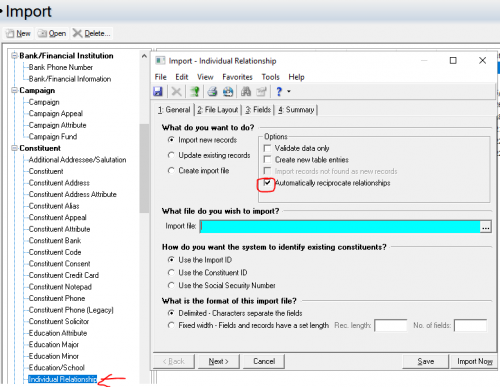
@Bernard NemisThe easiest way to do this would be using Individual Relationship Import in RE database view.
make sure you have automatically reciprocate relationship for your purpose.
You will just need to start from the parent or the child side. If you start from parent, you need the parent's Constituent ID or Constituent Import ID, and you will need the child's Constituent Import ID (cannot use COnstituent ID).
@Alex WongThanks, Alex. I will check this out. I appreciate it.
@JoAnn StrommenHello, JoAnn. Thanks for your feedback. I will have to go the Import route as we have a good amount of incoming freshmen (with potential two parent records each) to connect. We currently have ImportOmatic, but I wanted to see how other folks are doing it, and see if that's something we can do via regular BB import.
@Bernard Nemis: @JoAnn StrommenHello, JoAnn. Thanks for your feedback. I will have to go the Import route as we have a good amount of incoming freshmen (with potential two parent records each) to connect. We currently have ImportOmatic, but I wanted to see how other folks are doing it, and see if that's something we can do via regular BB import.
@Bernard Nemis:
Having done this before, for a class of 500 students where each parent had their own record, I would absolutely use ImportOmatic. Especially if you will be importing a mix of new students to existing parents, and completely new families. RE's native import functionality doesn't allow you to manage potential duplicates or updates to information during the import process like IOM does.
Karen
@Karen DienerThank you, Karen! I appreciate your feedback.
@Bernard Nemis Let me agree and add on to @Alex Wong's sage advice. If you go the import route, it is suggested that you use the import to create the import file to get the fields you need. It's a chore without question.
@Dariel DixonThanks for affirming, Dariel. I will definitely go that route.
@JoAnn StrommenHello, JoAnn. How do you change the default so that each record opens in the Relationship tab when you click on a record from Query?
Thanks!
@Bernard Nemis In db view, on menu at top of window go to Tools > User Options > Records tab. In the top box for default tab instead of Bio 1 select Relationships.Just a couple clicks to reverse when you're done with that task.
I use this frequently when working on various tasks/data.
@JoAnn StrommenThanks, JoAnn! I appreciate it.
@Alex WongHello, Alex.
Quick question, I saw an article in knowledgebase that all you need are the parent's ImportID and the Child's ImportID, Relationship, and Reciprocal as the basic fields to be able to import/create a relationship between the parent and the child (from the Parent's record). I was able to do this and saw the child relationship in the parent's record. However, when I go to the child's Relationship tab, there's no relationship to the parent. Am I missing something so that the relationship is added to both records? Come to think of it, do I need to create a new row and reverse the values for the ImportIDs and the Relationship/Reciprocal?
@Bernard Nemis
when you do the import, you must check the checkbox “Automateically reciprocate relationships" in order for both “parent” and “child” constituent to have the relationship record.
@Alex WongAhhh. I missed that on your last post. Thank you very much!!!