Scanning Merchandise in the Gift Store




Hello! I am a new volunteer working in the gift store at a local non-profit. This is my frustration when scanning merchandise and I cannot figure out how to fix it. I click on “Merchandise” then scan the items. If I am scanning more than two of the same items, it brings me back to Merchandise and I have to click on it again and scan the remaining items. Ex: If there are 10 different items a customer is purchasing, I end up having to click on Merchandise 5 different times. Is there a way this can be updated so I can scan as many items as needed for one sale? Thanks!
Comments
-
Hello!
That's strange - we don't experience that! I'm not sure why it isn't working for you - but that isn't the way it's supposed to work. I would have someone reach out to Altru Support to see if they can figure it out.
For reference, this is how it should work:
When we click the merchandise button on the daily sales screen we see this:
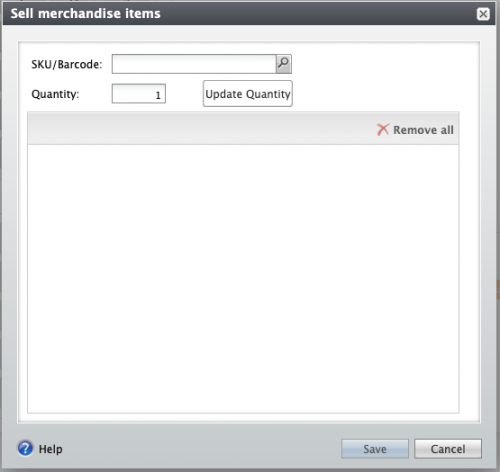
When we scan one item:
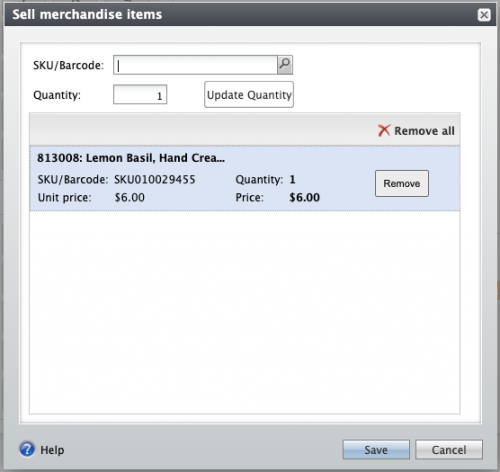
If we scan the same item again, it changes the quantity to 2:
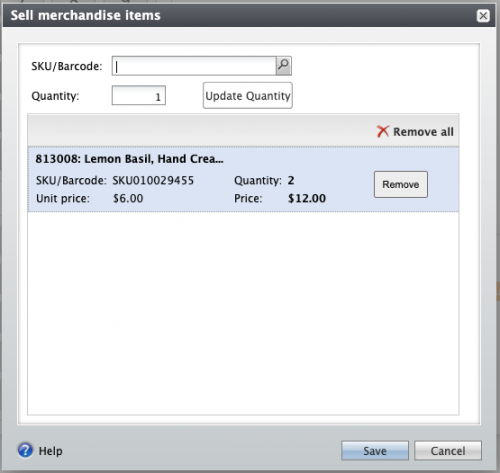
And if we scan another item, it adds it to the order:
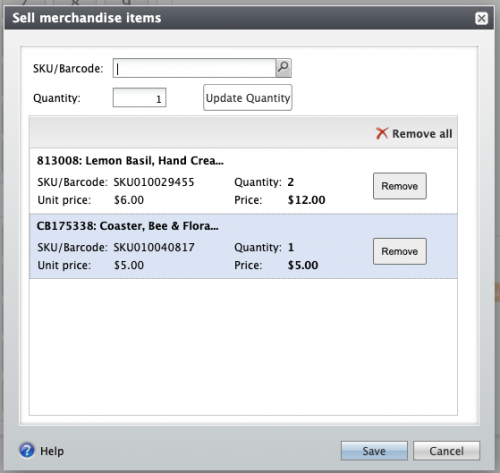
When we are done scanning all the items, we push the Save button to return to the main Daily Sales screen.
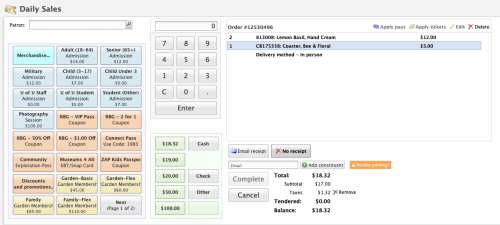
I'm happy to try to answer other questions if I can!Good luck!
0 -
@Dianne Crosby
Thank you, Dianne! Our screens match what you have, so we will definitely reach out to Altru to find out why it keeps going back to merchandise after ringing up two items. Thanks again!0




Categories
- All Categories
- New eTapestry Home Community
- New K-12 Community Home (TEST)
- New Higher Education Home Page (Test)
- New Impact Edge Community TEST
- New YourCause Community TEST
- New SKY Community TEST
- New Grantmaking TEST Community
- New Altru Test Community
- New bbcon Community - TEST
- 12 Blackbaud Agents for Good™
- New Raiser's Edge NXT Community
- 8 Blackbaud Community Help
- 223 bbcon®
- 1.4K Blackbaud Altru®
- 411 Blackbaud Award Management™ and Blackbaud Stewardship Management™
- 1.2K Blackbaud CRM™ and Blackbaud Internet Solutions™
- 16 donorCentrics®
- 361 Blackbaud eTapestry®
- 2.7K Blackbaud Financial Edge NXT®
- 688 Blackbaud Grantmaking™
- 604 Blackbaud Education Management Solutions for Higher Education
- 3.3K Blackbaud Education Management Solutions for K-12 Schools
- 954 Blackbaud Luminate Online® and Blackbaud TeamRaiser®
- 85 JustGiving® from Blackbaud®
- 7.1K Blackbaud Raiser's Edge NXT®
- 4K SKY Developer
- 258 ResearchPoint™
- 124 Blackbaud Tuition Management™
- 165 Organizational Best Practices
- 249 Member Lounge (Just for Fun)
- 40 Blackbaud Community Challenges
- 37 PowerUp Challenges
- 3 (Closed) PowerUp Challenge: Grid View Batch
- 3 (Closed) PowerUp Challenge: Chat for Blackbaud AI
- 3 (Closed) PowerUp Challenge: Data Health
- 3 (Closed) Raiser's Edge NXT PowerUp Challenge: Product Update Briefing
- 3 (Closed) Raiser's Edge NXT PowerUp Challenge: Standard Reports+
- 3 (Closed) Raiser's Edge NXT PowerUp Challenge: Email Marketing
- 3 (Closed) Raiser's Edge NXT PowerUp Challenge: Gift Management
- 4 (Closed) Raiser's Edge NXT PowerUp Challenge: Event Management
- 3 (Closed) Raiser's Edge NXT PowerUp Challenge: Home Page
- 4 (Closed) Raiser's Edge NXT PowerUp Challenge: Standard Reports
- 4 (Closed) Raiser's Edge NXT PowerUp Challenge: Query
- 829 Community News
- 3.1K Jobs Board
- 57 Blackbaud SKY® Reporting Announcements
- 47 Blackbaud CRM Higher Ed Product Advisory Group (HE PAG)
- 19 Blackbaud CRM Product Advisory Group (BBCRM PAG)