Issue with Address in Core Contact Card





Hi! In using Core today, it looks like the Address fields on the Contact Card are getting updates like in Academics. Sadly, I'm having a problem.
When I click edit to add the country, it erases the rest of the address fields.
We use an integration from Ravenna to enroll new students. Even though Ravenna has “Country” listed in their database, it doesn't seem to sync/map over. I have to add the country manually because our integration with Magnus will strip off the state if Blackbaud doesn't have the country completed.
Is anyone else having this issue? I'll need to call support next week. If this doesn't get updated, this is not good for my workflow at all. ???
I wish the Old Core Contact Card could remain the same. Why does country need to go first? I'm not sure I understand.
Comments
-
@Kimberly Fradelis hi there! I'm Jessi, the Product Manager for Core.
Wiping an address by selecting a country is not what I would expect while editing an existing address either. Thanks for your feedback on that. I'll check in with the team to see if this is something we can address quickly.
You noticed that country comes before the rest of the address now. This change was made to enable address lookup. Now when you add a new address for someone, you can select the address from a list of matching results to automatically populate the rest of the address fields. Country is newly required so that the address lookup service knows where to look to offer the best search results. It should streamline address entry moving forward, especially as it is added to other forms in the future.
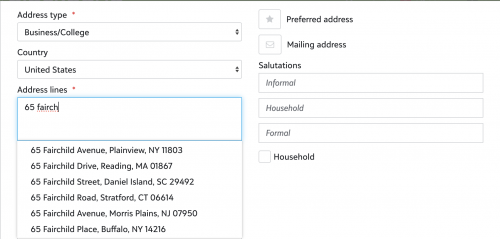
For best results, you'll also want to be sure that you have a default country selected under Profile Page Settings from Core>Users>User profile settings.
1



Categories
- All Categories
- New YourCause Community TEST
- New SKY Community TEST
- New Grantmaking TEST Community
- New Altru Test Community
- New bbcon Community - TEST
- 12 Blackbaud Agents for Good™
- New Raiser's Edge NXT Community
- 7 Blackbaud Community Help
- 218 bbcon®
- 1.4K Blackbaud Altru®
- 409 Blackbaud Award Management™ and Blackbaud Stewardship Management™
- 1.2K Blackbaud CRM™ and Blackbaud Internet Solutions™
- 16 donorCentrics®
- 361 Blackbaud eTapestry®
- 2.7K Blackbaud Financial Edge NXT®
- 680 Blackbaud Grantmaking™
- 598 Blackbaud Education Management Solutions for Higher Education
- 3.3K Blackbaud Education Management Solutions for K-12 Schools
- 952 Blackbaud Luminate Online® and Blackbaud TeamRaiser®
- 85 JustGiving® from Blackbaud®
- 7K Blackbaud Raiser's Edge NXT®
- 3.9K SKY Developer
- 257 ResearchPoint™
- 123 Blackbaud Tuition Management™
- 165 Organizational Best Practices
- 247 Member Lounge (Just for Fun)
- 40 Blackbaud Community Challenges
- 37 PowerUp Challenges
- 3 (Closed) PowerUp Challenge: Grid View Batch
- 3 (Closed) PowerUp Challenge: Chat for Blackbaud AI
- 3 (Closed) PowerUp Challenge: Data Health
- 3 (Closed) Raiser's Edge NXT PowerUp Challenge: Product Update Briefing
- 3 (Closed) Raiser's Edge NXT PowerUp Challenge: Standard Reports+
- 3 (Closed) Raiser's Edge NXT PowerUp Challenge: Email Marketing
- 3 (Closed) Raiser's Edge NXT PowerUp Challenge: Gift Management
- 4 (Closed) Raiser's Edge NXT PowerUp Challenge: Event Management
- 3 (Closed) Raiser's Edge NXT PowerUp Challenge: Home Page
- 4 (Closed) Raiser's Edge NXT PowerUp Challenge: Standard Reports
- 4 (Closed) Raiser's Edge NXT PowerUp Challenge: Query
- 822 Community News
- 3.1K Jobs Board
- 57 Blackbaud SKY® Reporting Announcements
- 47 Blackbaud CRM Higher Ed Product Advisory Group (HE PAG)
- 19 Blackbaud CRM Product Advisory Group (BBCRM PAG)