API Not working




we've identified an issue with the Luminate API. We consulted the Luminate API documentation and attempted to retrieve data directly using the API, but we're still getting the errors.
We followed the instructions outlined in the API documentation provided at https://developer.blackbaud.com/lo-api/loapi/single-sign-on/getSingleSignOnToken.
and i am getting {"errorResponse":{"code":"1","message":"Unable to process request."}} this error
so any one can help me this
Thanks
Comments
-
@Parth patel Hi! Discussion moved to the Luminate Online community. Thanks!
0 -
@Crystal Bruce Thanks For A Reply Can you please share the Luminate Online community LInk?
0 -
@Parth patel
Good morning,
I'm sorry to hear about this experience. I'd like to identify if the problem is with the documentation (did we give you bad, or not enough, information) or a bug. I have a few questions to get started.- The first part of the example call is https://secure2.convio.net/. Some sites use https://secure3.convio.net. Please open your organization's website or a donation form and check the URL to see if your org uses secure2 or secure3. (assuming you create your website and/or forms in Luminate Online)
- The second part of the call is /organization/site/. This must be replaced by the same information as you see in the URL for your website or donation forms. (assuming you create your website and/or forms in Luminate Online).
For example, if your donation form URL is https://secure3.convio.net/goodnews/gns/donations then your api calls must start with https://secure3.convio.net/goodnews/gns/ - The third part of the call identifies which servlet to use. The available options are located near the top of each API documentation page.
There are three parts to this- CR or SR indicates if this is a Client or Server Servlet. Then we identify which category of method this is (Constituent=Cons, TeamRaiser=TR, etc.,). The end of the Servlet is always API. The only option for getSingleSignOnToken is SRConsAPI.
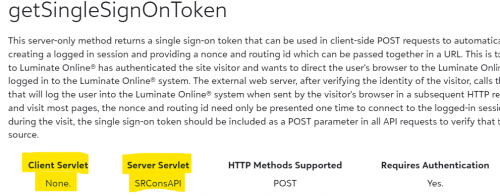
So far our example call would be https://secure3.convio.net/goodnews/gns/SRConsAPI
- Next we need to identify the method we are calling. In this case getSingleSignOnToken. We add the method onto the call with ?method=methodname
https://secure3.convio.net/goodnews/gns/SRConsAPI/?method=getSingleSignOnToken. - Next we need to connect this call with our organization's resources with the correct API key. These additional parameters are added with ampersands &.
(If you need help setting up or checking your API key, see Setup - LO API (blackbaud.com.) Please do not share your API key with anyone.
For our example:
https://secure3.convio.net/goodnews/gns/SRConsAPI/?method=getSingleSignOnToken & api_key=123456789 - Then we need to add our credentials which are our login name and password.
https://secure3.convio.net/goodnews/gns/SRConsAPI/?method=getSingleSignOnToken & apikey=123456789 & loginname=johndoe & login_password=A1!password - After this comes the required v parameter. The v stands for version and the only option is 1.0.
https://secure3.convio.net/goodnews/gns/SRConsAPI/?method=getSingleSignOnToken & api_key=123456789 & v=1.0 - Then you must identify which constituent is being logged in. You can either use the constituent id or member id
https://secure3.convio.net/goodnews/gns/SRConsAPI/?method=getSingleSignOnToken & apikey=123456789 & v=1.0 & cons_id=123
OR
https://secure3.convio.net/goodnews/gns/SRConsAPI/?method=getSingleSignOnToken & apikey=123456789 & v=1.0 & member_id=45678 - After this there are a number of optional parameters, but none of that should be necessary.
If none of those call parameters are the issue, then I'd ask if the third-party server that is trying to log the user into the Luminate System is not including any session cookies or session id. That is prevented for security reasons.
Finally, I'd verifty that getSingleSignOnToken is the correct method for what you need to accomplish. This method is only for authenticating constituents from third-party resources. If you just need to login a constituent, try the authenticateUser - LO API (blackbaud.com) method or the login - LO API (blackbaud.com) method.
And….if none of that helps, I'd suggest reaching out toSupport - Blackbaudand creating a ticket so we can fully research the issue.
I hope that helps.
Liz1









Categories
- All Categories
- New YourCause Community TEST
- New SKY Community TEST
- New Grantmaking TEST Community
- New Altru Test Community
- New bbcon Community - TEST
- 12 Blackbaud Agents for Good™
- New Raiser's Edge NXT Community
- 7 Blackbaud Community Help
- 218 bbcon®
- 1.4K Blackbaud Altru®
- 409 Blackbaud Award Management™ and Blackbaud Stewardship Management™
- 1.2K Blackbaud CRM™ and Blackbaud Internet Solutions™
- 16 donorCentrics®
- 361 Blackbaud eTapestry®
- 2.7K Blackbaud Financial Edge NXT®
- 680 Blackbaud Grantmaking™
- 598 Blackbaud Education Management Solutions for Higher Education
- 3.3K Blackbaud Education Management Solutions for K-12 Schools
- 952 Blackbaud Luminate Online® and Blackbaud TeamRaiser®
- 85 JustGiving® from Blackbaud®
- 7K Blackbaud Raiser's Edge NXT®
- 3.9K SKY Developer
- 257 ResearchPoint™
- 123 Blackbaud Tuition Management™
- 165 Organizational Best Practices
- 247 Member Lounge (Just for Fun)
- 40 Blackbaud Community Challenges
- 37 PowerUp Challenges
- 3 (Closed) PowerUp Challenge: Grid View Batch
- 3 (Closed) PowerUp Challenge: Chat for Blackbaud AI
- 3 (Closed) PowerUp Challenge: Data Health
- 3 (Closed) Raiser's Edge NXT PowerUp Challenge: Product Update Briefing
- 3 (Closed) Raiser's Edge NXT PowerUp Challenge: Standard Reports+
- 3 (Closed) Raiser's Edge NXT PowerUp Challenge: Email Marketing
- 3 (Closed) Raiser's Edge NXT PowerUp Challenge: Gift Management
- 4 (Closed) Raiser's Edge NXT PowerUp Challenge: Event Management
- 3 (Closed) Raiser's Edge NXT PowerUp Challenge: Home Page
- 4 (Closed) Raiser's Edge NXT PowerUp Challenge: Standard Reports
- 4 (Closed) Raiser's Edge NXT PowerUp Challenge: Query
- 822 Community News
- 3.1K Jobs Board
- 57 Blackbaud SKY® Reporting Announcements
- 47 Blackbaud CRM Higher Ed Product Advisory Group (HE PAG)
- 19 Blackbaud CRM Product Advisory Group (BBCRM PAG)