Addressee/Salutations





It's been a long time since I've had to configure Addressee/Salutations for an organization I worked at…so I'd love some insight!
The way ours are set up now, the “and” for the presence of a spouse is showing up for each record - whether the spouse is on the record or not. We can use the “smart” function to remove the spouse, but “and” is still there.
It'll say “Carrie and Clark” instead of “Carrie Clark”.
Is there a trick I'm missing to remove “and” if there is no spouse on record?
Comments
-
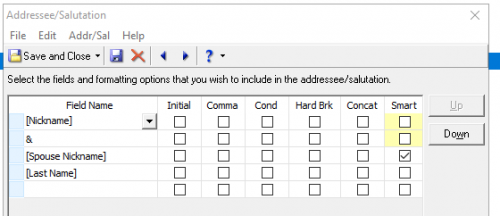
@Carrie Clark Your ‘smart’ check might be in wrong place. This is ours for nickname. Could be first name.
 0
0 -
@Carrie Clark
This KB will help you refresh your memory on how to do this.1 -
Thanks, all. I've gone through the knowledgebase articles, and table is set up similarly to the screenshot…but the AND or the & are still showing up when no spouse is present.
I'll go back to the drawing board. Thanks, both!
0 -
@Carrie Clark ‘Similar’ is not the same as ‘the same’ as. Yes, your error is due to how you have smart check box.?
This kb article explains format omits field after smart is checked
- Knowledgebase
- Article
- 48236
0 -
@Carrie Clark Your ‘smart’ check might be in wrong place. This is ours for nickname. Could be first name.
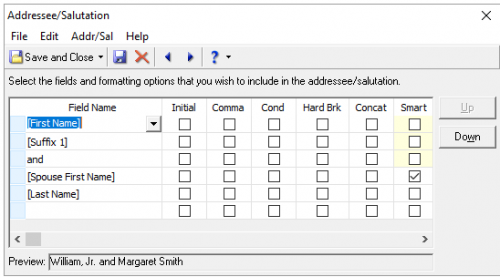
Yes! I attached the wrong imagine initially - so I removed it. But this is how ours is set up - and why I'm confused about the inaccuracies.
 0
0 -
@Carrie Clark The preview box in your screen shot shows the format you want.
Troubleshooting:
So many look alike, are you certain you selected the addressee that uses this format?
It could be you may need to log out and restart. Don't recall if this is one of those changes that requires a restart.0 -
0
-
@Deb Dressely
Hi Deb!I'm going to have to put in a ticket with Blackbaud I think. This isn't that complicated, but almost none of our table values show up correctly without having to manually manipulate the data after ?
1 -
It's been a long time since I've had to configure Addressee/Salutations for an organization I worked at…so I'd love some insight!
The way ours are set up now, the “and” for the presence of a spouse is showing up for each record - whether the spouse is on the record or not. We can use the “smart” function to remove the spouse, but “and” is still there.
It'll say “Carrie and Clark” instead of “Carrie Clark”.
Is there a trick I'm missing to remove “and” if there is no spouse on record?
Consider implementing conditional logic in your configuration to exclude "and" when no spouse is present in the record. Lock Smith West Hollywood
0 -
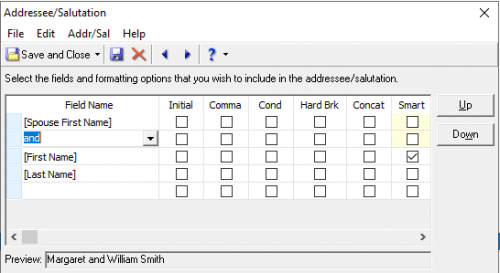
@Deb Dressely We have the same add/sal protocol from your screenshot [Spouse First Name] and [First Name] [Last Name] with the smart column checked on the [First Name] row; however, this configuration does not work. The result is similar to what @Carrie Clark has experienced. This will be a fun clean up project.
I am new to my role and when I discovered this problem, my initial thought was the reason this does not produce the expected results is because where KI = individual, all records have a [First Name] but may not have a [Spouse Name].
If I understand configuration correctly, the configuration for your screenshot would drop the [First Name] and because all records where KI = individual, [First Name] remains omnipresent.
@Alex and @JoAnn … what am I missing?
0 -
@Carrie Clark When you are identifying as spouse are you checking the Spouse box on relationship General 1 tab or just putting in relationship/reciprocal of ‘Spouse’? You have to have the spouse box checked for add/sal to pull data.

Just trying to think of reasons it's not displaying correctly for you.
Did support offer a solution/answer?
1 -
@Carrie Clark
What JoAnn ask you about is a valid question on troubleshooting the issue you have.I would suggest you provide not only the screenshot of your addressee configuration, but also screenshot of a test record (so we don't see any PII info) that mimic a real record with and without spouse. this will further help troubleshoot your issue.
Currently as it stands, the configuration looks correct, so barring potentially software issue with RE (which is unlikely on this situation), it is more likely a user error, which we can try to help you get to the bottom of.
0















Categories
- All Categories
- New YourCause Community TEST
- New SKY Community TEST
- New Grantmaking TEST Community
- New Altru Test Community
- New bbcon Community - TEST
- 12 Blackbaud Agents for Good™
- New Raiser's Edge NXT Community
- 7 Blackbaud Community Help
- 218 bbcon®
- 1.4K Blackbaud Altru®
- 409 Blackbaud Award Management™ and Blackbaud Stewardship Management™
- 1.2K Blackbaud CRM™ and Blackbaud Internet Solutions™
- 16 donorCentrics®
- 361 Blackbaud eTapestry®
- 2.7K Blackbaud Financial Edge NXT®
- 681 Blackbaud Grantmaking™
- 599 Blackbaud Education Management Solutions for Higher Education
- 3.3K Blackbaud Education Management Solutions for K-12 Schools
- 952 Blackbaud Luminate Online® and Blackbaud TeamRaiser®
- 85 JustGiving® from Blackbaud®
- 7K Blackbaud Raiser's Edge NXT®
- 3.9K SKY Developer
- 257 ResearchPoint™
- 123 Blackbaud Tuition Management™
- 165 Organizational Best Practices
- 247 Member Lounge (Just for Fun)
- 40 Blackbaud Community Challenges
- 37 PowerUp Challenges
- 3 (Closed) PowerUp Challenge: Grid View Batch
- 3 (Closed) PowerUp Challenge: Chat for Blackbaud AI
- 3 (Closed) PowerUp Challenge: Data Health
- 3 (Closed) Raiser's Edge NXT PowerUp Challenge: Product Update Briefing
- 3 (Closed) Raiser's Edge NXT PowerUp Challenge: Standard Reports+
- 3 (Closed) Raiser's Edge NXT PowerUp Challenge: Email Marketing
- 3 (Closed) Raiser's Edge NXT PowerUp Challenge: Gift Management
- 4 (Closed) Raiser's Edge NXT PowerUp Challenge: Event Management
- 3 (Closed) Raiser's Edge NXT PowerUp Challenge: Home Page
- 4 (Closed) Raiser's Edge NXT PowerUp Challenge: Standard Reports
- 4 (Closed) Raiser's Edge NXT PowerUp Challenge: Query
- 822 Community News
- 3.1K Jobs Board
- 57 Blackbaud SKY® Reporting Announcements
- 47 Blackbaud CRM Higher Ed Product Advisory Group (HE PAG)
- 19 Blackbaud CRM Product Advisory Group (BBCRM PAG)