BB for outlook plug-in to add emails as actions
We have one staff member whose computer was updated and she said she has a newer version of Outlook.
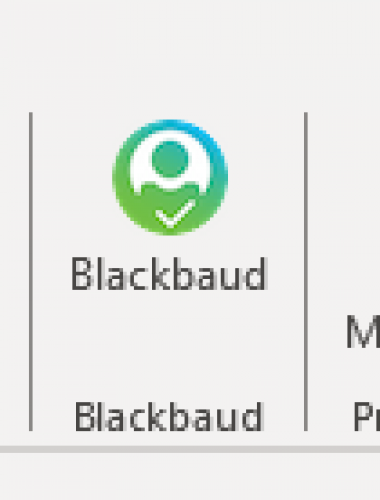
The plug in to add the email as an action that is at the top for other version is not there and we could not find a way to access it. On her screen it says ‘new outlook’ at top right and that it's replacing Windows version. I don't know where else to look for Outlook version.
Any ideas?

Comments
-
@JoAnn Strommen
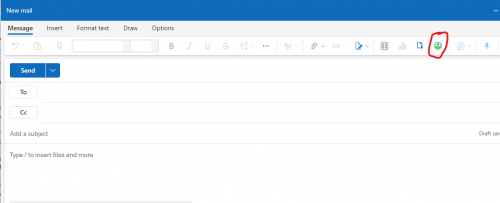
I am using the New Outlook and I see the icon. (you have to be in the compose email window).
0 -
@JoAnn Strommen I'm still using the old version of Outlook (don't like the new look) and have the Blackbaud plugin…. I don't tend to use it though, as I find it will add an action but doesn't input the email, EG a blank action.
I think our previous Database Admin person had this set up. Have a look here:0 -
@Alex Wong Thank you. Forwarded your response to team member. I went to look as well. Selecting the icon you indicated, we do not see an option to add as an action.
Can it only be done when composing? Are you not able to go back to sent emails or save incoming emails?@Ange Scott The kb article is for the ‘old’ version. We really like using the plug-in to create actions here in our office. We encourage new staff to add it as an option. When I have spot checked, the action is attached to record and the email text is there. Obviously have not checked every action created that way but so far no problems reported by anyone.
0 -
@JoAnn Strommen
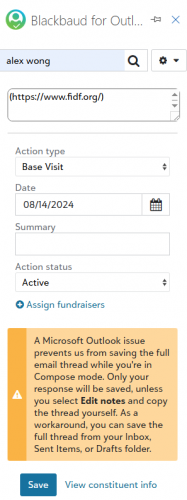
i only see the icon when composing. I don't know if it was somewhere else before too.after clicking on icon and authenticate, i get a side bar to add action
1 -
@JoAnn Strommen
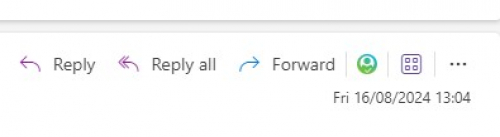
I've not switched over to the new Outlook yet, but if it's anything like web-based Outlook then I have the BB button on the actual email rather than in the top ribbon. It's not in the 3 dots menu for your colleague by any chance?
0 -
@Rachel Cavalier Thanks for the suggestion.
I stood by her as we clicked/viewed all the options for all the icons/options across the top in message, in compose, etc. It's possible we missed something but hard for me to check when it's on her computer.
Will try to find it again next week.1
Categories
- All Categories
- 6 Blackbaud Community Help
- 210 bbcon®
- 1.4K Blackbaud Altru®
- 395 Blackbaud Award Management™ and Blackbaud Stewardship Management™
- 1.1K Blackbaud CRM™ and Blackbaud Internet Solutions™
- 15 donorCentrics®
- 360 Blackbaud eTapestry®
- 2.5K Blackbaud Financial Edge NXT®
- 649 Blackbaud Grantmaking™
- 567 Blackbaud Education Management Solutions for Higher Education
- 3.2K Blackbaud Education Management Solutions for K-12 Schools
- 937 Blackbaud Luminate Online® and Blackbaud TeamRaiser®
- 84 JustGiving® from Blackbaud®
- 6.5K Blackbaud Raiser's Edge NXT®
- 3.7K SKY Developer
- 247 ResearchPoint™
- 118 Blackbaud Tuition Management™
- 165 Organizational Best Practices
- 239 The Tap (Just for Fun)
- 33 Blackbaud Community Challenges
- 31 PowerUp Challenges
- 3 (Open) PowerUp Challenge: Data Health
- 3 (Closed) Raiser's Edge NXT PowerUp Challenge: Product Update Briefing
- 3 (Closed) Raiser's Edge NXT PowerUp Challenge: Standard Reports+
- 3 (Closed) Raiser's Edge NXT PowerUp Challenge: Email Marketing
- 3 (Closed) Raiser's Edge NXT PowerUp Challenge: Gift Management
- 4 (Closed) Raiser's Edge NXT PowerUp Challenge: Event Management
- 3 (Closed) Raiser's Edge NXT PowerUp Challenge: Home Page
- 4 (Closed) Raiser's Edge NXT PowerUp Challenge: Standard Reports
- 4 (Closed) Raiser's Edge NXT PowerUp Challenge: Query
- 783 Community News
- 2.9K Jobs Board
- 53 Blackbaud SKY® Reporting Announcements
- 47 Blackbaud CRM Higher Ed Product Advisory Group (HE PAG)
- 19 Blackbaud CRM Product Advisory Group (BBCRM PAG)