Does anyone have any experience in recording a Charitable remainder unitrust in raisers edge. What is best to record or best practices.
@Denise Schlake discussion moved to the Raiser's Edge community. Thanks!
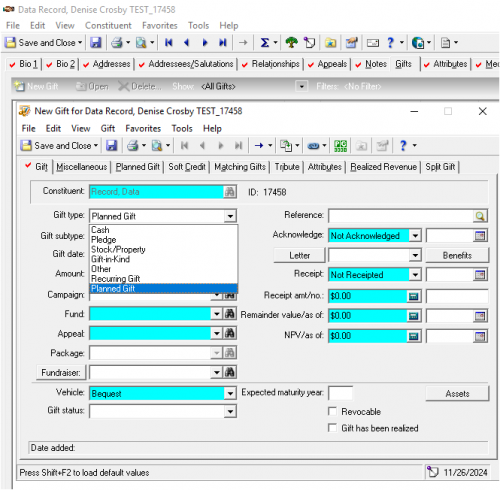
@Denise Schlake Hi Denise - it might be helpful to share if you have the planned giving module or not. There are ways to do it with and without. If you aren't sure check a gift and see if you have the gift type option of Planned Gift. You will see you have the Vehicle field near the bottom left.
@Denise Schlake
Hi Denise!
My organization just documented our procedure and protocol based off the Blackbaud guide for planned gift tracking in preparation to start using the Planned Giving module. I will link both the manual and the section (which is heavily the manual reformatted) we've documented so far. We've yet to stress test anything, but I can confidently say given the source that this should be the best practice for data entry on a charitable remainder trust. I hope this is helpful to you.
I would stress that the best practice in Raiser's Edge is usually to use the designated software, because work arounds can become messy and may complicate your data for future users, especially when it comes to reporting and analysis in the future. I would highly recommend utilizing the planned gift module in order to track these gifts properly and record the details that matter. I should note that my organization considered mimicking the fields of the module in Proposals, but it was not approved by my org for use because it was a messy, from putting gifts in, to reporting on them... I can share a sample of what we tested in Proposals, if you wish, which perhaps you could improve on, but I don't really recommend that route unless you have no other choice.
If you don't currently have the module, and need to justify it's purchase and think your org could be persuaded to allocate resources for it - I have a proposal that I wrote up which I had to submit to our COO as to why we needed it. I would be happy to share it if you would like to use it as a starting point.
With the module:
Remainder Unitrust
With a remainder unitrust, a donor invests their gift with a third party —the trustee — and instructs them to pay select individuals — beneficiaries — a fixed percentage of the trust’s value — determined annually — for life or for the length — or term, not to exceed 20 years — of the trust. After the term ends or the last beneficiary passes away, the remainder of the investment amount transfers to your organization.
Under Remainder unitrust, you should document if known:
How to Enter a Planned Gift for a Remainder Unitrust in Raiser's Edge
STOP: When you save a planned gift record, the Vehicle field is disabled. To select a different vehicle type, do so before you save the planned gift record.
When you receive a payment for the planned gift, you can create a gift record for the payment that links to the original planned gift record. To link a payment for a planned gift, open the planned gift record. The new gift is created from the original planned gift record. If the gift record exists, open the gift record to link it to a planned gift record. When the planned gift matures, you can complete the planned gift record. To do this, you must edit planned gift information on the Gift tab of the original planned gift record. You can edit a gift record if you have security rights. You may also edit a planned gift to update the Remainder value/as of and NPV/as of fields. We recommend you update this information periodically throughout the life of the planned gift.
“Gift-in-Kind”, or “Other”
Please see the below link to the Planned Gift Tracking Guide from Blackbaud which was our primary resource.