Happy New Year everyone and welcome to 2019! It’s going to be another very busy year for
Blackbaud’s Cloud Solution for K-12 Schools and even though it’s still very early into January, we’re not wasting any time getting started.
The January 9 release, also known as 14.01 features a number of important updates for
Core,
Academics, and
Enrollment Management. Not only have we made improvements to
User Lists, we’re also debuting a brand new feature for
Enrollment Management.
Here’s a look at some of the bigger features within the January 9 release:
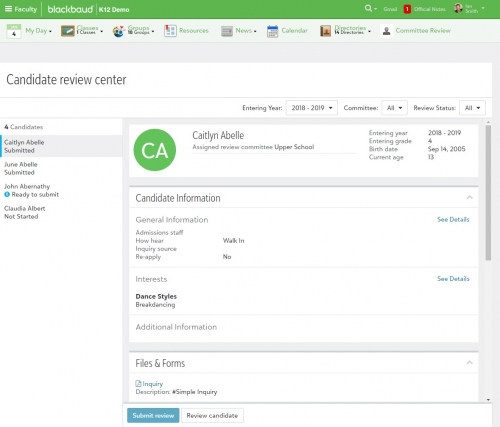
Enrollment Management: Introducing Committee Review! Following it’s time in EAP, Committee Review is now available for all
Enrollment Management schools. This is a feature that aims to streamline the candidate review and decision process using a centralized location to contain all relevant information. Better yet, schools no longer need to create workarounds like cloning roles or providing access to sensitive information.
Admissions managers can create an unlimited number of committees, add committee members and customize feedback settings. The
Candidates for Review list can also be used to assign candidates to committees, add enrollment decisions, as well as sending official notes.
Users empowered with the committee reviewer role, they only have access to view the candidate records and files assigned to the user. Reviewers can then easily manage and submit recommendations online from the
Candidate Review Center.
If you’re looking for all the finer details on this new feature, head on over to our
online help center. We’ll have plenty more on this topic very soon as well. Stay tuned to the K12 Blog for a dedicated post as well as our
YouTube channel for a pair of feature specific videos.
Core & Academics: User Profile Updates. We pulled double duty for this release and made an update to the
User profile within
Core and
Academics. Previously, a manager selected
Enrollment to see the user’s school profile.
With this release, we’ve renamed the tab to
Groups in order to view profiles for students and adults. including parents and faculty. We’ve made this change to help standardize it regardless if you’re viewing a student, faculty member, or parent record. If part of our effort to continue giving you a more consistent experience navigating the cloud solution.
Core: Blackbaud ID. Just like Committee Review, accessing
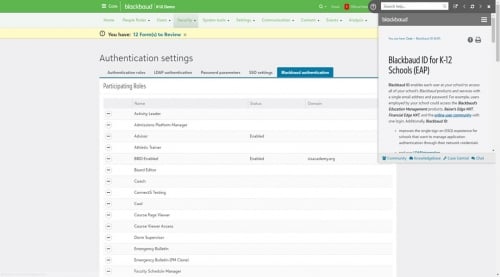
Blackbaud ID no longer requires schools to sign up for the EAP first. Blackbaud ID enables each user at your school to access all of your school's
Blackbaud products and services with a single email address and password. From the User profile page, an organization administrator can configure
Blackbaud ID with single sign on to use their active directory or network authentication. We also gave platform managers access to the settings under
Core,
Security,
Authentication settings,
Blackbaud authentication.
Also, as of this update,
Blackbaud ID now supports new roles like parents, parents of past students, and parents of incoming students. We strongly encourage schools to review all relevant documentation and be sure you understand the feature fully before enabling Blackbaud authentication. When you’re ready, focus on enabling it for administrators, faculty, and staff roles before other members of your community like students or parents.
For the complete list of changes, updates, and new features, head on over to the
January 9 release notes here. The release videos have also returned this month so if you want a visual look at all of the new features and updates, you can find it below. Better yet, we’re also giving you a small recap of the December release in case you missed it due to the holidays.
Speaking of things you may have missed, last month we took a retrospective look at how the
Academics and
Enrollment Management products have evolved and changed over the course of 2018. You can read about
Academics (a combination of
Blackbaud’s SIS and
LMS systems)
here and find
Enrollment Management right here.
Whether it’s your first time checking out the blog or you’re a returning reader in 2019, thanks for stopping by the Tips and Tricks section of the K-12 Community. We’ll be back next week to shine the spotlight on other sections of the product, so we’ll see you right back here on Tuesday.
Thanks for reading everyone!