Duplicate Constituent Code Maintenance





In the past I've been able to run a query where I have multiple "Alumnus" constituent codes on specific records. I would then utilize the Globally Change Records arena, attach my query and select the Constituent Code to then "delete", simply hit run now and boom they'd be gone. Then I would use my same query to do the same steps but select "add" this time to put the code back on as just 1. Today I'm working the same way but am getting "Error Saving: Required Field Missing: Constituent Code…………… I'm so perplexed on this one. I do these 3 times a year but today for some reason this keeps happening. Any thoughts? Also, I have to do these steps still over in DB view.
Answers
-
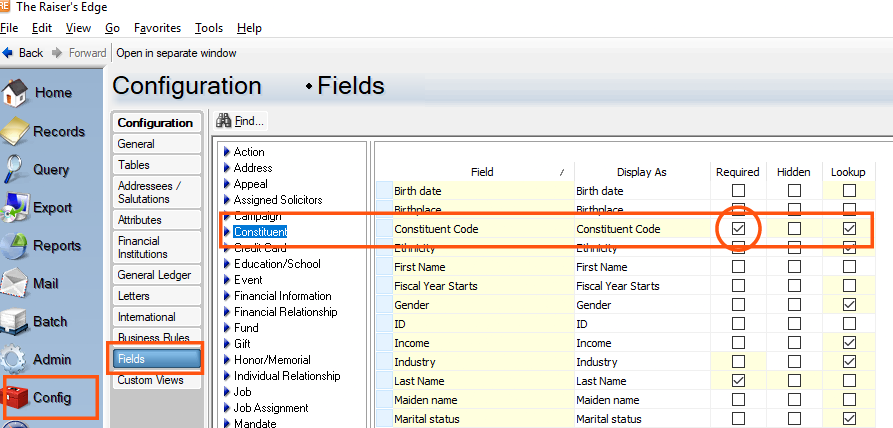
It sounds like the issue is coming from a field‑level requirement that was recently turned on in your system. In Database View, the Constituent Code field is marked as “Required” under Configuration → Fields, so when Global Change deletes all of the Alumnus codes from a record, the record temporarily has zero constituent codes — and RE won’t allow it to save in that state.
A quick workaround:
- Go to Configuration → Business Rules
- Temporarily turn off the rule that requires at least one Constituent Code
- Run your Global Change to delete and re‑add the code
- Turn the rule back on afterward
I always put a post‑it on my monitor so I don’t forget to re‑enable it.
I’ve attached a screenshot showing where the field requirement lives in Configuration → Fields in case that helps.
 2
2 -
Appreciate you, that definitely did the trick! Have a wonderful weekend!
1





Categories
- All Categories
- New YourCause Community TEST
- New SKY Community TEST
- New Grantmaking TEST Community
- New Altru Test Community
- New bbcon Community - TEST
- 12 Blackbaud Agents for Good™
- New Raiser's Edge NXT Community
- 7 Blackbaud Community Help
- 218 bbcon®
- 1.4K Blackbaud Altru®
- 409 Blackbaud Award Management™ and Blackbaud Stewardship Management™
- 1.2K Blackbaud CRM™ and Blackbaud Internet Solutions™
- 16 donorCentrics®
- 361 Blackbaud eTapestry®
- 2.7K Blackbaud Financial Edge NXT®
- 680 Blackbaud Grantmaking™
- 598 Blackbaud Education Management Solutions for Higher Education
- 3.3K Blackbaud Education Management Solutions for K-12 Schools
- 952 Blackbaud Luminate Online® and Blackbaud TeamRaiser®
- 85 JustGiving® from Blackbaud®
- 7K Blackbaud Raiser's Edge NXT®
- 3.9K SKY Developer
- 257 ResearchPoint™
- 123 Blackbaud Tuition Management™
- 165 Organizational Best Practices
- 247 Member Lounge (Just for Fun)
- 40 Blackbaud Community Challenges
- 37 PowerUp Challenges
- 3 (Closed) PowerUp Challenge: Grid View Batch
- 3 (Closed) PowerUp Challenge: Chat for Blackbaud AI
- 3 (Closed) PowerUp Challenge: Data Health
- 3 (Closed) Raiser's Edge NXT PowerUp Challenge: Product Update Briefing
- 3 (Closed) Raiser's Edge NXT PowerUp Challenge: Standard Reports+
- 3 (Closed) Raiser's Edge NXT PowerUp Challenge: Email Marketing
- 3 (Closed) Raiser's Edge NXT PowerUp Challenge: Gift Management
- 4 (Closed) Raiser's Edge NXT PowerUp Challenge: Event Management
- 3 (Closed) Raiser's Edge NXT PowerUp Challenge: Home Page
- 4 (Closed) Raiser's Edge NXT PowerUp Challenge: Standard Reports
- 4 (Closed) Raiser's Edge NXT PowerUp Challenge: Query
- 822 Community News
- 3.1K Jobs Board
- 57 Blackbaud SKY® Reporting Announcements
- 47 Blackbaud CRM Higher Ed Product Advisory Group (HE PAG)
- 19 Blackbaud CRM Product Advisory Group (BBCRM PAG)