How To Write An Amazing Community Bio!
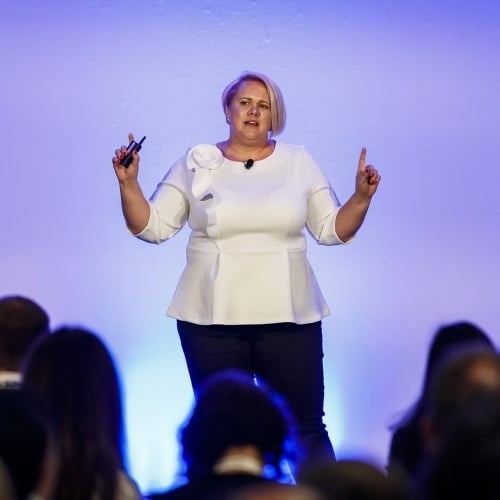
Holly Herbert
Blackbaud Employee




If your profile picture is your face in the community, then your community bio is your persona. It establishes who you are and sets the tone for how you will interact on the community, while representing your passions and your expertise.
Community bios are short and snappy, so figuring out how to make every word count is important. There are essentially three parts to a community bio.
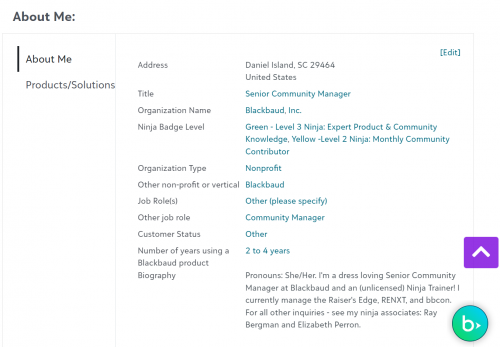
Let's break them down:
About me (Who):
This is who you are and how you relate to the Community. Share something professional and something personal. For examples, check out the bios of a community manager or a community points leader. Feel free to borrow from their brilliance, copy & paste their bio format, then update with your details.
Why:
Once you've established who you are, the next step is to explain why you're in the Community. This helps other community members understand what your goals are for the site and for your own network. My "why" statement is: "I'm here to help create an online space in which community members can Learn, Engage, and Connect."
Your "why" statement can be short (like the example) or can be more expansive if you have lots of reasons for being in the community.
What:
The final part of your bio is your "what" statement. This statement establishes what experiences and expertise you can offer your fellow community members. Using my bio as an example once again, you can see my "what" statement is essentially a giant generalization of my resume: "I have a Master's degree in Public Relations from Indiana University and over a decade of experience in community building and management for nonprofits."
The "what" statement is what helps people understand what kind of knowledge base you draw from when you respond or post in the community.
If you put the who, the why, and the what together, you will have a strong and compelling bio on community.
Ready to update your Community bio? Go here to edit/update your profile.
Community bios are short and snappy, so figuring out how to make every word count is important. There are essentially three parts to a community bio.

Let's break them down:
About me (Who):
This is who you are and how you relate to the Community. Share something professional and something personal. For examples, check out the bios of a community manager or a community points leader. Feel free to borrow from their brilliance, copy & paste their bio format, then update with your details.
Why:
Once you've established who you are, the next step is to explain why you're in the Community. This helps other community members understand what your goals are for the site and for your own network. My "why" statement is: "I'm here to help create an online space in which community members can Learn, Engage, and Connect."
Your "why" statement can be short (like the example) or can be more expansive if you have lots of reasons for being in the community.
What:
The final part of your bio is your "what" statement. This statement establishes what experiences and expertise you can offer your fellow community members. Using my bio as an example once again, you can see my "what" statement is essentially a giant generalization of my resume: "I have a Master's degree in Public Relations from Indiana University and over a decade of experience in community building and management for nonprofits."
The "what" statement is what helps people understand what kind of knowledge base you draw from when you respond or post in the community.
If you put the who, the why, and the what together, you will have a strong and compelling bio on community.
Ready to update your Community bio? Go here to edit/update your profile.
19
Comments
-
Great advice. Not just for this community, but everywhere.0
-
Thanks, John!0
-
John Heizer... my sentiments exactly!0
-
Excellent ... I put a profile together using your brilliant advice. Thank you.0
-
Thanks for another very helpful blog, Holly!0
-
Bio has been updated - believe I followed your great advice!0
-
Excellent Ideas!0
-
Thanks!0
-
Defiitelysomething to work on! Thanks for the tip!0
-
I've been putting off getting involved because I felt I was too busy. Boy, was I wrong!! I have found information that has helped me in my position as a Development Stewardship Coordinator. I will make more time for this community!!!0
-
Great advice! I'm going to use this to update my profile0
-
I'm the Director of Library Services and Technology Integration at Calvary Christian Academy. I assist teachers with all things LMS related, I'm especially popular at the end of each semester!
I enjoy using the community to trouble shoot issues with using the "on" products. I am a problem solver by nature, so helping others solve tech problems or sharing "best practices" is one way I can contribute to the community.0 -
thanks for the insight Holly! well said!0
-
Thanks, Holly!0
-
Good tips. Should probably go back and read mine again.
 0
0 -
I should have read your helpful hint BEFORE I updated my bio, lol. Time for a little tweaking!0
-
Thank you for this article. Very helpful. Great to be back on this site! I have started a new job and I'm ready to continue learning more and more about Raiser's Edge and Raiser's Edge NXT. Also to talk with fellow Raiser's Edge users in Blackbaud community, to gain some perspective, ask for advice and one day get Raiser's Edge certified! 0
-
Thank you!0
-
Done, thanks!0
-
Informative post. Thanks!0
-
I'd been putting this off because it is always so awkward to talk about oneself. But this is very helpful. Thank you.0
-
This is great advice - and it applies to all social media groups!
Thanks0 -
Very helpful!0
-
Thanks for the advice!0
-
Thank you for the suggestions - very helpful.0
-
Helpful hints, thanks!0
-
Thanks for your advice Holly. I think I covered all of your steps!0
-
Hey, thanks for the tips. I have an RE certification, however I don't know how to add that badge to my profile. Any help appreciated.
0 -
Illuminating thanks0





























Categories
- All Categories
- New K-12 Community Home (TEST)
- New Higher Education Home Page (Test)
- New Impact Edge Community TEST
- New YourCause Community TEST
- New SKY Community TEST
- New Grantmaking TEST Community
- New Altru Test Community
- New bbcon Community - TEST
- 12 Blackbaud Agents for Good™
- New Raiser's Edge NXT Community
- 8 Blackbaud Community Help
- 222 bbcon®
- 1.4K Blackbaud Altru®
- 410 Blackbaud Award Management™ and Blackbaud Stewardship Management™
- 1.2K Blackbaud CRM™ and Blackbaud Internet Solutions™
- 16 donorCentrics®
- 361 Blackbaud eTapestry®
- 2.7K Blackbaud Financial Edge NXT®
- 687 Blackbaud Grantmaking™
- 604 Blackbaud Education Management Solutions for Higher Education
- 3.3K Blackbaud Education Management Solutions for K-12 Schools
- 954 Blackbaud Luminate Online® and Blackbaud TeamRaiser®
- 85 JustGiving® from Blackbaud®
- 7K Blackbaud Raiser's Edge NXT®
- 4K SKY Developer
- 258 ResearchPoint™
- 123 Blackbaud Tuition Management™
- 165 Organizational Best Practices
- 248 Member Lounge (Just for Fun)
- 40 Blackbaud Community Challenges
- 37 PowerUp Challenges
- 3 (Closed) PowerUp Challenge: Grid View Batch
- 3 (Closed) PowerUp Challenge: Chat for Blackbaud AI
- 3 (Closed) PowerUp Challenge: Data Health
- 3 (Closed) Raiser's Edge NXT PowerUp Challenge: Product Update Briefing
- 3 (Closed) Raiser's Edge NXT PowerUp Challenge: Standard Reports+
- 3 (Closed) Raiser's Edge NXT PowerUp Challenge: Email Marketing
- 3 (Closed) Raiser's Edge NXT PowerUp Challenge: Gift Management
- 4 (Closed) Raiser's Edge NXT PowerUp Challenge: Event Management
- 3 (Closed) Raiser's Edge NXT PowerUp Challenge: Home Page
- 4 (Closed) Raiser's Edge NXT PowerUp Challenge: Standard Reports
- 4 (Closed) Raiser's Edge NXT PowerUp Challenge: Query
- 829 Community News
- 3.1K Jobs Board
- 57 Blackbaud SKY® Reporting Announcements
- 47 Blackbaud CRM Higher Ed Product Advisory Group (HE PAG)
- 19 Blackbaud CRM Product Advisory Group (BBCRM PAG)