The Summer Break Refresher: Files And Forms Bulk Delete

Derek Nichols
Blackbaud Employee




With the newest school year rapidly approaching, Blackbaud was pretty busy getting the Education management products updated with new features. In case you missed it, here's the latest on the Enrollment management's newest addition: Files and Forms.With September nearly here, the new academic year is finally here and summer vacation is at an end. While most educators are able to take a break through the summer, Blackbaud keeps the pedal to the metal in terms of releases, many of which may have flown way under the radar.
So, this week’s blog is focusing on one of those major features launched back in July. Hopefully you caught a glimpse of it in our weekly release notes or perhaps the July recap blog right here in the community, but in case you missed it, here’s everything you need to know about the brand new Files and Forms area inside Enrollment management.
What Is It?
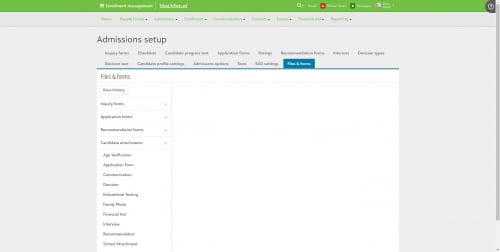
Inside of Admissions setup, Files and Forms is a list that compiles all files or forms that are uploaded in conjunction with the Admissions process. Anything from Inquiries, Applications, Recommendation forms, Candidate Attachments, and Miscellaneous files are presented in an easy to use list.
How Does It Work?
Expand the section you want to work with and select one of the individual files listed to see its information. This includes things like its current status (Inactive, Active, Archived), associated school years, and number of submissions.
Admissions managers may also notice a Share to Core profile option, which allows them to send the selected file or form uploaded through the admissions process to the Core user profile.
The biggest piece to this new feature is the ability to bulk delete these files. Each file or form will have all associated school years listed out and they can be selected either individually or in bulk. The school year also includes the submissions tied to them as well, so schools have more freedom of choice with how they choose to maintain them. Instead of having to delete all submissions on an individual level, they can bulk delete them based on the school year.
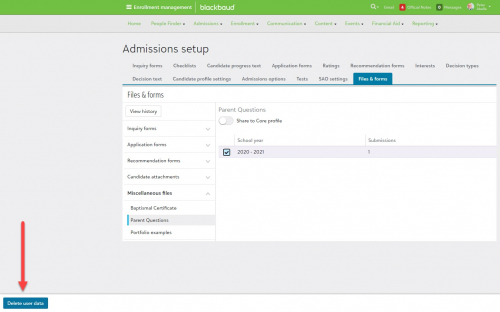
Selecting Delete user data opens a warning message reiterating that this is a permanent delete as well as how many submissions will be impacted. There’s also a text field that saves the reason for the files being deleted. Using the View History option shows who deleted the information, when, and the reasoning for it.
Keep an eye out on our official YouTube Channel as I’ll be going over this feature there soon. For now, if you want to know even more, make sure to head over to our online help where a topic on this very subject is waiting to be viewed as well as some frequently asked questions.
That’s going to do it for this week, but I hope you found this post informative. I’ll see you right back here next week!
So, this week’s blog is focusing on one of those major features launched back in July. Hopefully you caught a glimpse of it in our weekly release notes or perhaps the July recap blog right here in the community, but in case you missed it, here’s everything you need to know about the brand new Files and Forms area inside Enrollment management.
What Is It?
Inside of Admissions setup, Files and Forms is a list that compiles all files or forms that are uploaded in conjunction with the Admissions process. Anything from Inquiries, Applications, Recommendation forms, Candidate Attachments, and Miscellaneous files are presented in an easy to use list.

How Does It Work?
Expand the section you want to work with and select one of the individual files listed to see its information. This includes things like its current status (Inactive, Active, Archived), associated school years, and number of submissions.
Admissions managers may also notice a Share to Core profile option, which allows them to send the selected file or form uploaded through the admissions process to the Core user profile.
The biggest piece to this new feature is the ability to bulk delete these files. Each file or form will have all associated school years listed out and they can be selected either individually or in bulk. The school year also includes the submissions tied to them as well, so schools have more freedom of choice with how they choose to maintain them. Instead of having to delete all submissions on an individual level, they can bulk delete them based on the school year.

Selecting Delete user data opens a warning message reiterating that this is a permanent delete as well as how many submissions will be impacted. There’s also a text field that saves the reason for the files being deleted. Using the View History option shows who deleted the information, when, and the reasoning for it.
Keep an eye out on our official YouTube Channel as I’ll be going over this feature there soon. For now, if you want to know even more, make sure to head over to our online help where a topic on this very subject is waiting to be viewed as well as some frequently asked questions.
That’s going to do it for this week, but I hope you found this post informative. I’ll see you right back here next week!
2
Categories
- All Categories
- New K-12 Community Home (TEST)
- New Higher Education Home Page (Test)
- New Impact Edge Community TEST
- New YourCause Community TEST
- New SKY Community TEST
- New Grantmaking TEST Community
- New Altru Test Community
- New bbcon Community - TEST
- 12 Blackbaud Agents for Good™
- New Raiser's Edge NXT Community
- 8 Blackbaud Community Help
- 222 bbcon®
- 1.4K Blackbaud Altru®
- 410 Blackbaud Award Management™ and Blackbaud Stewardship Management™
- 1.2K Blackbaud CRM™ and Blackbaud Internet Solutions™
- 16 donorCentrics®
- 361 Blackbaud eTapestry®
- 2.7K Blackbaud Financial Edge NXT®
- 687 Blackbaud Grantmaking™
- 604 Blackbaud Education Management Solutions for Higher Education
- 3.3K Blackbaud Education Management Solutions for K-12 Schools
- 954 Blackbaud Luminate Online® and Blackbaud TeamRaiser®
- 85 JustGiving® from Blackbaud®
- 7K Blackbaud Raiser's Edge NXT®
- 4K SKY Developer
- 258 ResearchPoint™
- 123 Blackbaud Tuition Management™
- 165 Organizational Best Practices
- 248 Member Lounge (Just for Fun)
- 40 Blackbaud Community Challenges
- 37 PowerUp Challenges
- 3 (Closed) PowerUp Challenge: Grid View Batch
- 3 (Closed) PowerUp Challenge: Chat for Blackbaud AI
- 3 (Closed) PowerUp Challenge: Data Health
- 3 (Closed) Raiser's Edge NXT PowerUp Challenge: Product Update Briefing
- 3 (Closed) Raiser's Edge NXT PowerUp Challenge: Standard Reports+
- 3 (Closed) Raiser's Edge NXT PowerUp Challenge: Email Marketing
- 3 (Closed) Raiser's Edge NXT PowerUp Challenge: Gift Management
- 4 (Closed) Raiser's Edge NXT PowerUp Challenge: Event Management
- 3 (Closed) Raiser's Edge NXT PowerUp Challenge: Home Page
- 4 (Closed) Raiser's Edge NXT PowerUp Challenge: Standard Reports
- 4 (Closed) Raiser's Edge NXT PowerUp Challenge: Query
- 829 Community News
- 3.1K Jobs Board
- 57 Blackbaud SKY® Reporting Announcements
- 47 Blackbaud CRM Higher Ed Product Advisory Group (HE PAG)
- 19 Blackbaud CRM Product Advisory Group (BBCRM PAG)