BBMS Reaches For The SKY™




Change is good. No, really, it is. And, in this case, it’s very good. That is, if you’re using Raiser’s Edge NXT™ and Blackbaud Online Express™ with Blackbaud Merchant Services™ (BBMS). In addition to helping you streamline payment processing and online fundraising, Blackbaud Merchant Services now features a new, and improved, web portal.
This portal, which provides you with real-time access to credit card and direct debit transaction information, leverages the capabilities of Blackbaud SKY UX™. Delivering a consistent and always-modern user experience across our cloud solutions, SKY UX is the same interface used in Raiser's Edge NXT and Financial Edge NXT. But, that’s not all. The web portal also incorporates changes that will help simplify the tasks you do.
Let’s Start from the Beginning
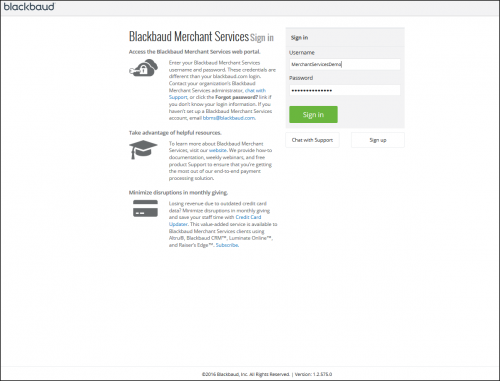
If you’re a regular Blackbaud Merchant Services Web Portal user, you’ll notice the difference immediately—starting with the login screen. While closely resembling the login screen for www.blackbaud.com, the new web portal login screen is where you enter your Blackbaud Merchant Services username and password.
(Click the image to view a higher resolution screenshot)
And, Once Inside. . .
When you log in, you’ll see that we’ve done some reorganizing, starting with:
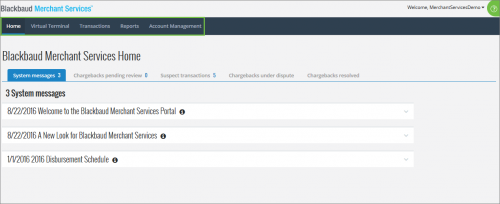
• Moving the primary navigation to the top of the page
Forget about scrolling down to the bottom of the screen to view the menu. Everything you’re looking for is now at the top of the page.
(Click the image to view a higher resolution screenshot)
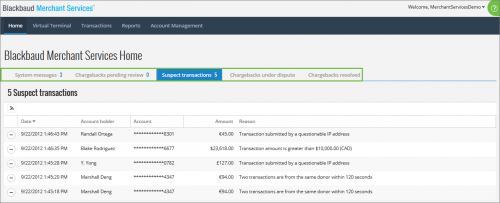
• Placing actionable items more prominently on the home page
You should review chargebacks and approve suspect transactions right away so we’ve placed them front and center on the home page. The numbers next to the tabs indicate that there are items requiring your review.
(Click the image to view a higher resolution screenshot)
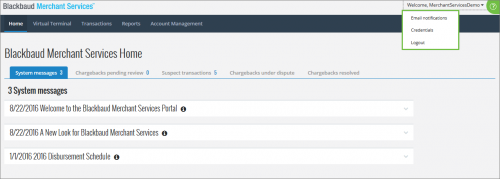
• Relocating email notifications to the user settings section
Set up email notifications for yourself and your colleagues in just a few clicks from within the user menu.
(Click the image to view a higher resolution screenshot)
• Modifying the sub-navigation using a new action bar
You don’t have to leave the screen you’re on to find all of the transaction detail you need. Simply click the ellipsis (circle with three periods) to view the sub-navigation and, once clicked, the detail appears to the right of the screen. Use the arrows at the top to navigate to the next (or previous) record.
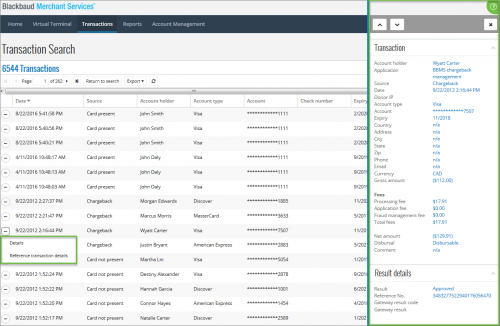
(Click the image to view a higher resolution screenshot)
Want to Know More?
If you haven’t already, we encourage you to login to the new Blackbaud Merchant Services Web Portal. We have a number of resources to help you navigate the enhanced user interface, including:
• Blackbaud Merchant Services SKY UX Online Feature Walk Through
• Blackbaud Merchant Services Web Portal Guide
• Blackbaud Merchant Services New Features and Enhancements
We also invite you to attend one of our Navigating the Blackbaud Merchant Services Web Portal webinars, held every other week. In that webinar you can see a live demonstration and ask any questions via chat.
This portal, which provides you with real-time access to credit card and direct debit transaction information, leverages the capabilities of Blackbaud SKY UX™. Delivering a consistent and always-modern user experience across our cloud solutions, SKY UX is the same interface used in Raiser's Edge NXT and Financial Edge NXT. But, that’s not all. The web portal also incorporates changes that will help simplify the tasks you do.
Let’s Start from the Beginning
If you’re a regular Blackbaud Merchant Services Web Portal user, you’ll notice the difference immediately—starting with the login screen. While closely resembling the login screen for www.blackbaud.com, the new web portal login screen is where you enter your Blackbaud Merchant Services username and password.

(Click the image to view a higher resolution screenshot)
And, Once Inside. . .
When you log in, you’ll see that we’ve done some reorganizing, starting with:
• Moving the primary navigation to the top of the page
Forget about scrolling down to the bottom of the screen to view the menu. Everything you’re looking for is now at the top of the page.

(Click the image to view a higher resolution screenshot)
• Placing actionable items more prominently on the home page
You should review chargebacks and approve suspect transactions right away so we’ve placed them front and center on the home page. The numbers next to the tabs indicate that there are items requiring your review.

(Click the image to view a higher resolution screenshot)
• Relocating email notifications to the user settings section
Set up email notifications for yourself and your colleagues in just a few clicks from within the user menu.

(Click the image to view a higher resolution screenshot)
• Modifying the sub-navigation using a new action bar
You don’t have to leave the screen you’re on to find all of the transaction detail you need. Simply click the ellipsis (circle with three periods) to view the sub-navigation and, once clicked, the detail appears to the right of the screen. Use the arrows at the top to navigate to the next (or previous) record.

(Click the image to view a higher resolution screenshot)
Want to Know More?
If you haven’t already, we encourage you to login to the new Blackbaud Merchant Services Web Portal. We have a number of resources to help you navigate the enhanced user interface, including:
• Blackbaud Merchant Services SKY UX Online Feature Walk Through
• Blackbaud Merchant Services Web Portal Guide
• Blackbaud Merchant Services New Features and Enhancements
We also invite you to attend one of our Navigating the Blackbaud Merchant Services Web Portal webinars, held every other week. In that webinar you can see a live demonstration and ask any questions via chat.
0
Categories
- All Categories
- 6 Blackbaud Community Help
- 209 bbcon®
- 1.4K Blackbaud Altru®
- 394 Blackbaud Award Management™ and Blackbaud Stewardship Management™
- 1.1K Blackbaud CRM™ and Blackbaud Internet Solutions™
- 15 donorCentrics®
- 359 Blackbaud eTapestry®
- 2.5K Blackbaud Financial Edge NXT®
- 646 Blackbaud Grantmaking™
- 563 Blackbaud Education Management Solutions for Higher Education
- 3.2K Blackbaud Education Management Solutions for K-12 Schools
- 934 Blackbaud Luminate Online® and Blackbaud TeamRaiser®
- 84 JustGiving® from Blackbaud®
- 6.4K Blackbaud Raiser's Edge NXT®
- 3.7K SKY Developer
- 243 ResearchPoint™
- 118 Blackbaud Tuition Management™
- 165 Organizational Best Practices
- 238 The Tap (Just for Fun)
- 33 Blackbaud Community Challenges
- 28 PowerUp Challenges
- 3 (Open) Raiser's Edge NXT PowerUp Challenge: Product Update Briefing
- 3 (Closed) Raiser's Edge NXT PowerUp Challenge: Standard Reports+
- 3 (Closed) Raiser's Edge NXT PowerUp Challenge: Email Marketing
- 3 (Closed) Raiser's Edge NXT PowerUp Challenge: Gift Management
- 4 (Closed) Raiser's Edge NXT PowerUp Challenge: Event Management
- 3 (Closed) Raiser's Edge NXT PowerUp Challenge: Home Page
- 4 (Closed) Raiser's Edge NXT PowerUp Challenge: Standard Reports
- 4 (Closed) Raiser's Edge NXT PowerUp Challenge: Query
- 779 Community News
- 2.9K Jobs Board
- 53 Blackbaud SKY® Reporting Announcements
- 47 Blackbaud CRM Higher Ed Product Advisory Group (HE PAG)
- 19 Blackbaud CRM Product Advisory Group (BBCRM PAG)