What's New In Raiser's Edge NXT The Week Of March 21





This week, Raiser's Edge NXT updates with several enhancements to lists and Analyze!
 Analyze recaptured donors. Through your appeals and donor retention efforts, you may recapture lapsed supporters who haven't given in over a year. To analyze donors who gave during the current fiscal year after at least a year-long lapse in giving, you can now select Recapture in Fundraising, Analyze. From here, you can quickly compare your recaptured donors and their revenue — year-to-date — to all donors who gave within the past five years but not the previous year.
With these metrics, you can also:
For more information, see the Donor Recapture Analysis Help.
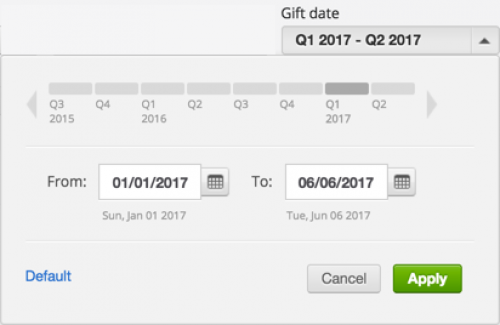 Analyze giving for a specific time frame. By popular demand, you can now analyze giving for a specific date range under Overview in Fundraising, Analyze. With the Gift date under Giving, you can now include gifts from a specific date range or quarters and save a view of gifts from that time frame. Previously, this filter included gifts based on a sliding number of days, and saved views included giving within that time frame based on whenever you viewed the metrics. (In any existing saved views, the Gift date filter now includes the last four quarters. To use a different time frame, adjust the saved view as necessary.) For more information, see the Giving Analysis Filters Help.
Easily apply and summarize list filters. To help find and apply filters to a list, you can now easily navigate and choose criteria when you select Filters. Additionally, when you apply a filter to a list, you can now clearly view its criteria or number of selected options above the columns. To quickly remove a filter from the list, select its X. For more information, see the Lists Help.
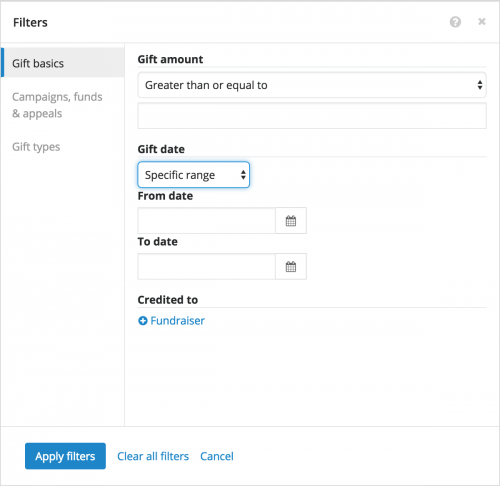 Filter a gift list by a specific date range. To help focus on the giving you want, you can now filter a list of gifts to include only those from a particular date range, in addition to general time periods like Last week or This quarter. To include gifts from a specific date range:
For more information about these features, or to catch up on previous releases, check out the What's New Help and What's Recent Help. Enjoy!
 Analyze recaptured donors. Through your appeals and donor retention efforts, you may recapture lapsed supporters who haven't given in over a year. To analyze donors who gave during the current fiscal year after at least a year-long lapse in giving, you can now select Recapture in Fundraising, Analyze. From here, you can quickly compare your recaptured donors and their revenue — year-to-date — to all donors who gave within the past five years but not the previous year.
With these metrics, you can also:
- View how many donors gave during the past five years but not the current or previous year — similar to a SYBUNT (Some Year, But Unfortunately Not This year) total.
- Compare your recapture efforts for the current year — both fiscal and calendar — to previous years'.
For more information, see the Donor Recapture Analysis Help.
 Analyze giving for a specific time frame. By popular demand, you can now analyze giving for a specific date range under Overview in Fundraising, Analyze. With the Gift date under Giving, you can now include gifts from a specific date range or quarters and save a view of gifts from that time frame. Previously, this filter included gifts based on a sliding number of days, and saved views included giving within that time frame based on whenever you viewed the metrics. (In any existing saved views, the Gift date filter now includes the last four quarters. To use a different time frame, adjust the saved view as necessary.) For more information, see the Giving Analysis Filters Help.
Easily apply and summarize list filters.
 To help find and apply filters to a list, you can now easily navigate and choose criteria when you select Filters. Additionally, when you apply a filter to a list, you can now clearly view its criteria or number of selected options above the columns. To quickly remove a filter from the list, select its X. For more information, see the Lists Help.
 Filter a gift list by a specific date range. To help focus on the giving you want, you can now filter a list of gifts to include only those from a particular date range, in addition to general time periods like Last week or This quarter. To include gifts from a specific date range:
- On the gift list, select Filters and Gift basics.
- Under Gift date, select Specific range.
- Choose the start and end dates of the gifts to include.
- Select Apply filters.
For more information about these features, or to catch up on previous releases, check out the What's New Help and What's Recent Help. Enjoy!
0
Comments
-
Recapture would be fantastic if I were able to choose everyone who had a particular constituent code and not by primary constituent code. I suppose that I can create a list out of all recapturable constituents and then filter it there, but I'd like to see this right on the report.0
-
Great feedback, Karen! I'd recommend you add it to the Idea Bank as well, to help us gauge interest and prioritize. Thanks!0


Categories
- All Categories
- 6 Blackbaud Community Help
- 209 bbcon®
- 1.4K Blackbaud Altru®
- 394 Blackbaud Award Management™ and Blackbaud Stewardship Management™
- 1.1K Blackbaud CRM™ and Blackbaud Internet Solutions™
- 15 donorCentrics®
- 359 Blackbaud eTapestry®
- 2.5K Blackbaud Financial Edge NXT®
- 646 Blackbaud Grantmaking™
- 563 Blackbaud Education Management Solutions for Higher Education
- 3.2K Blackbaud Education Management Solutions for K-12 Schools
- 934 Blackbaud Luminate Online® and Blackbaud TeamRaiser®
- 84 JustGiving® from Blackbaud®
- 6.4K Blackbaud Raiser's Edge NXT®
- 3.7K SKY Developer
- 243 ResearchPoint™
- 118 Blackbaud Tuition Management™
- 165 Organizational Best Practices
- 238 The Tap (Just for Fun)
- 33 Blackbaud Community Challenges
- 28 PowerUp Challenges
- 3 (Open) Raiser's Edge NXT PowerUp Challenge: Product Update Briefing
- 3 (Closed) Raiser's Edge NXT PowerUp Challenge: Standard Reports+
- 3 (Closed) Raiser's Edge NXT PowerUp Challenge: Email Marketing
- 3 (Closed) Raiser's Edge NXT PowerUp Challenge: Gift Management
- 4 (Closed) Raiser's Edge NXT PowerUp Challenge: Event Management
- 3 (Closed) Raiser's Edge NXT PowerUp Challenge: Home Page
- 4 (Closed) Raiser's Edge NXT PowerUp Challenge: Standard Reports
- 4 (Closed) Raiser's Edge NXT PowerUp Challenge: Query
- 779 Community News
- 2.9K Jobs Board
- 53 Blackbaud SKY® Reporting Announcements
- 47 Blackbaud CRM Higher Ed Product Advisory Group (HE PAG)
- 19 Blackbaud CRM Product Advisory Group (BBCRM PAG)