What's New In Blackbaud Raiser's Edge NXT® — January 30th





- Raise more with donation forms in Online Giving (for some of you)
- Accept online registrations for events (for those in Canada)
- Enhancements to online registration forms (for those in the US and Canada)
- Action list improvements (for some of you)
- Reschedule Address Finder runs (for those in the US)
From the web view, you can now access Online Giving to create Optimized Donation Forms and access your (standard) forms. Optimized forms encourage donors to complete transactions because of a new streamlined design that captures payments before collecting contact information. They also require minimal setup and include the same fee coverage options as standard forms.
Optimized forms:
- Use a branding card you customize with images and your mission statement.
- Are visually appealing, intuitive, and engaging.
- Automatically adjust to increase higher than average gift amounts based on donor data analysis.
- Display anywhere on your website without creating new web pages.
- Manage users, roles, and settings for optimized and Standard Donation Forms.
- Set up a Blackbaud Merchant Services account, if necessary.
For more information, see Online Giving.
Accept online registrations for events (for those in Canada)
You can now let people register for your events online through Online Registration Forms. These forms let your constituents sign themselves and others up for an event, enter their contact information, choose to make an additional donation, and pay their registration fees (for paid events). From an event record, under Online registration forms, you can add a new form, edit an existing form, or review stats of the effectiveness of your existing forms. In the Form Designer, you can style your form to mimic the branding of your organization's website.

For more information, see Online Registration Forms.
Enhancements to online registration forms (for those in the US and Canada)
Note: You’ll need to embed the updated HTML code for your registration form to take advantage of these new enhancements.
We’ve made enhancements to the code snippet for online registration forms you create with the registration form designer:
-
You can now embed multiple registration forms on a single webpage.
-
From Marketing, Email, Marketing Emails, successful transactions from recipients who interact with links on webpages that contain embedded forms are now included in performance analytics. For more information, see Marketing Email Performance Analysis.
For more information on how to embed online registration forms on your organization’s website, see Publish Online Registration Form.
Action list improvements (for some of you)To help you better query your data, we addressed multiple requests submitted through the idea bank and improved action lists.
From Lists, Actions and Fundraising, Work, Actions, you can now:
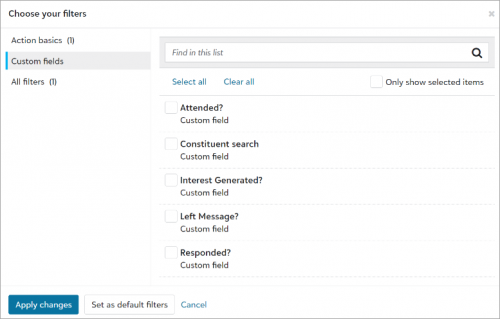
- Use custom fields as columns and filters.
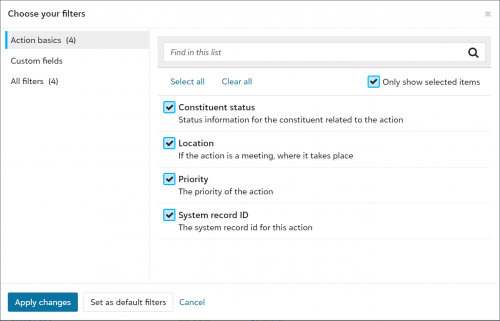
- Use Location, Priority, and System record ID as columns and filters. You can also use Constituent status as a filter.
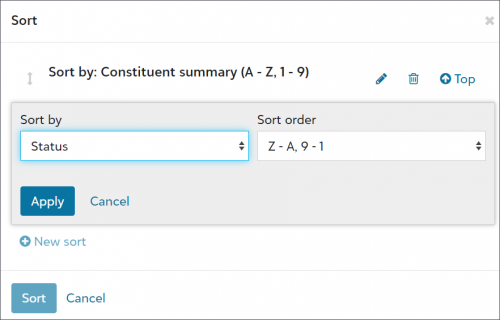
- Sort lists by multiple columns and select the sort order for each column.
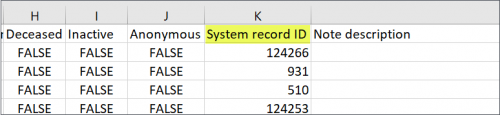
- Include System record ID in exports.
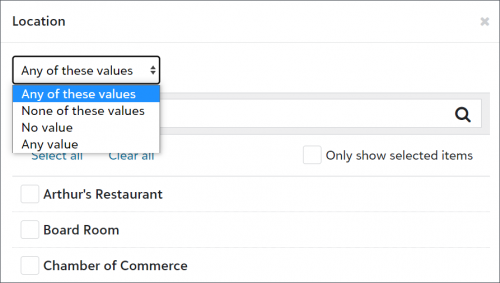
- Further refine list filters with the new All of these values, Any of these values, None of these values, No value, and Any value operators.


Reschedule Address Finder runs
Based on feedback, you can now change the date of Address Finder runs. From Tools, Data health, under Scorecard, Next update, select Reschedule Address Finder run. You can reschedule 90 days after a successful run or within 365 days from today's date.
For more information, see Address Finder.
Categories
- All Categories
- 6 Blackbaud Community Help
- 209 bbcon®
- 1.4K Blackbaud Altru®
- 394 Blackbaud Award Management™ and Blackbaud Stewardship Management™
- 1.1K Blackbaud CRM™ and Blackbaud Internet Solutions™
- 15 donorCentrics®
- 359 Blackbaud eTapestry®
- 2.5K Blackbaud Financial Edge NXT®
- 646 Blackbaud Grantmaking™
- 563 Blackbaud Education Management Solutions for Higher Education
- 3.2K Blackbaud Education Management Solutions for K-12 Schools
- 934 Blackbaud Luminate Online® and Blackbaud TeamRaiser®
- 84 JustGiving® from Blackbaud®
- 6.4K Blackbaud Raiser's Edge NXT®
- 3.7K SKY Developer
- 243 ResearchPoint™
- 118 Blackbaud Tuition Management™
- 165 Organizational Best Practices
- 238 The Tap (Just for Fun)
- 33 Blackbaud Community Challenges
- 28 PowerUp Challenges
- 3 (Open) Raiser's Edge NXT PowerUp Challenge: Product Update Briefing
- 3 (Closed) Raiser's Edge NXT PowerUp Challenge: Standard Reports+
- 3 (Closed) Raiser's Edge NXT PowerUp Challenge: Email Marketing
- 3 (Closed) Raiser's Edge NXT PowerUp Challenge: Gift Management
- 4 (Closed) Raiser's Edge NXT PowerUp Challenge: Event Management
- 3 (Closed) Raiser's Edge NXT PowerUp Challenge: Home Page
- 4 (Closed) Raiser's Edge NXT PowerUp Challenge: Standard Reports
- 4 (Closed) Raiser's Edge NXT PowerUp Challenge: Query
- 779 Community News
- 2.9K Jobs Board
- 53 Blackbaud SKY® Reporting Announcements
- 47 Blackbaud CRM Higher Ed Product Advisory Group (HE PAG)
- 19 Blackbaud CRM Product Advisory Group (BBCRM PAG)