In a Nutshell: Topics for Teachers

Derek Nichols
Blackbaud Employee




With our move to online classrooms and more remote learning, we're continuing our look at major features inside the Education management products. Today, let's talk about Topics.We hope this new week continues to find you well in these challenging times. This week, we’re going to continue our look at various features inside of the Academics product which may be valuable to our new way of educating remotely.
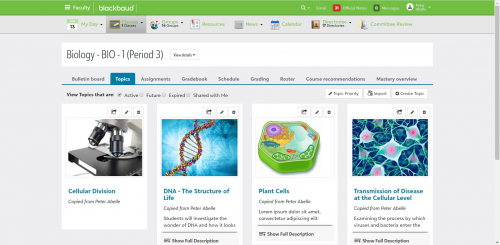
Today’s topic is…well, Topics! On a basic level, Topics give you a dynamic way to organize and share learning resources with your classroom. They support flexible Responsive Web Design layouts and multiple content types for things like Text, Links, Downloads, Photos, Audio, Video and Embeds.
What about Bulletin Boards?
Yes, so far Topics sounds very similar to setting up a Bulletin Board. However, Bulletin Boards are not quite as flexible as Topics. Bulletin Boards are more useful for posting general class information.
Topics on the other hand, can be used to design blended learning units, organize professional development resources, share out parent information and much more.
Let’s Get Started!
First things first, head to the Faculty persona inside of the Blackbaud Education management product. Once published, you’ll see them under things like Class Sections, Advisories, Activities, Dorms and Community Groups.
When you select + Create Topic, there are multiple ways to customize your content like adding a Cover Photo, selecting a certain layout to display your content, and much more. Once created, you can then add content to it by selecting the pencil icon from the list.
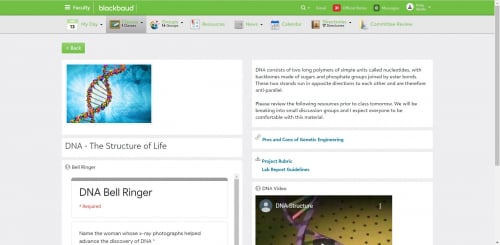
A new builder window opens, letting you add in elements from the left side to the right side. Materials can be added to supplement the information in the topic. You can also select a Learning Tool is applicable, add Text, or add a download that students can grab such as a document, file, or Google Drive file.
On the other hand, Elements can be used to further customize the look and feel of the Topic through use of Horizontal Lines and Spacers.
Sharing Topics and the Topic Bank
The other core aspect to Topics is the ability to share and use a repository called the Topic Bank. Sharing can have huge benefits for collaboration, as topics form other classes can be imported or copied. Select the arrow icon above the topic that should be shared and then select the class or educator to be shared with.
Use the Shared With Me filter from course Topics to see any topics that other teachers have shared with you. For those looking to import a topic, the Topic Bank is the place to go. Once a topic is flagged as shareable by any user, it gets placed inside the Topic Bank where others can choose to import them.
Whew, that’s a lot of information. Need a visual rundown on everything discuss above? No worries, we have you covered as well. Have a look at Topics and how they can supercharge your virtual classroom.
Of course, you can always check out our online help as well. That’s going to do it for this week, but we hope this information helps you continue making your virtual classroom the best it can be. Until next time, be safe, be well, and we’ll talk later. Thanks for reading everyone!
Today’s topic is…well, Topics! On a basic level, Topics give you a dynamic way to organize and share learning resources with your classroom. They support flexible Responsive Web Design layouts and multiple content types for things like Text, Links, Downloads, Photos, Audio, Video and Embeds.
What about Bulletin Boards?
Yes, so far Topics sounds very similar to setting up a Bulletin Board. However, Bulletin Boards are not quite as flexible as Topics. Bulletin Boards are more useful for posting general class information.
Topics on the other hand, can be used to design blended learning units, organize professional development resources, share out parent information and much more.

Let’s Get Started!
First things first, head to the Faculty persona inside of the Blackbaud Education management product. Once published, you’ll see them under things like Class Sections, Advisories, Activities, Dorms and Community Groups.
When you select + Create Topic, there are multiple ways to customize your content like adding a Cover Photo, selecting a certain layout to display your content, and much more. Once created, you can then add content to it by selecting the pencil icon from the list.
A new builder window opens, letting you add in elements from the left side to the right side. Materials can be added to supplement the information in the topic. You can also select a Learning Tool is applicable, add Text, or add a download that students can grab such as a document, file, or Google Drive file.
On the other hand, Elements can be used to further customize the look and feel of the Topic through use of Horizontal Lines and Spacers.

Sharing Topics and the Topic Bank
The other core aspect to Topics is the ability to share and use a repository called the Topic Bank. Sharing can have huge benefits for collaboration, as topics form other classes can be imported or copied. Select the arrow icon above the topic that should be shared and then select the class or educator to be shared with.
Use the Shared With Me filter from course Topics to see any topics that other teachers have shared with you. For those looking to import a topic, the Topic Bank is the place to go. Once a topic is flagged as shareable by any user, it gets placed inside the Topic Bank where others can choose to import them.
Whew, that’s a lot of information. Need a visual rundown on everything discuss above? No worries, we have you covered as well. Have a look at Topics and how they can supercharge your virtual classroom.
 https://www.youtube.com/watch?v=4yCHBUkOUgY
Of course, you can always check out our online help as well. That’s going to do it for this week, but we hope this information helps you continue making your virtual classroom the best it can be. Until next time, be safe, be well, and we’ll talk later. Thanks for reading everyone!
3
Comments
-
This is great Derek! Just wanted to also let the community know that we will be releasing Topics for teams as well in the next couple of weeks, so that coaches and athletes can stay connected with at home training plans and other resources.0
-
Angie Addison That sounds great, thanks for the info!
I think everyone can expect to see a blog post around the same time. Stay tuned!0 -
Thanks for sharing. Topics have been integral in our transition to distance learning. Nesting topics...that is the next enhancement we would like to see when it comes to topics.0
-
I wish we had the ability to put publishing time/date into each of the elements when arranging a topics page. For example, If I wanted to make a topics page for each week of online learning, but did not want to have the students be able to see it all at once, I could set it up so only certain elements appear each day at midnight when building the topic page. This would be great for people who like to pre-plan.
I know you can put times/dates on topics themselves, but in some cases it makes more sense to have 1 topic page for a week rather than 1 per day.0 -
Would like to have the capability of having an Assignment link to a Topic and/or a Topic link to an Assignment.0
-
Thanks for the feedback and ideas everyone. I'll be sure to pass them along to the team.0
-
I saw this idea under VOTING and voided for it -- this would be very helpful during Distance Learning.
Allow Link to Assignments from within Topic
When building out the topic, faculty want the ability to link to assignment that have been created related to a specific topic. Within the LMS - Topic creation - under "Material" add the ability to drag in "assignment as a content type."
0









Categories
- All Categories
- 6 Blackbaud Community Help
- 209 bbcon®
- 1.4K Blackbaud Altru®
- 395 Blackbaud Award Management™ and Blackbaud Stewardship Management™
- 1.1K Blackbaud CRM™ and Blackbaud Internet Solutions™
- 15 donorCentrics®
- 359 Blackbaud eTapestry®
- 2.5K Blackbaud Financial Edge NXT®
- 646 Blackbaud Grantmaking™
- 563 Blackbaud Education Management Solutions for Higher Education
- 3.2K Blackbaud Education Management Solutions for K-12 Schools
- 934 Blackbaud Luminate Online® and Blackbaud TeamRaiser®
- 84 JustGiving® from Blackbaud®
- 6.4K Blackbaud Raiser's Edge NXT®
- 3.7K SKY Developer
- 243 ResearchPoint™
- 118 Blackbaud Tuition Management™
- 165 Organizational Best Practices
- 238 The Tap (Just for Fun)
- 33 Blackbaud Community Challenges
- 28 PowerUp Challenges
- 3 (Open) Raiser's Edge NXT PowerUp Challenge: Product Update Briefing
- 3 (Closed) Raiser's Edge NXT PowerUp Challenge: Standard Reports+
- 3 (Closed) Raiser's Edge NXT PowerUp Challenge: Email Marketing
- 3 (Closed) Raiser's Edge NXT PowerUp Challenge: Gift Management
- 4 (Closed) Raiser's Edge NXT PowerUp Challenge: Event Management
- 3 (Closed) Raiser's Edge NXT PowerUp Challenge: Home Page
- 4 (Closed) Raiser's Edge NXT PowerUp Challenge: Standard Reports
- 4 (Closed) Raiser's Edge NXT PowerUp Challenge: Query
- 779 Community News
- 2.9K Jobs Board
- 53 Blackbaud SKY® Reporting Announcements
- 47 Blackbaud CRM Higher Ed Product Advisory Group (HE PAG)
- 19 Blackbaud CRM Product Advisory Group (BBCRM PAG)