Online Help Feedback Explained: Make Your Voice Heard!

Derek Nichols
Blackbaud Employee




This week, we’re taking a closer look at Feedback with our online help, where to find it, what to do with it, and how it helps us improve our content.In the past, we’ve covered a ton of ways of how we’re asking for feedback or how you can get in touch with us regarding your thoughts and feature ideas. Places like here in the Community, the Ideas section, our YouTube channel and more are a good way to reach out.
For today however, I wanted to talk about our Feedback system that can be used when looking over our online help topics. While it’s nothing new, I’ll be going over what it is, where to find it, and how to best use it effectively. So, let’s dive in!
What is the Online Help Feedback?
While there are some of you who are already actively using this, the Feedback feature from the Online Help is a way we can further tweak and improve our content offering for you. Through it, we want to hear what you think, both good and what could be improved.
Where Can I Find it?
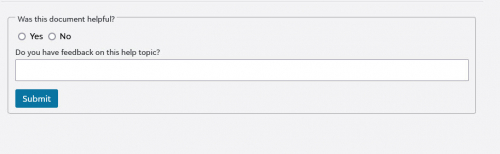
Thankfully, it’s pretty easy so you won’t have to do much digging in order to track it down. At the very bottom of every help page/topic, you’ll see a question asking you if what you just read was helpful. While you don’t have to, this is the best way to let us know what you think. Any response given is documented, read, and acted upon by the individual in charge of that content.
What’s the best way to utilize it?
That’s right, we look at the feedback given and act upon it as best we can. So, first thing to do, select Yes or No on whether or not you found the topic helpful and then enter in some details as to why you selected that option. As such, it’s important to provide as much detail in order to help us pinpoint trouble areas or add in things that can better assist our users.
Please keep in mind that submitting your feedback doesn’t connect you with support or a chat program. The feedback is collected and used to take action on that particular topic in order to improve it as needed. It’s not instantaneous, so give us some time to go through everything.
Also, don’t be afraid to submit feedback if you found the information and details really helpful. Just like anyone, we definitely take pride in knowing our content has helped someone get the information they needed.
I certainly hope you found this information helpful and if you haven’t, give the feedback process a try. Make sure to come back next week as we take a look at everything that launched in March. See you then!
For today however, I wanted to talk about our Feedback system that can be used when looking over our online help topics. While it’s nothing new, I’ll be going over what it is, where to find it, and how to best use it effectively. So, let’s dive in!
What is the Online Help Feedback?
While there are some of you who are already actively using this, the Feedback feature from the Online Help is a way we can further tweak and improve our content offering for you. Through it, we want to hear what you think, both good and what could be improved.
Where Can I Find it?
Thankfully, it’s pretty easy so you won’t have to do much digging in order to track it down. At the very bottom of every help page/topic, you’ll see a question asking you if what you just read was helpful. While you don’t have to, this is the best way to let us know what you think. Any response given is documented, read, and acted upon by the individual in charge of that content.

What’s the best way to utilize it?
That’s right, we look at the feedback given and act upon it as best we can. So, first thing to do, select Yes or No on whether or not you found the topic helpful and then enter in some details as to why you selected that option. As such, it’s important to provide as much detail in order to help us pinpoint trouble areas or add in things that can better assist our users.
Please keep in mind that submitting your feedback doesn’t connect you with support or a chat program. The feedback is collected and used to take action on that particular topic in order to improve it as needed. It’s not instantaneous, so give us some time to go through everything.
Also, don’t be afraid to submit feedback if you found the information and details really helpful. Just like anyone, we definitely take pride in knowing our content has helped someone get the information they needed.
I certainly hope you found this information helpful and if you haven’t, give the feedback process a try. Make sure to come back next week as we take a look at everything that launched in March. See you then!
4
Categories
- All Categories
- 6 Blackbaud Community Help
- 209 bbcon®
- 1.4K Blackbaud Altru®
- 395 Blackbaud Award Management™ and Blackbaud Stewardship Management™
- 1.1K Blackbaud CRM™ and Blackbaud Internet Solutions™
- 15 donorCentrics®
- 359 Blackbaud eTapestry®
- 2.5K Blackbaud Financial Edge NXT®
- 646 Blackbaud Grantmaking™
- 563 Blackbaud Education Management Solutions for Higher Education
- 3.2K Blackbaud Education Management Solutions for K-12 Schools
- 934 Blackbaud Luminate Online® and Blackbaud TeamRaiser®
- 84 JustGiving® from Blackbaud®
- 6.4K Blackbaud Raiser's Edge NXT®
- 3.7K SKY Developer
- 243 ResearchPoint™
- 118 Blackbaud Tuition Management™
- 165 Organizational Best Practices
- 238 The Tap (Just for Fun)
- 33 Blackbaud Community Challenges
- 28 PowerUp Challenges
- 3 (Open) Raiser's Edge NXT PowerUp Challenge: Product Update Briefing
- 3 (Closed) Raiser's Edge NXT PowerUp Challenge: Standard Reports+
- 3 (Closed) Raiser's Edge NXT PowerUp Challenge: Email Marketing
- 3 (Closed) Raiser's Edge NXT PowerUp Challenge: Gift Management
- 4 (Closed) Raiser's Edge NXT PowerUp Challenge: Event Management
- 3 (Closed) Raiser's Edge NXT PowerUp Challenge: Home Page
- 4 (Closed) Raiser's Edge NXT PowerUp Challenge: Standard Reports
- 4 (Closed) Raiser's Edge NXT PowerUp Challenge: Query
- 779 Community News
- 2.9K Jobs Board
- 53 Blackbaud SKY® Reporting Announcements
- 47 Blackbaud CRM Higher Ed Product Advisory Group (HE PAG)
- 19 Blackbaud CRM Product Advisory Group (BBCRM PAG)