Line Up! It's Time For Calculating Rank and Performance Categories

Jacqueline Koca
Blackbaud Employee




Second part of the school year is fast approaching and it comes time again to recognize your students’ achievements and progress. Using Rank and Performance Categories is a great way to recognize these, and there are great tools in the system to assist you with this process!
Before you can calculate Rank or Performance Categories, you first must decide how these will be determined. The following resources walk through setting up rank and performance categories. Rank uses GPAs to determine top performers. Performance categories can be used for many things, from Honor Roll to National Honor Society membership:
How to Define a Rank Calculation
What are Performance Categories and How to Define Them
Once you have your ranks and categories defined and added to course records as needed, it’s time to calculate and find out how the students line up. And guess what? One wizard can do it all!
Setting up the Wizard
In Grades, the Run Calculations section houses any saved calculation parameters. Opening a new wizard gives you a window like the one below, where you can set the School, Academic year, and Session. The green box shows where we can choose to calculate Rank or Performance Categories.
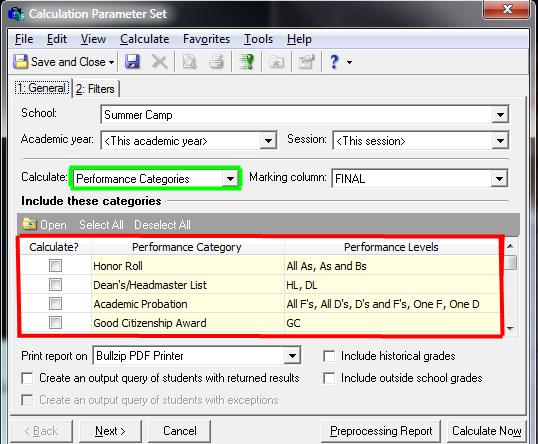
The red box shows where we can select which specific calculations to run. If multiple Performance Categories or Ranks have been created, we can choose to run only the ones we need. It’s as simple as a check in the box!
All that’s left is to set the options at the bottom of the wizards and adjust any filters needed. Once you’re ready to go, click that Preprocessing Report button and view the control report. Look good? Then let’s Calculate Now!
Your students now have the appropriate rank or performance category! These can be added to report cards, transcripts or to reports.
Tips and Tricks:
Before you can calculate Rank or Performance Categories, you first must decide how these will be determined. The following resources walk through setting up rank and performance categories. Rank uses GPAs to determine top performers. Performance categories can be used for many things, from Honor Roll to National Honor Society membership:
How to Define a Rank Calculation
What are Performance Categories and How to Define Them
Once you have your ranks and categories defined and added to course records as needed, it’s time to calculate and find out how the students line up. And guess what? One wizard can do it all!
Setting up the Wizard
In Grades, the Run Calculations section houses any saved calculation parameters. Opening a new wizard gives you a window like the one below, where you can set the School, Academic year, and Session. The green box shows where we can choose to calculate Rank or Performance Categories.

The red box shows where we can select which specific calculations to run. If multiple Performance Categories or Ranks have been created, we can choose to run only the ones we need. It’s as simple as a check in the box!
All that’s left is to set the options at the bottom of the wizards and adjust any filters needed. Once you’re ready to go, click that Preprocessing Report button and view the control report. Look good? Then let’s Calculate Now!
Your students now have the appropriate rank or performance category! These can be added to report cards, transcripts or to reports.
Tips and Tricks:
- GPAs must be calculated before Ranks and Performance categories that use GPAs will calculate correctly.
- You can open a calculation directly from the wizard. Just highlight calculation row and click Open on the dark gray bar!
- Save separate parameters or use one and just switch the Calculate: dropdown.
0
Categories
- All Categories
- 6 Blackbaud Community Help
- 209 bbcon®
- 1.4K Blackbaud Altru®
- 395 Blackbaud Award Management™ and Blackbaud Stewardship Management™
- 1.1K Blackbaud CRM™ and Blackbaud Internet Solutions™
- 15 donorCentrics®
- 359 Blackbaud eTapestry®
- 2.5K Blackbaud Financial Edge NXT®
- 646 Blackbaud Grantmaking™
- 563 Blackbaud Education Management Solutions for Higher Education
- 3.2K Blackbaud Education Management Solutions for K-12 Schools
- 934 Blackbaud Luminate Online® and Blackbaud TeamRaiser®
- 84 JustGiving® from Blackbaud®
- 6.4K Blackbaud Raiser's Edge NXT®
- 3.7K SKY Developer
- 243 ResearchPoint™
- 118 Blackbaud Tuition Management™
- 165 Organizational Best Practices
- 238 The Tap (Just for Fun)
- 33 Blackbaud Community Challenges
- 28 PowerUp Challenges
- 3 (Open) Raiser's Edge NXT PowerUp Challenge: Product Update Briefing
- 3 (Closed) Raiser's Edge NXT PowerUp Challenge: Standard Reports+
- 3 (Closed) Raiser's Edge NXT PowerUp Challenge: Email Marketing
- 3 (Closed) Raiser's Edge NXT PowerUp Challenge: Gift Management
- 4 (Closed) Raiser's Edge NXT PowerUp Challenge: Event Management
- 3 (Closed) Raiser's Edge NXT PowerUp Challenge: Home Page
- 4 (Closed) Raiser's Edge NXT PowerUp Challenge: Standard Reports
- 4 (Closed) Raiser's Edge NXT PowerUp Challenge: Query
- 779 Community News
- 2.9K Jobs Board
- 53 Blackbaud SKY® Reporting Announcements
- 47 Blackbaud CRM Higher Ed Product Advisory Group (HE PAG)
- 19 Blackbaud CRM Product Advisory Group (BBCRM PAG)